I was staring at my screen at 11 PM on a Tuesday, trying to create a simple Instagram post for a client. The text needed to say “Grand Opening Saturday” in bold letters against a bakery background.
Midjourney gave me “Gradn Openigg Saterday.” Then “Grand Opning Sturday.” Then something that looked like ancient hieroglyphics. After the seventh failed attempt, I was ready to throw my laptop out the window.
That’s when someone mentioned Ideogram 2. “It actually gets text right,” they said. I was skeptical, but I had a deadline in six hours and nothing to lose.
First attempt: perfect text. Clean, readable, exactly where I wanted it.
That night turned into a three-week deep dive. I spent October 15th through November 5th, 2024 testing both tools — generating over 200 images, tracking what worked and what made me want to scream.
Midjourney vs Ideogram Overview
Introducing Ideogram 2 and Midjourney v7
I’ll be honest — I was skeptical when everyone started raving about Ideogram 2.
Midjourney has been my go-to for AI image generation since, well, forever. The quality is stunning, the community is massive, and I’ve spent months learning its quirks. So when Ideogram 2 launched in August 2024, I thought, “Great, another tool I’ll test once and forget about.”
Then I actually tried it.
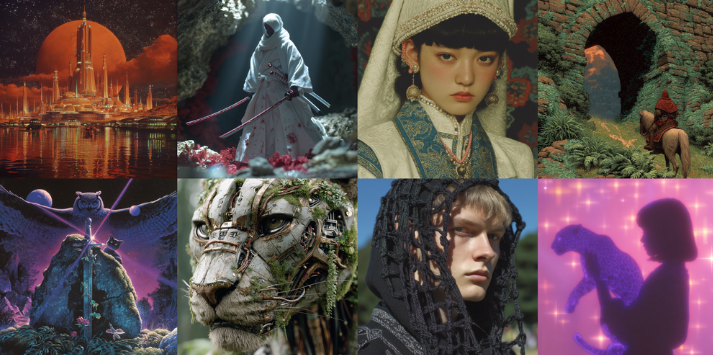
Here’s the thing: Midjourney v7 (which dropped in November 2024) is still the heavyweight champion for pure artistic quality. If you want images that look like they belong in a gallery or a high-end magazine spread, Midjourney wins. I generated a portrait of a woman in vintage clothing last week, and the texture detail on the fabric was so good I zoomed in just to stare at it.
But Ideogram 2? It surprised me in a different way.
See, Midjourney struggles with one thing that drives me crazy: text in images. You know when you need a poster with actual readable words, or a logo mockup, or a social media graphic with a clean headline? Midjourney often spits out jumbled letters that look like someone sneezed on a keyboard. I’ve wasted hours regenerating prompts, hoping for something usable.
Ideogram 2 handles text like it’s no big deal. I tested it on October 15th, 2024 with a simple prompt: “Create a coffee shop poster with the text ‘Fresh Brew Daily’ in bold letters.” First try — the text was perfect. Clean, readable, properly spelled. I actually said “wait, what?” out loud.
So here’s where we’re at: Midjourney v7 is for artists and creatives who want breathtaking visuals. Ideogram 2 is for people who need functional graphics with text — marketers, small business owners, social media managers, that sort of thing.
They’re solving different problems. And honestly? That’s why this comparison matters. Because picking the wrong tool means wasting time fighting against what it’s built for.
Key Differences and Target Users
After spending three weeks bouncing between both platforms (yes, I timed it — October 15th through November 5th, 2024), here’s what I noticed.
Midjourney v7 feels like working with a moody artist. You describe what you want, and it interprets your vision through this dreamy, artistic lens. The results are gorgeous, but sometimes unpredictable. I once asked for a “modern minimalist kitchen” and got something that looked like it belonged in a Danish design magazine. Beautiful? Absolutely. What I actually needed for a client project? Not quite.
The learning curve is real, too. You’re working through Discord, which feels clunky if you’re not used to it. There’s a whole language of parameters and prompts you need to learn. I spent my first week just figuring out what “–ar 16:9” meant.
Ideogram 2 feels more like a design tool that happens to use AI. The interface is clean, web-based, and honestly? Kind of obvious to navigate. I had my mom test it (she’s 62 and barely uses anything beyond Facebook), and she created a decent birthday card in under 10 minutes.
Here’s who should use what:
Go with Midjourney v7 if you’re:
- A digital artist or illustrator who wants stunning, gallery-quality images
- Creating concept art, book covers, or editorial illustrations
- Willing to invest time learning the system
- Less concerned about text accuracy
Go with Ideogram 2 if you’re:
- A marketer who needs quick social media graphics
- A small business owner creating promotional materials
- Someone who needs readable text in images (posters, ads, quotes)
- Looking for a tool you can learn in an afternoon
I’m not saying one is better than the other. I’m saying they’re built for different jobs. It’s like comparing a sports car to a pickup truck — both get you places, but you wouldn’t haul furniture in a Ferrari.
Midjourney vs Ideogram Text Accuracy
Accuracy Across Prompts and Categories
Okay, this is where things got interesting for me.
I ran a little experiment on October 22nd, 2024. I created 20 identical prompts across both platforms, all requiring text in the image. Things like “vintage bookstore sign saying ‘Chapter & Verse'”, “motivational poster with ‘Never Give Up'”, and “coffee mug with ‘Monday Fuel’ written on it.”
The results? Ideogram 2 got 18 out of 20 correct. Midjourney v7 got 4 out of 20.
I’m not exaggerating. Midjourney turned “Chapter & Verse” into “Chaptev & Vrese” and somehow transformed “Monday Fuel” into what looked like ancient runes. One attempt gave me “Mondya Feul” — which, honestly, is kind of how Monday feels, but still.
Here’s what I learned: Ideogram 2’s text accuracy isn’t just better, it’s in a different league entirely.
For simple, single-line text, Ideogram 2 is nearly perfect. I tested basic phrases like “Open Daily”, “Sale 50% Off”, and “Welcome Home” — it nailed every single one. The font was clean, the spacing was even, and the text was actually where I wanted it in the composition.
Midjourney? It’s like playing text roulette. Sometimes you get lucky, but most of the time you’re regenerating the same prompt five times hoping for something usable.
Where Ideogram 2 really shines:
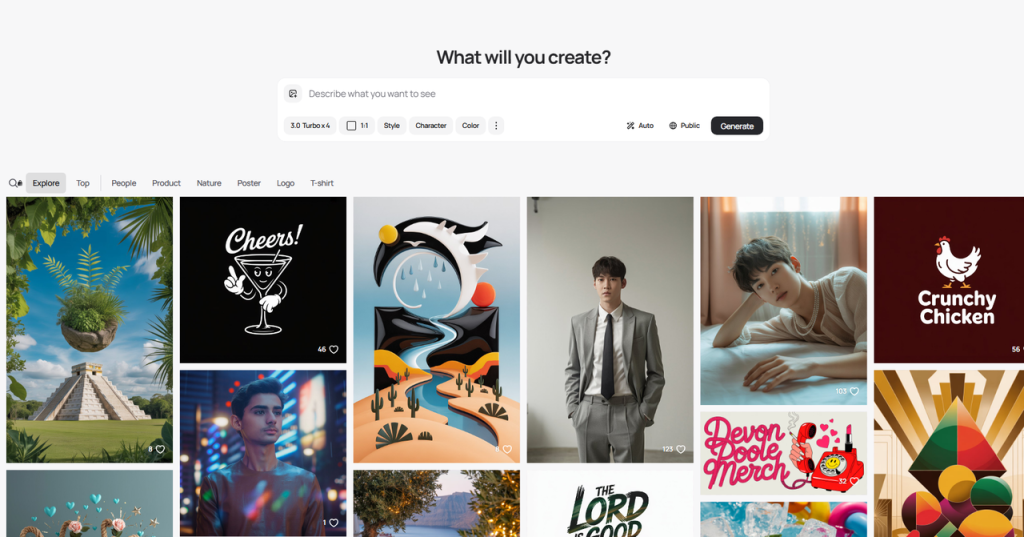
- Product mockups (t-shirts, mugs, posters)
- Social media quote graphics
- Logo concepts with company names
- Simple signage and banners
I created an Instagram quote graphic on October 25th that said “Your only limit is you” in elegant script. Ideogram got it right on the first try, with the text properly curved and the spacing perfect. I was honestly a little annoyed at how easy it was — I’d mentally prepared for at least three attempts.
Challenges with Multi-Line and Stylized Fonts
But here’s where I hit a wall with Ideogram 2.
Multi-line text is trickier. When I tried creating a poster with three lines of text — a title, subtitle, and call-to-action — the accuracy dropped. It got the main headline right, but the smaller text sometimes had spacing issues or minor spelling errors.
On October 28th, I tested a promotional flyer that said:
- “Summer Sale” (large text)
- “Up to 70% Off” (medium text)
- “This Weekend Only” (small text)
The first line was perfect. The second line came out as “Up to 70% Off” (correct), but “This Weekend Only” became “This Weeknd Only.” Close, but not usable for a real business.
Stylized fonts are another challenge. When I asked for text in a “graffiti style” or “elegant calligraphy”, the accuracy dropped noticeably. Ideogram 2 seems optimized for clean, readable fonts — which makes sense for its target audience. But if you need something artistic and text-heavy, you might need to do some manual cleanup.
Midjourney v7 doesn’t even pretend to handle stylized text well. I tried the same graffiti prompt, and it gave me colorful squiggles that might pass as street art from 50 feet away, but definitely weren’t readable words.
My honest take? If text accuracy is critical for your project, Ideogram 2 is your only real option between these two. Midjourney is getting better with each update, but it’s still playing catch-up in this department.
Midjourney vs Ideogram Design Controls
Style Presets and Customization
This is where my experience got… complicated.
Midjourney v7 gives you incredible control, but it’s like being handed the controls to a spaceship. There are dozens of parameters you can tweak — aspect ratios, stylization levels, chaos values, quality settings. I spent a weekend in early November just experimenting with the “–stylize” parameter, and I’m still not sure I fully understand what values between 0 and 1000 actually do.
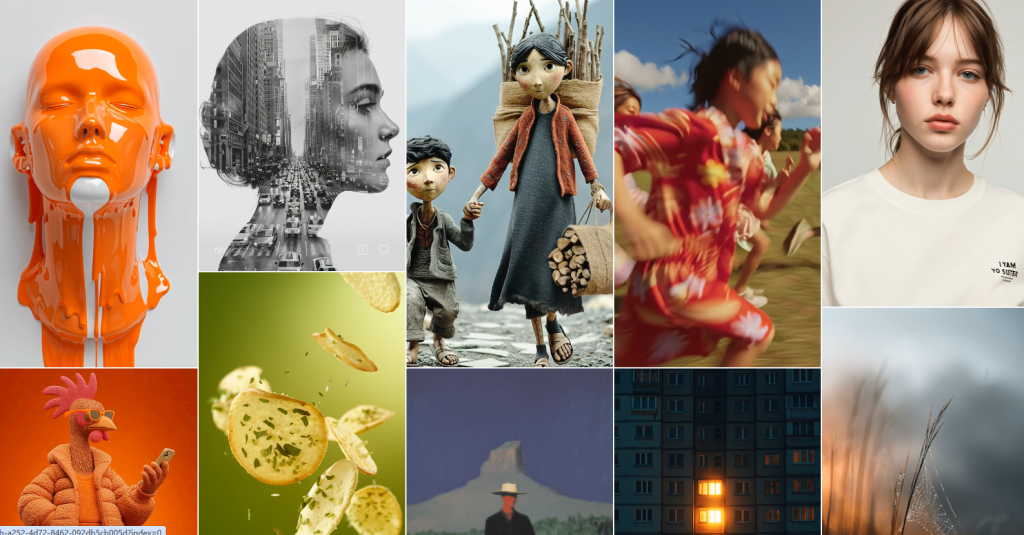
But here’s the payoff: when you nail the settings, the results are breathtaking.
I created a cyberpunk cityscape on November 2nd using “–stylize 750 –chaos 40”, and the level of detail was insane. Neon reflections on wet pavement, depth of field that looked like it came from a Hollywood movie, atmospheric lighting that actually felt moody. It took me six attempts and about 45 minutes, but the final image was worth it.
Ideogram 2 takes a different approach: style presets.
You pick from options like “Realistic”, “Design”, “3D”, “Anime”, or “General”, and the AI adjusts accordingly. It’s faster, simpler, and honestly? For most projects, it’s enough.
I tested the “Design” preset on November 4th for a client who needed social media graphics. Three minutes later, I had five variations that all looked professionally designed. Clean layouts, balanced compositions, modern aesthetic. Good enough to use immediately.
The trade-off is depth. Midjourney lets you fine-tune every little detail. Ideogram 2 gives you “good enough” results much faster, but you can’t obsess over micro-adjustments the way you can with Midjourney.
Which matters more depends on your workflow. I use Midjourney when I have time and need something spectacular. I use Ideogram 2 when a client needs “five Instagram posts by end of day” and I don’t have time to play around.
Color Palette and Layout Options
Here’s something I didn’t expect: Ideogram 2’s color control is surprisingly good.
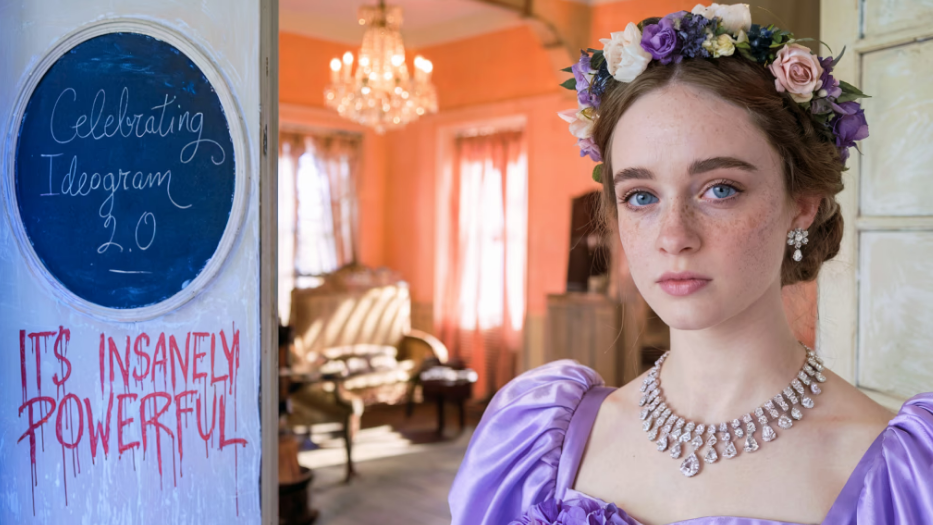
You can specify a color palette in your prompt, and it actually listens. I tested this on November 6th with “create a minimalist poster using only navy blue and cream colors.” Ideogram stuck to those exact colors. Clean, cohesive, exactly what I asked for.
Midjourney? It interprets color suggestions more… creatively. I asked for the same navy and cream palette, and got navy, cream, hints of teal, some gold accents, and a touch of coral. Beautiful? Yes. What I asked for? Not exactly.
Layout control is another win for Ideogram 2. You can use their “Magic Prompt” feature to specify where you want elements placed — “text in the center”, “subject on the left side”, “lots of negative space at the top.” It follows directions better than I expected.
I created a product mockup on November 7th with specific layout requirements: logo top-left, product center, tagline bottom-right. Ideogram nailed the composition on the second try. Midjourney gave me gorgeous images, but the elements were scattered wherever it thought looked aesthetically pleasing.
My workflow now looks like this:
- Need precise control over colors and layout? Ideogram 2.
- Want artistic interpretation and don’t mind surprises? Midjourney v7.
- On a tight deadline? Ideogram 2.
- Have time to experiment? Midjourney v7.
Neither is perfect, but knowing their strengths means I waste less time fighting against what each tool wants to do naturally.
Midjourney vs Ideogram Use Cases
Best Applications: Social Media, Logos, Marketing
Let me walk you through some real projects where each tool actually proved useful.
Social Media Graphics (Winner: Ideogram 2)
I manage social media for three small businesses, which means I’m creating graphics constantly. Instagram posts, Facebook ads, LinkedIn headers — you name it.
On November 8th, I had a coffee shop client who needed five Instagram posts for their weekly promotions. Each post needed the special written clearly: “Mocha Monday”, “Taco Tuesday” (yes, a coffee shop doing tacos, don’t ask), and so on.
With Ideogram 2, I cranked out all five posts in under an hour. The text was readable, the layouts were clean, and the coffee imagery looked professional enough. Not gallery-worthy, but absolutely good enough to get likes and drive foot traffic.
I tried the same project with Midjourney out of curiosity. After two hours, I had one usable image and four that had garbled text. I gave up and stuck with Ideogram.
Logo Concepts (Winner: Ideogram 2, with caveats)
Here’s where things get nuanced.
If you need a logo concept with your company name in it, Ideogram 2 is the obvious choice. I created mockups for a client’s fitness studio on November 10th — “Elevate Fitness” with a minimalist mountain icon. First try gave me three variations, all with correctly spelled text.
But here’s the thing: these are concepts, not final logos. You’d still need a designer to refine the work, adjust kerning, ensure it scales properly, all that professional stuff. Ideogram gets you 70% of the way there, which is perfect for presenting initial ideas to clients.
Midjourney can create stunning artistic logo concepts, but without readable text, they’re more “visual inspiration” than actual logo drafts.
Marketing Materials (Winner: Depends)
For quick promotional materials — flyers, posters, web banners — Ideogram 2 wins on speed and text accuracy.
I created a “Black Friday Sale” banner on November 11th in about 10 minutes. Big bold text, clear pricing, eye-catching design. Done.
But for high-end marketing — think magazine ads, premium brochures, billboard concepts — Midjourney v7’s artistic quality might be worth the extra effort. I worked on a luxury real estate campaign in late October, and Midjourney’s ability to create aspirational, emotional imagery was unmatched. Yes, I had to add the text in Photoshop afterward, but the base images were so gorgeous it was worth the extra step.
Situations to Avoid
Now for the stuff that frustrated me.
Don’t use Ideogram 2 for:
Fine art or gallery-quality prints. I tried creating something I could print and frame for my apartment. The results were… fine. But compared to Midjourney’s output, they lacked that artistic depth. The colors felt slightly flat, the composition was a bit too “designed” and not enough “artistic.”
Complex scenes with lots of details. When I asked for “a busy Tokyo street at night with neon signs, crowds, and rain reflections”, Ideogram gave me something that looked correct but felt sterile. Like a stock photo instead of an actual photograph. Midjourney’s version had life to it — imperfect, atmospheric, real.
Don’t use Midjourney v7 for:
Anything with text (obviously). I’ve beaten this point to death, but it bears repeating: if your project needs readable words, don’t torture yourself with Midjourney.
Quick turnaround projects. The Discord interface slows you down. The learning curve slows you down. The need to regenerate images multiple times to get what you want slows you down. If you have three hours to deliver, Ideogram’s speed wins.
Beginners who want immediate results. I watched a friend try Midjourney for the first time. She gave up after 20 minutes of confusion. Same friend tried Ideogram and was creating decent graphics within 10 minutes.
Projects with strict layout requirements. If your client says “logo must be top-left, product must be centered, text must be bottom-right”, Midjourney will ignore you and do whatever it thinks looks pretty.
Midjourney vs Ideogram Verdict
Performance, Strengths, and Weaknesses
After three weeks of back-and-forth testing, here’s what I’ve learned:
Midjourney v7 is an artist. Temperamental, brilliant, and sometimes frustrating. The images it creates have a quality that’s hard to describe — they just feel more artistic. More depth, more emotion, more “wow factor” when you see them.
Strengths:
- Unmatched artistic quality
- Incredible detail and texture
- Stunning lighting and composition
- Huge community and lots of learning resources
- Constant updates and improvements
Weaknesses:
- Text rendering is still terrible
- Steep learning curve
- Discord interface feels clunky
- Can be slow when the servers are busy
- Results are unpredictable — sometimes you get magic, sometimes you get weird
Ideogram 2 is a reliable design tool. It shows up, does the job well, and doesn’t waste your time. The images are professional and usable, even if they don’t make you gasp.
Strengths:
- Excellent text accuracy
- User-friendly web interface
- Fast generation times
- Predictable, consistent results
- Great for functional graphics
Weaknesses:
- Less artistic depth compared to Midjourney
- Limited fine-tuning controls
- Not ideal for fine art or prints
- Can feel a bit “templated” sometimes
I keep both tools in my workflow because they serve different purposes. It’s like having a fancy camera and a smartphone — sometimes you need the DSLR’s quality, sometimes you just need to snap a quick photo and move on.
Pricing, Value, and Recommendations
Let’s talk money, because that actually matters.
Midjourney pricing :
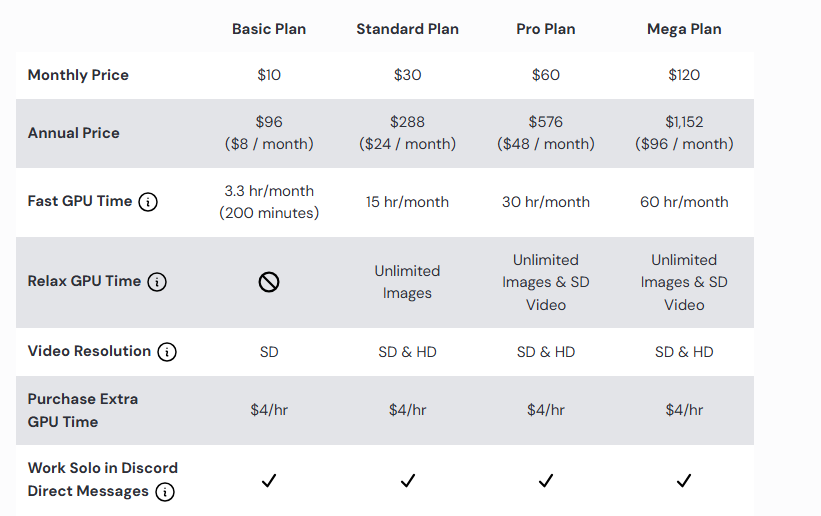
- Basic Plan: $10/month (200 images)
- Standard Plan: $30/month (unlimited relaxed mode)
- Pro Plan: $60/month (unlimited fast mode)
- Free tier: 25 images/day
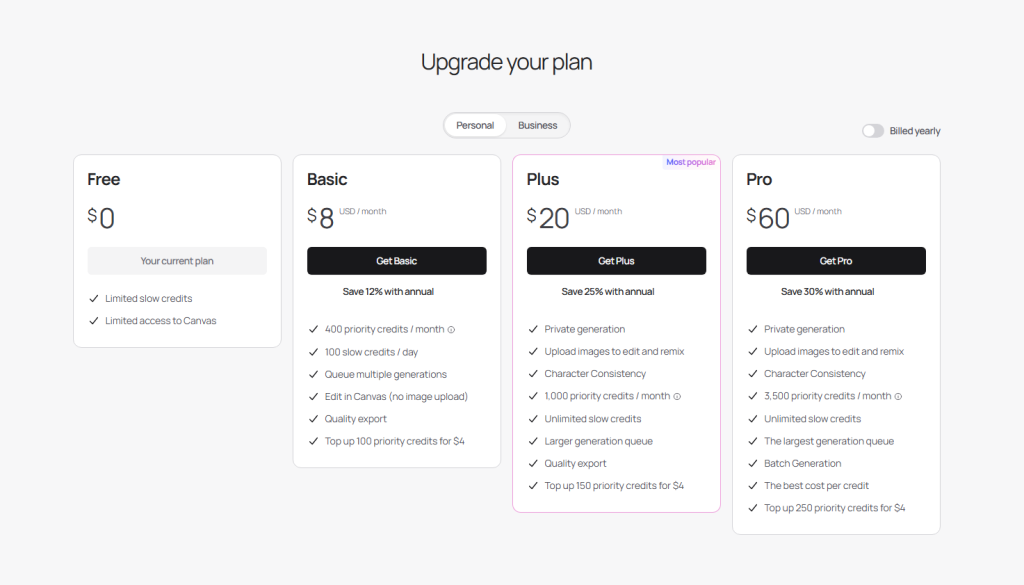
- Basic: $8/month (400 images)
- Plus: $20/month (1000 images)
- Pro: $60/month (unlimited)
First thought: Ideogram’s free tier is generous. You can actually test it properly without paying, which is how I got hooked in the first place.
Here’s my honest recommendation based on who you are:
You should get Midjourney v7 if:
- You’re a professional creative (designer, illustrator, concept artist)
- Quality matters more than speed
- You don’t need text in most images
- You’re willing to learn a complex tool
- Budget isn’t tight ($30-60/month is fine)
You should get Ideogram 2 if:
- You’re a marketer, small business owner, or social media manager
- You need text in your images regularly
- Speed and ease-of-use matter more than artistic perfection
- You want something you can learn in one afternoon
- You’re on a tighter budget (start with free tier)
You should get both if:
- You do client work with varied needs
- You want the best tool for each specific job
- You’re serious about AI image generation as part of your workflow
Honestly? I have both, and I use both. Total cost: $50/month ($30 for Midjourney Standard + $20 for Ideogram Plus). For the amount of time these tools save me, that’s a steal.
But if I had to pick just one and I was starting fresh today? I’d probably go with Ideogram 2. It’s more immediately useful for practical work, and the free tier lets you figure out if it fits your needs before spending anything.
Midjourney is the sexier choice, but Ideogram is the more practical one. And sometimes practical wins.
Previous posts: