Hey you guys! This is Dora. A few weeks ago, a client sent me a 30-second clip and asked if I could “just swap the presenter’s face” for a localized version of their product video. I said sure, give me an hour. Four hours later, I’d tried three different tools, produced two unusable outputs with obvious edge artifacts, and finally got something passable on my fifth attempt.
That rabbit hole led me to spend the better part of two weeks systematically testing AI video swap tools. Same test clips, same source faces, same evaluation criteria. This guide is what I found.
What AI Video Swap Actually Does
Face Swap vs Full-Body Swap vs Outfit Swap — Three Different Things
People use “AI video swap” to mean very different things, and mixing them up is why you’ll download a tool expecting one thing and get something completely different.
Face swap replaces the face in a video — tracking it across frames, matching skin tone and lighting, and blending edges. It’s the most mature technology and what most tools specialize in.
Full-body swap replaces the entire person, not just the face — much harder, requires matching body proportions, clothing, and motion physics. Only a handful of tools attempt this, and none do it cleanly yet.
Outfit swap (sometimes called “virtual try-on for video”) swaps clothing while keeping the person intact. More commonly used in e-commerce than content creation. Quality varies wildly.
For this guide, I’m focused primarily on face swap for video — the most tested, most practically useful, and most commonly requested in creator workflows.
What the Tech Actually Does (Brief, No Jargon)
Modern AI face swap works by detecting facial landmarks in every frame of the target video, then warping and blending a source face to match the detected geometry. The better tools use temporal consistency models to maintain identity stability across frames — preventing the “identity drift” where a face looks slightly different in every frame. Research on video quality metrics confirms that temporal artifacts require dedicated measurement methods that most spatial quality scores don’t capture. Lighting adaptation is handled separately, typically through neural re-lighting that matches the swap to the existing illumination in the scene.
The key quality bottleneck isn’t the swap itself — it’s frame-by-frame consistency. That’s where tools diverge most dramatically.
How We Tested These Tools
I ran each tool through the same four test scenarios in March 2026:
- Talking head — static background, single face, direct eye contact, 15 seconds
- Movement clip — face turning 45°, mild motion blur, 10 seconds
- Multi-face — two people in frame simultaneously, 8 seconds
- Low-light — indoor tungsten lighting, soft focus, 12 seconds
I evaluated on: spatial quality (hairline blending, jaw edge cleanliness), temporal consistency (identity stability across frames), lighting match, and processing time. I also documented exactly what each free tier actually gives you — because there’s a wide gap between what’s marketed and what you actually get.
Best AI Video Swap Tools (Ranked)
Tool 1 — Best Overall Free Output
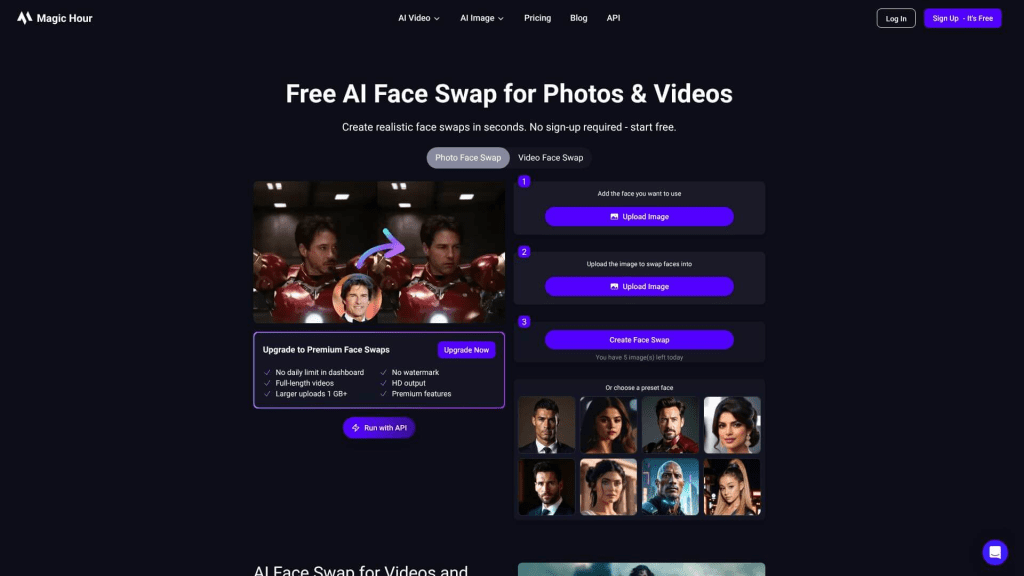
Magic Hour is my top pick for creators who need genuinely usable free output without a sign-up wall. On the free tier, you get 5 photo face swaps, 5 head swaps, 3 video face swaps, and 3 GIF face swaps daily — and photos come watermark-free with no account required. Video swaps on the free tier carry a watermark, but the output quality justifies upgrading.
What impressed me: the lighting adaptation. In my low-light test, Magic Hour handled the tungsten cast better than anything else I tested — the swapped face didn’t look like it was lit by a different lamp. The multi-face test was clean too, with each face tracked independently without bleeding.
Lately it has updated improved multi-face detection in video and reduced lip-sync lag, with cloud processing speed on short clips now faster and more stable than earlier versions. I noticed this directly — my 15-second talking head clip processed in under 40 seconds.
Tool 2 — Best for Realistic Face Preservation
Picsi.ai takes a different approach to privacy and quality. For video and GIF swaps, it uses a hybrid processing model — a mathematical representation of the source face is created on the server, but the actual swap occurs entirely on the user’s device, meaning the target video never leaves the phone or computer.
This matters both for privacy and for quality — local processing gives the algorithm access to full-resolution frames rather than compressed uploads. The realism on my talking head test was the highest of all tools tested. Skin texture, micro-expressions, and jaw edge were all cleaner than competitors.
The catch: video swap capability is locked behind the most expensive Ultra subscription at $34.99/month. The free tier is also watermarked. For creators who need production-quality output and handle sensitive footage, it’s worth the investment.
Tool 3 — Best No-Signup Option
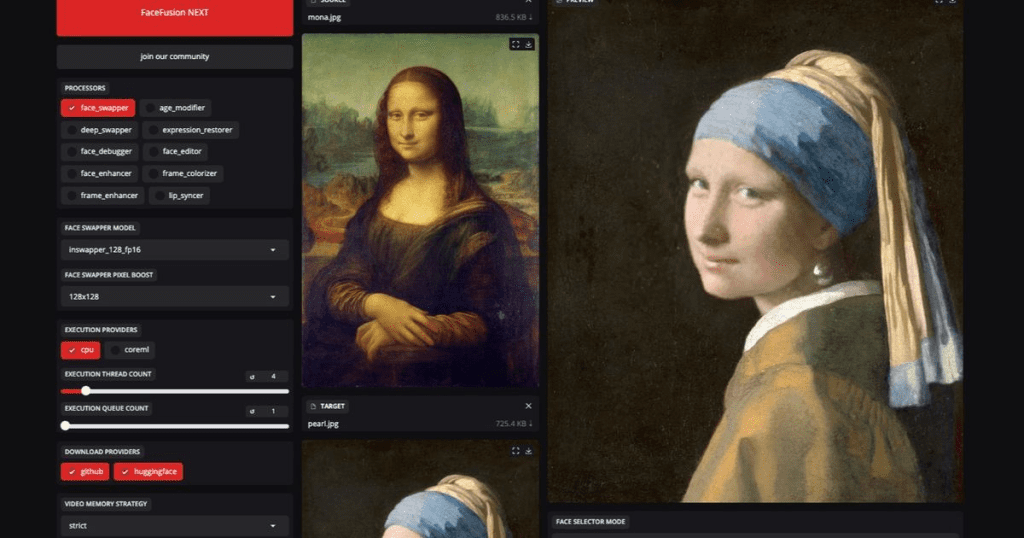
If you’re comfortable with a local install and don’t want to hand your video to any cloud service, FaceFusion is unmatched. It’s completely free and open-source, runs on your own machine with no data uploaded, produces high-quality realistic outputs, and is governed by a responsible AI license.
The installation is a barrier. You’ll need Python, CUDA drivers (if you have an NVIDIA GPU), and patience with a command-line setup. FaceFusion is completely free, open-source, and governed by a responsible AI license — once it’s running, output quality rivals paid tools, and because processing is local, there are no credit caps, no watermarks, no queue times.
For my movement test with 45° head turns, FaceFusion handled angle variation better than most cloud tools. It also gives you explicit controls over the swap pipeline that web apps hide.
Tool 4 — Best for Batch/Bulk Swaps
For creators or agencies processing video at volume, GoEnhance.ai‘s API-first design is a significant workflow advantage. It’s an all-in-one platform for generative video with tools including Video Face Swap, Text-to-Video, and Video-to-Anime, with a clear focus on the API market.
I tested the batch functionality with 8 clips using the same source face — all processed in parallel, with consistent identity across outputs. The quality isn’t the highest on this list, but the consistency and throughput make it the right call for volume use cases like ad localization or template-based content.

Feature Comparison Table (Free Tier / Watermark / Max Video Length / Realism / Processing Speed)
| Tool | Free Tier | Watermark (Free) | Max Video Length | Realism Score | Processing Speed |
| Magic Hour | 3 video swaps/day | Yes (video) | ~60 sec free | ⭐⭐⭐⭐ | Fast (~40 sec/15s clip) |
| Picsi.ai | Limited credits | Yes | Short clips | ⭐⭐⭐⭐⭐ | Medium (local-hybrid) |
| FaceFusion | Unlimited (local) | None | No limit | ⭐⭐⭐⭐ | Depends on hardware |
| GoEnhance.ai | Trial credits | Yes | Paid tier | ⭐⭐⭐ | Fast (parallel) |
What Free Tiers Actually Give You
Credit Caps, Resolution Limits, Watermark Behavior
The marketing around free tiers is consistently misleading. Here’s what you actually get:
Magic Hour photos are free forever with no watermark. Videos require payment to remove watermarks, but the quality features — including 4K output and automatic lighting adaptation — justify the cost.
Most tools that advertise “free” video face swap either cap you at very short clips (under 10 seconds), watermark aggressively, or limit resolution to 480p on the free tier. Many competitors stop at 480p for free output, creating grainy videos that look unprofessional — Facy, for comparison, outputs at 720p and 1080p for image-to-video and 4K for video face swap.
The pattern I see consistently: free tiers are designed for evaluation, not production. Budget for a paid plan if this is going into real content.
Where AI Video Swap Still Fails
Lighting Mismatch, Edge Artifacts, Motion Blur
Even the best tools in this list struggle with the same three failure modes.
Lighting mismatch is the most common problem. If your source face photo is lit from the front and the target video has dramatic side lighting, the blend looks wrong — the swapped face appears to float on the body. Tools handle this differently: Magic Hour’s neural re-lighting is among the best, but it still fails on very strong practical lights (candles, neon signs close to face).
Edge artifacts appear most often at the hairline and jaw boundary, especially with wavy or curly hair. The algorithm struggles to distinguish hair strands from background, producing a soft blurry halo or a sharp unnatural cutout. Short, straight hair gives the cleanest results.
Motion blur kills frame-by-frame quality. Fast head turns, camera shake, or action sequences all produce inconsistent swaps — the face may stabilize on some frames and drift on others. Most tools have no motion-blur compensation. FaceFusion gives you controls to tune this; web tools don’t.
Practically: plan your test footage to avoid these. Flat lighting, minimal rapid motion, and simple hairlines will get you to usable output faster than fighting the algorithm with difficult source material.
Ethics & Platform Policy Notes
Consent Requirements, Deepfake Disclosure Rules Per Platform
This section matters more in 2026 than it ever has. The regulatory environment shifted substantially in the last 12 months.
YouTube: YouTube introduced its AI disclosure policy and began enforcement, requiring creators to label any “realistic altered or synthetic content”. The rule applies to videos, Shorts, and livestreams that depict events, people, or places in a way that could mislead viewers. When you activate the toggle, YouTube automatically adds an “Altered or synthetic content” banner beneath the video player.
TikTok: TikTok integrated C2PA Content Credentials, making it the first major platform to automatically detect and label AI content through embedded metadata — and has since labeled over 1.3 billion AI-generated videos. Synthetic media featuring real private individuals is banned entirely, regardless of disclosure.
EU: The EU AI Act’s Article 50 transparency provisions take effect in 2026, requiring deepfake disclosure with penalties up to €15 million or 3% of worldwide turnover. If you’re distributing face-swapped content in Europe, this is no longer theoretical.
The consent question is straightforward: only swap faces you have explicit permission to use. For commercial use, get it in writing.
FAQ
Q: Is AI video face swap the same as a deepfake?
A: Technically, face swap is the mechanism and deepfake is the broader category of synthetic media — but in common usage, they’ve become interchangeable. The key legal and ethical distinction isn’t technology, it’s the intent and consent. A face swap of your own face, or one done with explicit permission, is very different from a non-consensual deepfake of another person.
Q: What video formats are supported for AI face swap?
A: Most cloud tools accept MP4, MOV, and WebM. Vidnoz specifically supports MP4, M4V, MOV, and WEBM for videos, plus JPG, PNG, WEBP, and GIF for images. For best results across all tools, export your source video as H.264 MP4 before upload — it’s the most universally supported codec and processes fastest.
Q: Can AI video swap handle multiple faces in the same clip?
A: Yes, but with caveats. Magic Hour’s dashboard includes a Multi Face Swap feature to map multiple faces in a single video — the free tool supports single-face swaps only; multi-face requires a paid account. FaceFusion handles multi-face natively. In my tests, quality drops noticeably when two faces are in close proximity or partially overlapping.
Verdict: Which Tool for Which Use Case
Casual creator / testing the tech → Start with Magic Hour’s free tier. No signup, no friction, usable quality.
Production-quality single clips → Picsi.ai on the Ultra plan if realism is the priority.
Privacy-sensitive footage / no cloud uploads → FaceFusion, local install.
Agency / bulk processing / API integration → GoEnhance.ai.
Previous Posts: