Hey, I’m Dora. Last week I uploaded a product shot into Qwen Chat, hit the video generation button, and then sat there for five minutes wondering if it had crashed. It hadn’t — it was just thinking. When the clip finally appeared, a slow pan across my image with surprisingly natural camera movement, I realized I’d been holding my breath.
That moment sums up Qwen’s image-to-video feature: the wait tests your patience, but the output sometimes genuinely catches you off guard. If you’ve been hunting for a free way to turn still images into short video clips, Qwen is one of the easiest options right now. But “easy to access” and “ready for your workflow” are two very different things.
What Is Qwen Image to Video?

Qwen is Alibaba’s AI platform — a ChatGPT competitor that also generates images and videos right inside the same chat interface.
When people say “Qwen image to video,” they’re usually talking about one of two things. First, the video generation feature built into Qwen Chat. You upload an image, describe the motion you want, and it produces a short clip. Second, the open-source Wan model family that powers this behind the scenes. The Wan models — currently up to Wan 2.7, released April 3, 2026 — are Alibaba’s dedicated video generation engine under Qwen’s hood.
This distinction matters. The Wan models are significantly more capable when used directly through API or local deployment. The chat interface gives you the simplest version: upload, prompt, wait, download. The API and open-source routes give you control over resolution, duration, negative prompts, seeds, and first-and-last-frame anchoring.
How to Access It
Free vs Paid Access
Qwen Chat’s video generation is free. No subscription, no credit card. Sign up at chat.qwen.ai and the feature is right there.
I didn’t hit a hard daily limit during testing, though things slowed down after six or seven generations in a session. It’s far more generous than Google’s Veo 2 in AI Studio, which caps you at two generations per day.
The catch? You get a simplified version of what the Wan model can do. No resolution picker beyond basic aspect ratios. No negative prompts. No seed control. For those features, you need the API route — Wan 2.7 I2V runs at about $0.63 per 720p generation through platforms like Segmind or Alibaba Cloud’s Model Studio.
Platform Availability
Qwen Chat works in your browser and on mobile apps for both Android and iOS. Video generation is available everywhere, though the browser experience is more stable. The mobile app login can be glitchy — I had one session where the video option just disappeared until I cleared the cache.
Step-by-Step: Generating Video from Image
Here’s the actual process, not the idealized version.
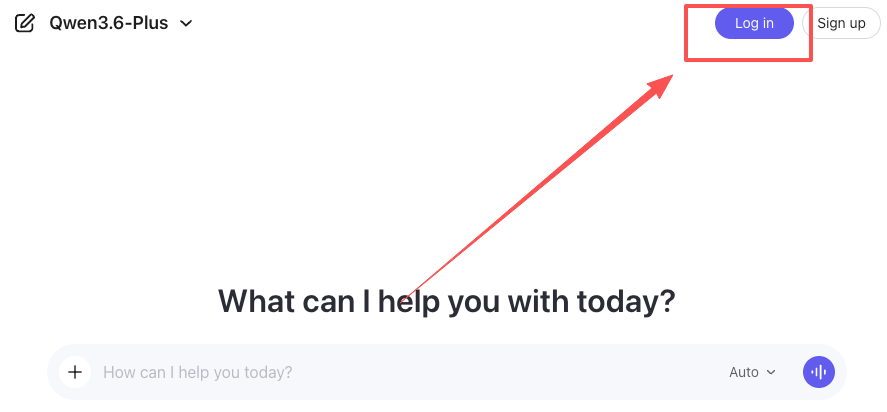
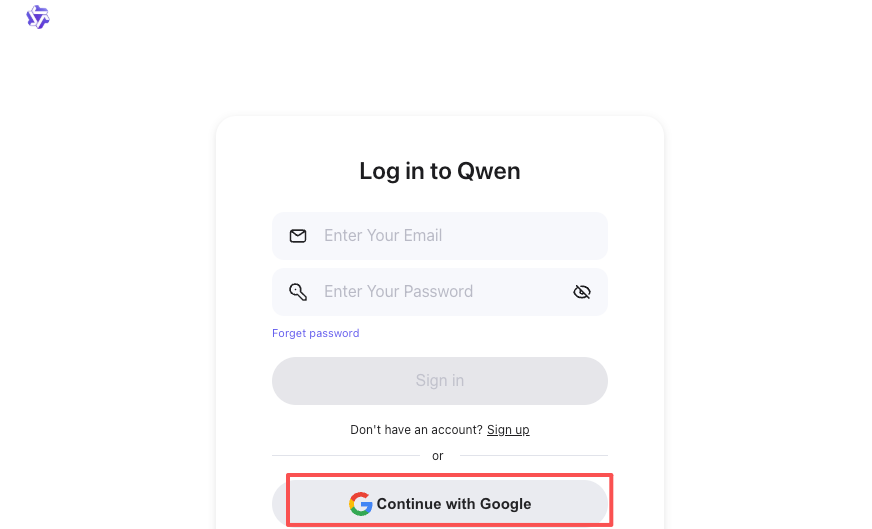
- Log in at chat.qwen.ai. Email or Google account works.
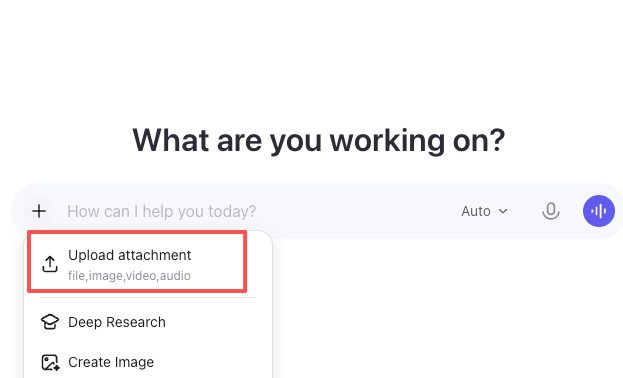
- Upload your image. Click the attachment icon below the text box. JPGs, PNGs, and WebP all work. Higher resolution inputs produce better output, but anything above 2000px didn’t make a noticeable difference.
- Select Video Generation. Click “More” below the text box, then “Video Generation.” Pick your aspect ratio — 16:9, 1:1, 3:4, and others are available.
- Write your prompt. Describe the motion, not the scene — the model already has your image. Instead of “a woman in a field,” write “gentle breeze moves through her hair, camera slowly pulls back, soft afternoon light.” Cinematographic terms like “slow pan,” “tracking shot,” and “rack focus” get recognized surprisingly well.
- Wait. Generation takes 2 to 6 minutes. No progress bar. I’ve started using this dead time to draft captions — it’s too long to just sit there, too short to start something new.
- Preview and download. If it doesn’t match what you had in mind — and about 30-40% of the time it won’t — adjust the prompt and try again.
One tip that saved me real frustration: keep your motion description to one clear action. “Camera pans left while the subject turns and the background transitions from day to night” is asking for trouble. Pick one thing.
Output Quality: Real Results
I’ll be direct because too many reviews dance around this.
What looks good: Static subjects with gentle motion — product shots where the camera orbits slowly, portraits with subtle expression changes, landscapes with drifting clouds. Lighting stays consistent. No dramatic flickering.
What looks okay: Medium-complexity motion. A person walking, leaves blowing. It works, but physics get a little dreamy — feet don’t quite connect with the ground, fabric moves in impossible directions.
What looks rough: Fast action, hand movements, or multiple subjects interacting. I uploaded a group photo and asked for conversation motion. The result looked like a wax museum someone gently shook. Hands were — well, you know the AI hands thing. It’s still that.
Through Qwen Chat, you get roughly 5-second clips at a resolution that looks fine on mobile but soft on desktop. The Wan 2.7 API pushes up to 15 seconds at 1080p with native audio sync, but that’s not exposed through the free interface.
One thing I didn’t expect: the model handles product photography surprisingly well. I uploaded a flat lay of skincare bottles and asked for a slow rotating reveal. The reflections on the glass stayed coherent, the shadows tracked correctly, and the result looked — I’ll say it — usable for an Instagram story without any post-production. That’s the sweet spot for Qwen video quality right now: simple subjects, controlled motion, social-first output.
Limits and Known Issues
Generation time is slow. Five minutes per clip kills rapid iteration. You can’t quickly test ten prompt variations like you would with image generation.
No negative prompts in the chat. You can’t tell the model what to avoid. Through the Wan API, adding “blurry, distorted, extra limbs” to the negative prompt makes a real difference. In chat, you’re at the model’s mercy.
Character consistency across generations doesn’t exist. Two clips of the same character in different scenes won’t look like the same person. Wan 2.7’s reference-to-video mode fixes this, but it’s not available through Qwen Chat.
Longer clips accumulate drift. Even through the API, clips beyond 5 seconds can develop subtle issues — skin textures shift, backgrounds wander. For production work, generate 5-second clips and stitch.
Qwen vs Kling vs Wan for Image-to-Video
Here’s my honest take from testing all three in early 2026.
| Qwen Chat | Kling 3.0 | Wan 2.7 (API) | |
| Price | Free | Limited free / paid | ~$0.63/clip |
| Max resolution | ~720p | 1080p | 1080p |
| Max duration | ~5 sec | 10 sec | 15 sec |
| Character consistency | Weak | Strong | Strong |
| Audio sync | No | Yes | Yes |
| Ease of use | Very easy | Easy | Requires dev skills |
Kling wins for character-driven content — talking heads, dialogue, action. Its motion control is more precise, and the native audio sync is genuinely impressive. Wan 2.7 via API is the production-grade tool with first-and-last-frame control and reference-based character locking. Qwen Chat wins on exactly one thing: it’s the lowest-friction entry point to AI video, period.
If you’re coming from our Wan 2.1 image-to-video guide, the quality jump to what’s available now through Qwen Chat is noticeable — fewer face-melting artifacts, better prompt adherence, smoother camera movement.
Who Should Use Qwen for This
Use it if: you’re exploring AI video for the first time, need occasional animated social content from existing images, or want to prototype video concepts before investing in paid tools.
Skip it if: you need consistent character identity across clips, produce client-facing work where resolution and audio matter, or do any volume — even ten clips a day makes the slow generation time painful. At that point, you’re better off spending the $0.63 per clip on Wan 2.7’s API and getting the control you actually need.
FAQ
Is Qwen image to video really free? Yes, through chat.qwen.ai. I generated seven clips in one session without hitting a wall.
What’s the maximum video length? About 5 seconds through Qwen Chat. Up to 15 seconds through the Wan 2.7 API.
Can I use these commercially? The Wan models use Apache 2.0 licensing, which permits commercial use. Check Alibaba Cloud’s current terms for the Qwen Chat platform specifically.
How does it compare to Sora? Sora produces better output but requires a $200/month ChatGPT Pro subscription. For creators testing the waters, Qwen is the smarter starting point.
Can I control camera movement? Through prompts, to a degree. Cinematography terms get picked up, but there’s no direct camera control interface like Kling’s motion reference system.
I’ll keep testing this as Alibaba updates the experience — especially when Wan 2.7’s open weights officially drop, likely sometime in Q2 2026. For now, if you’ve got a still image and five minutes of patience, it’s worth trying. Just don’t expect magic on the first attempt.
Previous posts: