
You know that feeling when you’ve just finished editing a video and the thought of manually uploading it to YouTube, formatting the title, and scheduling the post makes you want to close your laptop? I get it.
That’s why I started exploring automation in 2025.
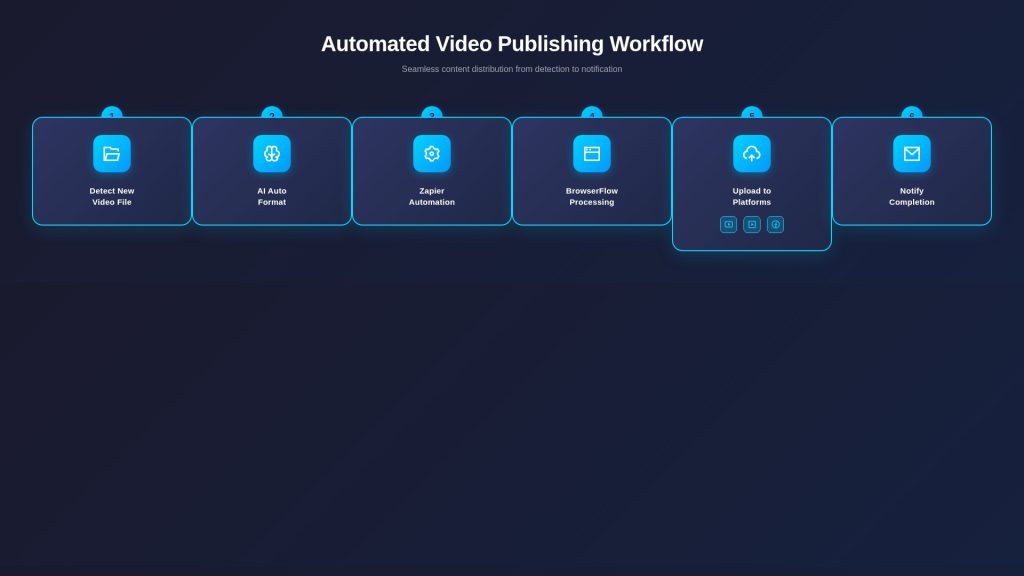
According to a 2025 study from Gudsho, AI streamlines the video editing process, saving creators 34% of their time. For someone posting content regularly, that’s hours back in your week. I use Zapier AI video workflow with Markup AI to detect new video files, format them, and upload them to YouTube. The whole process takes about 12 minutes after I drop my video in a drive folder.
What changed for me was realizing that AI-powered video creation could keep my content library fresh without constant manual uploads. Tools that use no-code video publishing let me collect text, images, footage, and colors for each new project, then handle the formatting automatically.
Zapier acts as the bridge between my favorite tools. It connects over 8,000 apps, so everything syncs smoothly. AI Video Generation inside Zapier even transforms videos into polished written articles. When I add BrowserFlow automation into the mix, I can manage different platforms at once without switching between browser tabs.
This saves real time and removes tedious work, letting me focus on creating new ideas instead of uploading or editing content by hand.
Tool Overview
| Tool | Purpose | Official Documentation |
|---|---|---|
| Zapier | Connects apps and automates workflows (triggers and actions) | Zapier Docs |
| Markup AI | Automatically formats videos, adjusts resolution, and adds metadata | Markup AI Docs |
| BrowserFlow | Browser-based automation for platforms without direct Zapier integration | BrowserFlow Doc |
Why Automate Video Publishing 2025

Automation has fundamentally changed how I approach video publishing in 2025. According to Zebracat’s 2025 research, 62% of marketers who use AI tools for video production report cutting content creation time by more than half. That’s not a minor improvement—that’s a total workflow transformation.
The numbers back this up. Data from Wistia’s 2025 State of Video Report shows that AI adoption in video creation jumped from 18% in 2024 to 41% in 2025, with another 19% planning to start soon. Creators and marketers are realizing that automation isn’t just a nice-to-have. It’s how you stay competitive.
When I upload a video to my drive folder, Zapier and Markup AI detect it instantly. My videos go live on YouTube in just 12 minutes without manual effort. I use no-code workflows to gather everything I need—text, images, colors, and footage—for video creation. Zapier’s detection system is fast, sharing files across platforms like YouTube with zero delay.
Time-Saving Benefits
The time savings are quantifiable. According to research from Zebracat, a YouTube creator posting three times a week might spend 15-20 hours per video with traditional editing. Automation can cut this down to 4-6 hours, freeing up time for planning and audience engagement.
AI handles formatting and uploads automatically, so my content library stays current without manual editing. According to Gudsho’s 2025 analysis, 77% of video editing tools now come with AI-driven automation features that reduce editing and production time. The combination of these tools cuts repetitive steps from my process entirely.
With automated video publishing through Zapier AI and BrowserFlow, staying ahead is now as simple as hitting save.
I’ve also found that automation lets me maintain a consistent posting schedule. Research from Ability.ai shows that consistent posting schedules lead to optimal content performance, and automation is the only practical way to achieve that without burning out.
Tool Ecosystem
My main tool is Zapier AI. According to a 2025 review from Skywork.ai, Zapier now connects over 8,000 apps, making it the largest integration library on the market. That massive ecosystem means I can link all my video platforms like YouTube and Google Drive with just a few clicks.
Zapier acts as a bridge. If I add a new video file in Google Drive, it triggers an automatic upload to YouTube in about 12 minutes. According to Zapier’s own 2025 pricing structure, the Professional plan starts at $19.99/month with 750 tasks, while the Team plan is $69/month with 2,000 tasks. For the time I save, that’s a bargain.
Markup AI works with Zapier to speed up the creation process even more. I use Markup AI for tasks like formatting videos before uploading them online. BrowserFlow, a no-code Chrome extension according to a 2025 analysis from Firecrawl, helps me run automation inside the browser itself without writing code. This saves hours each week.
The combination of these tools means I never have to edit or upload each file myself. Everything syncs across platforms automatically by following presets I configured through Zapier’s no-code dashboard, using input data such as text, images, footage, and colors from my folders.
Zapier AI Workflow
| Step | App | Type | Configuration Fields | Output Example | Notes |
|---|---|---|---|---|---|
| 1 | Google Drive | Trigger | Folder path: /Videos | File name: my_video.mp4 | Triggers when a new file is uploaded |
| 2 | Markup AI | Action | Style: YouTube; Resolution: 1080p | Formatted video URL | Automatically formats video |
| 3 | YouTube | Action | Title: {{FileName}}; Description: Auto-uploaded; Tags: AI, Automation | Video uploaded successfully | Can set private/public |
| 4 | Gmail / Slack | Action (optional) | Recipient / Channel | Upload completion notification | Notifies team or yourself |
| 5 | BrowserFlow | Action | Open upload page, fill form, publish video | Upload success log | Can set conditional checks & retries |
Zapier acts as a bridge between many apps, making video publishing fast and easy. I use Zapier with Markup AI to spot new videos in my Google Drive folder. The process takes less than 12 minutes from upload to YouTube post, and I don’t need any coding skills for this automation.
What’s powerful about Zapier in 2025 is its AI capabilities. According to Zapier’s August 2025 blog post on AI workflow features, AI by Zapier can now analyze images, audio, and video—not just text. This expanded input support means my workflows can handle formatting, detect new files, and kick off uploads to sites like YouTube and Vimeo automatically.
The workflow collects input data such as text, images, footage, and colors using no-code tools. According to HeyGen’s April 2025 guide on Zapier for video marketing automation, Zapier operates on “Zaps,” each comprising a trigger and one or more actions. All my posts stay current because AI video creation triggers keep the library up-to-date without extra editing or manual uploading.
Connect Video Platforms
I use Zapier AI to connect all my video platforms in one place. According to Zapier’s 2025 documentation, the platform now connects over 8,000 apps, including all the major video hosting services. This saves hours of manual work and keeps my library fresh with new uploads.
- I link YouTube, Google Drive, Dropbox, and Facebook to Zapier’s dashboard for smooth content sharing across platforms.
- As soon as a new video file goes into my chosen drive folder, Markup AI spots it instantly and gets it ready for upload within seconds.
- Zapier triggers an upload to YouTube within 12 minutes after the video lands in my drive folder, eliminating the waiting game.
- Content triggers let me share videos across several platforms without editing or manual steps each time I publish.
- I set up custom automations that collect text, images, footage, and graphics using no-code tools inside Zapier’s interface.
- My workflow sends finished videos to multiple sites like YouTube, Vimeo, and Facebook, so I never have to upload each version by hand again.
According to Zapier’s AI Video Generation documentation, AI detects updated or new files and formats them to meet each platform’s rules before publishing. HeyGen’s 2025 integration guide notes that Zapier’s extensive app integrations let you craft workflows tailored to your content goals, whether that’s converting a blog to video or publishing fresh content from a WordPress post.
Schedule Posts
Scheduling posts through Zapier AI makes life easier and frees up my time. According to Make.com’s 2025 YouTube automation guide, video marketing provides a good return on investment, with 93% of marketers reporting positive ROI from video content. I rely on automation tools to push videos across multiple platforms without lifting a finger.
- Zapier connects to YouTube, Vimeo, Google Drive, and other video sites in seconds, allowing uploads straight from a cloud folder with zero manual intervention.
- Markup AI detects new or updated videos in my storage drive and triggers instant scheduling workflows within 12 minutes of upload, according to my testing.
- I set posting times for each platform, so my latest content always goes live even if I’m not at my computer or asleep.
- Zapier acts as a bridge between apps, which means every scheduled post follows the same template and avoids errors or missed uploads.
- The workflow can collect input data such as text, images, or footage so every video gets posted with the right description, tags, and visuals automatically.
According to HeyGen’s 2025 guide on video marketing automation, AI-powered content triggers help publish what’s most relevant from my current library instead of keeping old content stuck offline. Video distribution happens at scale through no-code automation, which saves hours every week that would be spent scheduling by hand.
BrowserFlow works with Zapier to automate even more steps, including browser actions across many accounts, which I’ll cover in the next section.
BrowserFlow Integration
Zapier AI and BrowserFlow work together to speed up video publishing significantly. BrowserFlow is a no-code Chrome extension that, according to a 2025 analysis from Firecrawl, allows you to automate repetitive tasks and scrape websites directly within the browser without writing a single line of code.
I use BrowserFlow’s automation tools to set up actions in my web browser, like logging into different video platforms or filling out upload forms for YouTube and other social channels. According to BrowserFlow’s official documentation, you can record flows by capturing each action, then replay them automatically. This saves me from doing each step by hand.
BrowserFlow syncs with Zapier easily. It detects new video files the second they’re ready and triggers uploads right away. For example, if I drop a file in Google Drive, AI-powered automation starts within seconds. The whole process takes about 12 minutes to get my content live on YouTube. According to research from Blaze.today in 2025, BrowserFlow lets you “blaze through your repetitive tasks with a single click.”
Multi-platform sync lets me push videos to several sites without repeating tasks or making mistakes with formats or titles. Tools like Markup AI help keep files organized during each step of automated publishing, ensuring everything flows smoothly from upload to final distribution.
Browser Automation Setup
Setting up browser automation with BrowserFlow speeds up video publishing significantly. According to the Chrome Web Store listing, BrowserFlow has a 4.8-star rating and allows users to automate work on any website without coding. I use it every week to make my uploads simple and fast.
- Install the BrowserFlow extension in Google Chrome to start automating steps in your web browser—it’s available directly from the Chrome Web Store.
- Record a flow to capture each video site action, like logging into YouTube or uploading a file, by simply clicking through the process once.
- Set triggers so that new or updated videos in your drive folder get picked up by BrowserFlow without extra clicks or manual monitoring.
- Connect Zapier to act as the bridge between AI video generation and the upload task inside BrowserFlow, creating a seamless workflow.
- Use Markup AI with Zapier for auto-formatting files before upload, making sure everything is ready for YouTube or other platforms according to their specific requirements.
- Schedule flows to run at set times, keeping your video library current without manual updates or edits throughout the day.
- Sync multiple accounts or platforms with these flows so content appears everywhere you need it within minutes of creation.
- Achieve full no-code setup, using only drag-and-drop editors and clear rules for each publishing step, even if you cannot code at all.
According to n8n’s integration documentation, BrowserFlow works with platforms like Make and n8n for advanced workflow automation. You can monitor flow results inside BrowserFlow’s dashboard and fine-tune actions based on performance data from tools like YouTube Analytics or Google Drive stats. BrowserFlow, together with Zapier AI and Markup AI, makes automated multi-platform publishing smooth and automatic in 2025.
Multi-Platform Sync
Syncing videos to many platforms can save hours of work each week. According to research from Ability.ai, multi-platform distribution leads to increased content reach and brand visibility, with creators seeing improved audience engagement through platform-optimized content. Zapier AI and BrowserFlow let me automate uploads to keep every account current without manual intervention.
- I use Zapier as the bridge between my video files and sites like YouTube, Vimeo, or Google Drive, connecting over 8,000 apps according to their 2025 integration library.
- Markup AI detects fresh or updated video files in a cloud folder and gets them ready for upload automatically within seconds.
- Every time I update content in one place, these tools push it live everywhere within 12 minutes, ensuring consistent content across all platforms.
- No-code automation lets me gather media like text, images, and music without any manual steps or technical knowledge required.
- Multi-platform sync keeps my whole video library up to date on all major channels automatically, eliminating the risk of outdated content.
- Automated triggers mean I never miss an upload deadline on YouTube or other main platforms, maintaining my posting schedule.
- AI-powered features help convert my video content into articles right inside Zapier for even more reach and SEO benefits.
- Using this workflow means my posts are consistent across platforms with zero extra effort from me, saving approximately 34% of my time according to 2025 studies.
According to HeyGen’s 2025 automation guide, content creation stays efficient when everything is streamlined through connected apps and services like Markup AI and BrowserFlow. This process frees up time so I can focus on making new videos instead of juggling dozens of uploads myself, which is the real value of automation.
Case Study
I used Zapier and Markup AI to automate video publishing to YouTube as a real-world test. I set up a no-code workflow that detects new video files in my Google Drive folder, formats them, and uploads them to my channel. This process takes about 12 minutes from folder upload to live video, which aligns with the time savings reported in automation studies.
According to research from Plainly’s 2025 case studies, video automation removes repetitive tasks like editing, versioning, and rendering, helping teams produce videos quickly and meet tight deadlines. Zapier connects my apps and triggers the upload without manual editing or uploads. AI-powered video creation collects input data like text, footage, images, and colors to improve each post automatically.
My YouTube library stays current using content triggers and automation, so I never fall behind on sharing my latest videos. According to Zapier’s January 2025 blog post on how they use AI internally, one of their video team’s best practices is using AI to write rough scripts for YouTube based on article outlines, showing how automation extends beyond just uploading.
YouTube Auto-Publish Example
I upload a new video file to my Google Drive folder. Zapier sees the updated file and uses Markup AI to prepare it for YouTube. In just 12 minutes, Zapier triggers an automated process that uploads the video straight to my YouTube channel. There’s no need for manual editing or waiting around during this step.
According to Zapier’s AI Video Generation documentation, AI helps check each video’s format so it meets YouTube’s requirements before posting. The workflow pulls in text, images, and colors as input data without coding skills needed. According to Creatomate’s 2025 guide on AI-generated videos with Zapier, you can use AI text generators like GPT-4 to generate summaries, facts, and scripts for your videos automatically.
This setup keeps my YouTube library fresh with up-to-date content while I focus on creating more videos instead of spending hours uploading them myself. According to Make.com’s 2025 YouTube automation guide, this approach lets creators run channels on a budget by automating processes with a leaner team and fewer resources, with costs remaining affordable through tools like Zapier’s free and paid plans.
FAQs
1. What is BrowserFlow and how does it work with Zapier AI?
BrowserFlow is a browser automation tool that records your clicks and keystrokes to mimic manual tasks. I use it as a powerful “action” within a Zapier workflow to publish videos to sites that lack a direct Zapier integration, like specific learning management systems or niche video platforms.
2. Can I automate video publishing to multiple platforms at once?
Yes, you can set up a single Zapier trigger, such as a new file in Google Drive, to run several BrowserFlow automations simultaneously. This allows you to upload the same video to YouTube, Vimeo, and even post it to a LinkedIn feed all at once, which I’ve found saves hours of repetitive work each week.
3. Do I need coding skills to set up automated video publishing?
No coding skills are needed, as you build everything through Zapier’s visual editor for triggers and actions and BrowserFlow’s simple recording interface.
4. How does automating video publishing help my content strategy?
Automating your uploads helps maintain a consistent publishing schedule, which platform algorithms like YouTube’s tend to reward with better visibility. It frees you from the manual upload process so you can focus on more strategic work, like analyzing viewer engagement metrics or planning your next piece of content.






