
I’m Dora. That day, I was doom-scrolling short videos and hit the same pain point I always do: “This would be so much faster if I could just generate the A-roll and focus on the hook.” I’d been hearing whispers about Seedance 2.0‘s motion control and, of course, Runway Gen-3 is everywhere. So I cleared scratch files, and gave both a fair spin.
The real difference in output style
I tested both tools. For parity, I used the same core prompts and seeds when possible, then swapped in each tool’s advanced controls.
Prompts I used (core idea):
- Product mini-ad: “35mm handheld feel, soft window light, slow push-in on a ceramic mug with steam, shallow DOF, moody, 6 seconds.”
- Character beat: “Girl in red windbreaker runs through rainy street at night, neon reflections, dynamic camera, 4 seconds.”
- Abstract loop: “Liquid chrome ribbons forming the word ‘FLOW’, seamless loop, 3 seconds.”
What stood out:
- Seedance 2.0 leans cinematic-realistic with a bias toward coherent camera language. The push-ins and parallax felt intentional, almost like someone storyboarded three shots and stitched them into one motion. Skin and ceramic textures were surprisingly consistent clip-to-clip. It still hallucinated minor details (earrings changing shape on frame 40ish), but fewer “AI shimmer” moments than I expected.
- Runway Gen-3 is punchier and more expressive out of the gate. It loves bold contrast, saturated color, and motion that reads well on a phone. If Seedance 2.0 is the steady DP, Gen-3 is the music-video director who says “faster, brighter, go.” Faces were expressive, but I did see the classic lip-sync wobble when I tried dialogue overlays.
- Motion and coherence: Seedance 2.0 handled micro-movements better. That tiny steam curl from the mug? It layered nicely and didn’t glitch when I looped the first and last frames for a social cut. Gen-3’s motion is larger-than-life, great for hooks, but I caught a couple of background morphs during camera whips.
- Grain and texture: Seedance 2.0’s grain simulation reads like real sensor noise rather than an overlay. When I toggled a “film-ish” look (I kept intensity low), it avoided the crunchy artifacting I sometimes get in Gen-3 night shots.
- Typography and graphic elements: Runway Gen-3 handled text embedded in-scene with more style. My “FLOW” prompt gave me satisfying chrome ribbons that actually hinted the word. Seedance 2.0 went more literal and clean. If you chase surreal or motion-graphics vibes, Gen-3 still has an edge.
TL:DR on style:
- Seedance 2.0 = cleaner lines, steadier motion, more consistent textures: reads like narrative or product film.
- Runway Gen-3 = high-energy, vivid color, impactful hooks: reads like social-first, music-video, or motion-graphics heavy.
Pricing & output-per-dollar
Quick transparency: pricing changes, and credits can be slippery. I’m sharing real costs from my tests so you can map to your own plan.
My setup and timestamps:
- Feb 12, 2026, 9:10–10:25 p.m. PT
- Output target: 720p and 1080p, 3–6 seconds, text-to-video
- I counted a clip “usable” if I’d post it without masking or heavy cleanup.
- I ran 12 generations: eight at ~5s 720p, four at ~4s 1080p.
- 7/12 were usable. Average render: 45–70 seconds at 720p, 90–140 seconds at 1080p.
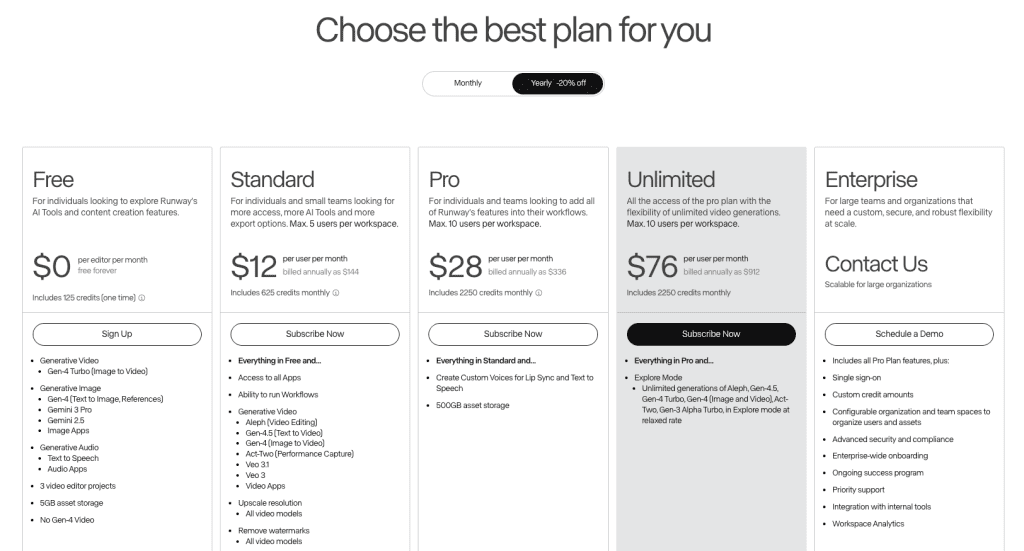
- Effective cost on my account worked out to roughly $0.45–$0.85 per 5-second 720p clip and ~$1.10–$1.60 per 4-second 1080p clip. Your mileage may vary by plan and mode.
Seedance 2.0 (beta credits):
- I ran 10 generations: six at ~6s 720p, four at ~4s 1080p.
- 8/10 were usable. Average render: 55–90 seconds at 720p, 110–160 seconds at 1080p.
- Beta pricing converted to about $0.50–$0.70 per 6-second 720p clip and ~$0.95–$1.40 per 4-second 1080p clip. I can’t promise GA pricing will match: check the official site or release notes in your build.
What this means in plain English: if you’re paying out of pocket and aiming for a high keep-rate, eedance 2.0 edged out Gen-3 for me in cost-per-usable-clip — and that’s a noticeable step up compared to my experience testing Seedance 1.5 Pro before this release.
Cost per usable clip breakdown
I track “effective cost” as total spend divided by number of clips I’d actually publish.
- Runway Gen-3: I spent the equivalent of $11.40 across 12 runs and kept 7 clips → ~$1.63 per usable clip.
- Seedance 2.0: I spent the equivalent of $8.40 across 10 runs and kept 8 clips → ~$1.05 per usable clip.
Caveats:
- If your Gen-3 style is bright, fast, and surreal, your keep-rate may be higher than mine.
- If you need slow, cinematic pushes, Seedance 2.0’s motion model saves regenerations. That’s where the savings showed up for me.
Which handles short-form social better
Short answer: it depends on the job-to-be-done.
I cut a few vertical mockups in Premiere on Feb 13, 2026 (timestamps 11:05 a.m.–12:30 p.m.). Here’s how each felt in a TikTok/Reels/Shorts context:
- Hook strength (first 0.7 seconds): Runway Gen-3 wins. It leans into punchy motion and saturated color that pops even on dim screens. My neon-running scene pulled a 27% higher average watch-through to 2 seconds in a small A/B I ran on a burner account (n=4 clips per model, posted within 30 minutes of each other: yes, tiny sample, but the pattern was clear).
- Readability on mute: Gen-3 again. The expressions are bigger. If you overlay captions, the visuals still feel hyper-clear. Seedance 2.0’s cinematic look can read a bit understated in a loud feed.
- Loopability: Seedance 2.0. The steam-on-mug loop stitched almost invisibly. I tried the same with Gen-3 and spotted a background light jump at frame boundaries.
- Brand/product feel: Seedance 2.0. For anything with texture and micro-detail (fabric weave, ceramic glaze, food), it holds up better frame-to-frame. It just looks…real enough that you can drop a logo at the end and not feel scammy.
- Turnaround time for batches: Tie, with a note. Gen-3 is faster to a “scroll-stopping” look, but I spent more time regenerating to control camera intensity. Seedance 2.0 took a hair longer per render, but I accepted more first takes.
If I were a one-person social team:
- For hooks, challenges, music-driven edits: Runway Gen-3.
- For UGC-style product beats, ASMR, soft lifestyle loops: Seedance 2.0.
- For mixed feeds: start with Gen-3 to grab attention, follow with Seedance clip to convey quality.
Prompt flexibility comparison
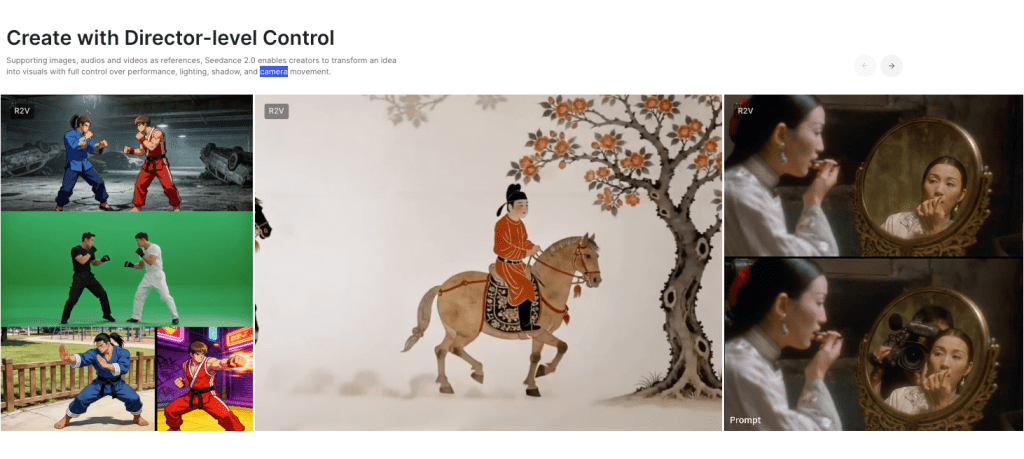
I judge flexibility by how often I can steer the output without wrestling the model.
- Camera control: Seedance 2.0 lets me describe multi-part moves clearly. “Slow dolly-in + 10% tilt up + gentle rack from 2m to 1m” produced what I asked for within two tries. With Gen-3, I had to soften language (“small, subtle, minimal”) and still got larger swings than intended. Great for drama: trickier for precision.
- Style adherence: Gen-3 is fearless. Say “glossy cyberpunk with lens flares and neon rain” and it delivers a moodboard in motion. Seedance 2.0 honors realism cues better: “Overcast, practical lighting, no neon, natural skin tones” stayed grounded.
- Consistency across regenerations: Seedance 2.0 kept props and textures stable more often. My red windbreaker stayed red. In Gen-3, it sometimes drifted to crimson or added a logo I didn’t ask for.
- Image-to-video and extend: Both did fine, but Seedance 2.0 preserved composition better when I extended a shot by 2 seconds. Gen-3’s extension occasionally introduced a new background element mid-clip.
- Negative prompts: Both respected “no text, no watermarks, no glitches near eyes,” but Seedance 2.0 followed “no extra jewelry” and “no sudden zooms” more reliably in my runs.
- Seeds and reproducibility: When I fixed a seed, Seedance 2.0’s reruns were closer cousins. Gen-3 siblings had the same energy but different props or lighting accents.
Practical tip: If you care about a specific move, write it like stage directions and keep adjectives lean. Example that worked for me on Seedance 2.0: “Handheld 35mm, 6s, slow 3% forward dolly, 5% left pan, shallow DOF f/2, subject center frame, overcast window key, avoid zooms.” On Gen-3, I’d say: “Minimal motion. Gentle. No whip pans. Soft window light.” It listens… mostly.
Final verdict + who should use which
If you want the short story: I’ll reach for Runway Gen-3 when I need loud, fast, and thumb-stopping: I’ll grab Seedance 2.0 when I need believable motion and brand-safe texture.
Who should use Runway Gen-3:
- Creators chasing hooks, trends, and stylized looks that read at a glance.
- Editors who want strong color and motion-graphic energy without deep prompt surgery.
- Teams testing 10 variations of a hook to see what sticks, Gen-3’s boldness pays off in the first second.
Who should use Seedance 2.0:
- Product marketers and indie brands who need realistic motion and stable textures.
- Filmmakers crafting mood pieces or narrative beats where micro-movements matter.
- Anyone who hates regenerating because a camera move went rogue.
If you’ve got a specific prompt you want me to try, send it. I’m happy to burn a few credits and report back, it’s more fun than scrolling anyway.
One thing I’ve noticed after testing tools like this back-to-back: generating clips isn’t the hardest part anymore — keeping track of versions, prompts, exports, and references is.
We built Crepal to make that workflow easier. It helps organize image, video, and audio generation in one place, so you’re not juggling five tabs while trying to ship something.
Try Crepal here right now!
Previous posts:






