
Choosing between Luma Dream Machine and Runway? You’re not alone. These are two of the most popular AI video generation tools right now, and they’re both incredibly powerful. But here’s the thing: they’re built for completely different types of creators.
On Dec 10, I’ve spent hours testing both platforms, and I can tell you this — picking the wrong one will cost you time, money, and frustration. Pick the right one? You’ll wonder how you ever worked without it.
In this guide, I’m breaking down everything you need to know: how they position themselves, what their videos actually look like, which one is faster, how much they really cost, and most importantly — which one is right for your specific needs.
| Feature | Luma Dream Machine | Runway |
|---|---|---|
| Best For | Artists & experimental creators | Businesses & professional production |
| Visual Style | Cinematic, dreamlike, artistic | Photorealistic, commercial-ready |
| Generation Speed | 2-4 minutes (5-sec clip) | 1-3 minutes (5-sec clip) |
| Starting Price | $29/month (120 generations) | $15/month (625 credits) |
| Free Tier | 30 generations/month | 125 credits (~5-10 videos) |
| Team Features | None | Built-in workspaces |
| Best Value | Pro plan if you need artistic freedom | Unlimited plan for heavy users ($95/mo) |

Tool Positioning: Luma Dream Machine vs Runway (Art-First vs Business-Ready)
| Category | Luma Dream Machine | Runway |
| Core Positioning | Artistic creation and visual experimentation | Professional video production and commercial use |
| Design Philosophy | Creative freedom and expressive storytelling | Consistency, control, and workflow efficiency |
| Output Style | Dreamlike, stylized, visually rich | Clean, realistic, brand-safe |
| Ideal Users | Artists, visual creators, indie filmmakers | Agencies, production teams, marketing departments |
When you’re choosing between Luma Dream Machine and Runway, the first thing you need to understand is their core philosophy. These aren’t just two tools with different features — they’re built with completely different visions in mind.
Think of it this way: Luma is like an artist’s studio, while Runway is like a production house.
Luma Dream Machine’s Artistic Philosophy
Luma Dream Machine positions itself as a tool for creative experimentation. It’s designed for people who want to push boundaries and create visually stunning, almost dreamlike content.
The platform prioritizes:
- Aesthetic beauty over commercial polish
- Creative freedom and artistic expression
- Experimental workflows that encourage trying new things
If you’ve ever seen those mesmerizing AI-generated videos with surreal transitions and artistic flair, there’s a good chance they came from Luma. The tool excels at creating content that feels more like digital art than corporate video.
Runway’s Commercial and Production Focus
Runway, on the other hand, was built with professional production in mind. It’s designed to fit seamlessly into existing video production workflows.
The platform emphasizes:
- Reliability and consistent output quality
- Integration with professional editing software
- Production-ready results that need minimal post-processing
Runway is the tool you reach for when you need AI-generated content that matches your brand guidelines, fits into a client presentation, or needs to look polished for a commercial project.
Target Audience Differences
So who is each tool really for?
Luma Dream Machine attracts:
- Digital artists and visual creators
- Social media content creators looking for eye-catching clips
- Experimental filmmakers and indie creators
- Anyone prioritizing artistic vision over corporate polish
Runway appeals to:
- Marketing teams and agencies
- Professional video editors and production houses
- Corporate content creators
- Businesses that need consistent, brand-aligned content
The key difference? Luma users are often asking “What’s possible?” while Runway users are asking “What do I need?”
Visual Style Comparison: Luma Dream Machine vs Runway (Side-by-Side)
Now let’s talk about what really matters: how does the content actually look?
Both tools can generate impressive AI video, but they produce noticeably different visual styles. Understanding these differences will help you pick the right tool for your specific project.
Aesthetic Quality Analysis
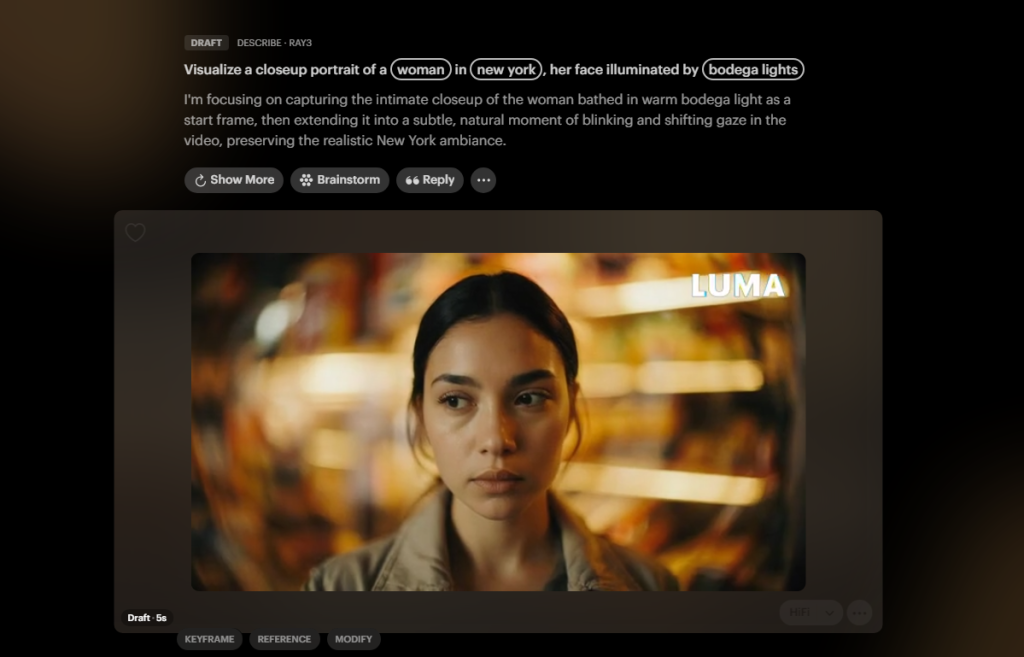
Luma Dream Machine’s Visual Signature:
Luma tends to produce content with a distinct cinematic, dreamlike quality. The videos often have:
- Rich, saturated colors that pop off the screen
- Smooth, flowing transitions that feel organic
- A slightly surreal or artistic edge
- Strong emphasis on visual beauty over photorealism
Think of Luma’s output as “stylized realism” — it looks real, but with an artistic filter that makes everything feel more magical.
Runway’s Visual Signature:
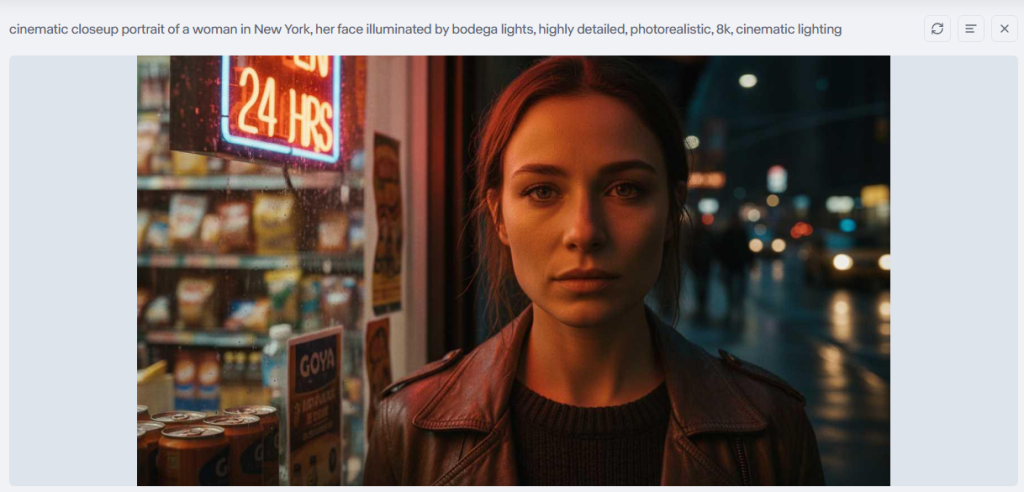
Runway focuses on clean, professional-looking output. The videos typically feature:
- More neutral, balanced color grading
- Precise, controlled movements
- Photorealistic quality that aims for “invisible AI”
- Consistency across multiple generations
Runway’s aesthetic is more “invisible production” — the goal is content that looks like it was shot with a real camera, not generated by AI.
Style Range and Flexibility
Here’s where things get interesting. Both platforms offer different approaches to creative control.
Luma’s Approach:
- Wider creative interpretation of your prompts
- More willing to experiment with unusual styles
- Better at artistic and abstract concepts
- Sometimes surprises you with unexpected (but beautiful) results
Example: If you prompt “a sunset over mountains,” Luma might give you a breathtaking, almost fantasy-like scene with dramatic colors.
Runway’s Approach:
- Tighter control over specific visual parameters
- More predictable and consistent results
- Better at matching reference images and brand styles
- Delivers what you ask for, with fewer surprises
Example: The same “sunset over mountains” prompt in Runway will likely give you a clean, realistic sunset that looks like stock footage.
Which is better? It depends on your goal:
- Need something artistically bold? → Luma
- Need something brand-safe and predictable? → Runway
Workflow Speed Comparison: Which Is Faster — Luma Dream Machine or Runway?
| Test Metric | Luma Dream Machine | Runway |
| 5s Video Generation | 2–4 minutes | 1–3 minutes |
| 10s Video Generation | 5–8 minutes | 4–6 minutes |
| Peak Time Delay | +30–50% | Minimal |
| Batch Generation Limit | 3–5 (paid plans) | 10+ (paid plans) |
| Best For | Individual creators | Teams and agencies |
Speed matters. Whether you’re racing against a deadline or just testing ideas, you need to know how long you’ll be waiting for your videos to generate.
Let’s break down the real-world speed differences between these two platforms.
Generation Time Benchmarks
Luma Dream Machine:
- Average generation time: 2-4 minutes for a 5-second clip
- Longer clips: Can take 5-8 minutes for 10+ second videos
- Peak hours impact: Generation times can increase by 30-50% during busy periods
Runway:
- Average generation time: 1-3 minutes for a 5-second clip
- Longer clips: Typically 4-6 minutes for 10+ second videos
- More consistent: Less affected by peak usage times
Bottom line: Runway is generally faster, especially during high-traffic periods. If you’re working on tight deadlines, those extra minutes add up quickly.
Iteration Speed Comparison Between Both Platforms
Here’s where workflow really matters. You rarely get the perfect video on your first try.
Luma’s Iteration Workflow:
- Each new generation starts from scratch
- No built-in “refine this result” feature
- You’ll need to adjust your prompt and regenerate completely
- Total time for 3 iterations: Roughly 12-15 minutes
Runway’s Iteration Workflow:
- Offers image-to-video features for more control
- You can use your first generation as a reference
- Slight prompt adjustments yield faster results
- Total time for 3 iterations: Roughly 8-12 minutes
Pro tip: If you’re someone who likes to experiment and iterate multiple times before settling on the final result, Runway’s faster iteration cycle can save you hours over the course of a project.
Batch Processing Capabilities

What if you need to generate multiple videos at once?
Luma Dream Machine:
- Queue-based system with limited simultaneous generations
- Free tier: 1 generation at a time
- Paid plans: Up to 3-5 simultaneous generations
- Good for: Individual creators working on single projects
- More robust parallel processing on higher tiers
- Free tier: 1 generation at a time
- Paid plans: Up to 10+ simultaneous generations (depending on plan)
- Better for: Teams and agencies handling multiple client projects
Real-world scenario: If you’re a marketing agency creating 20 variations of an ad campaign, Runway’s batch capabilities mean you could finish in 1-2 hours instead of an entire afternoon.
Pricing Comparison: Luma Dream Machine vs Runway for Teams & Enterprises
Let’s talk money. Pricing can make or break your decision, especially if you’re working with a budget or need to justify the expense to a client or boss.
Here’s an honest breakdown of what you’ll actually pay.
Individual Creator Plans Overview
Luma Dream Machine Pricing:
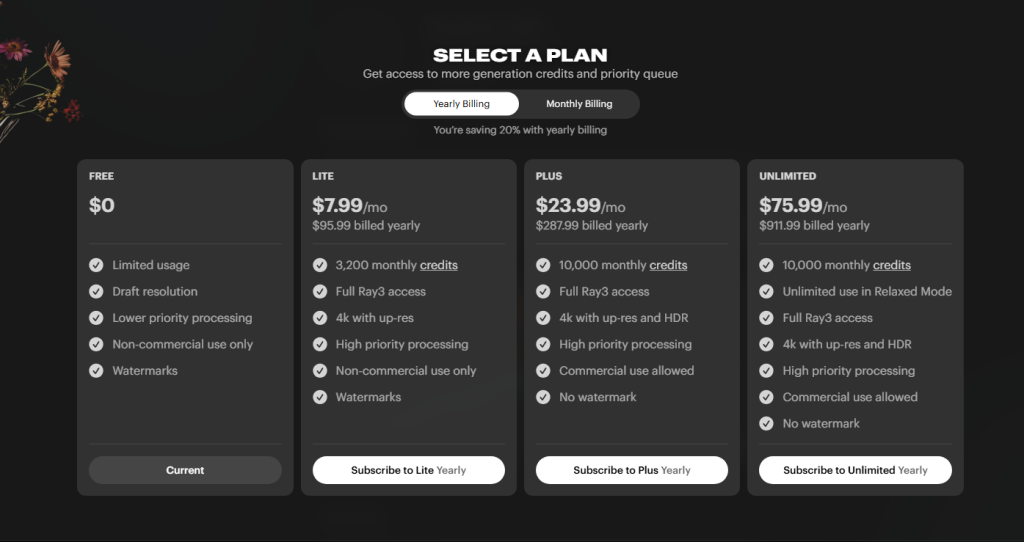
- Free Tier: 30 generations per month (resets monthly)
- Standard Plan: $29/month for 120 generations
- Pro Plan: $99/month for 400 generations
- What you get: All plans include the same quality and features — you’re just paying for volume
Runway Pricing:
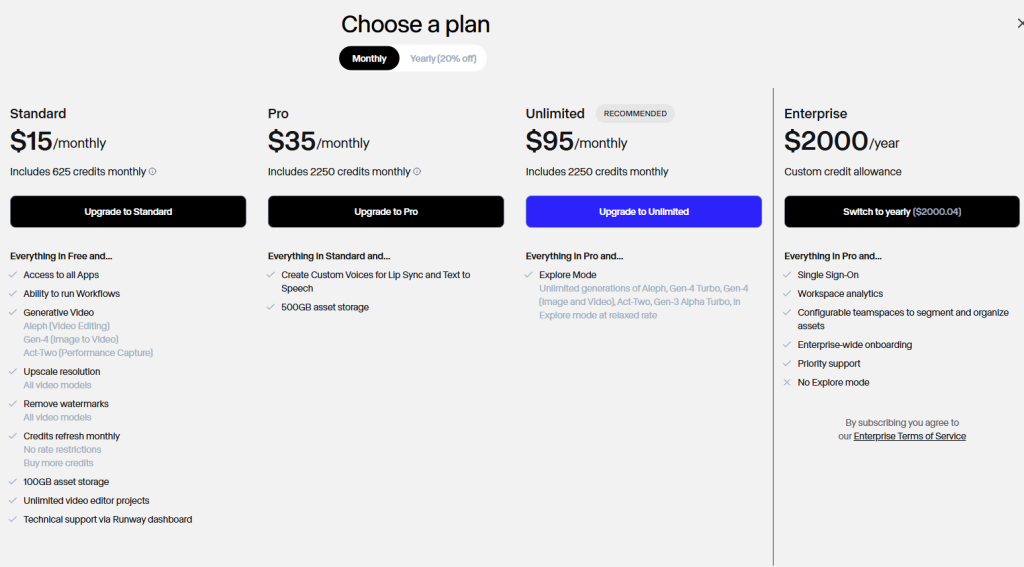
- Free Tier: 125 credits (roughly 5-10 generations depending on length)
- Standard Plan: $15/month for 625 credits
- Pro Plan: $35/month for 2,250 credits
- Unlimited Plan: $95/month for unlimited generations
- What you get: Higher tiers unlock faster processing and priority access
Key difference: Luma’s pricing is straightforward — you pay per generation. Runway uses a credit system that can be confusing at first, but often works out cheaper for heavy users thanks to their unlimited option.
My recommendation: If you’re creating 10+ videos per week, Runway’s unlimited plan at $95/month is the better value. For occasional use, Luma’s free tier is more generous.
Team Collaboration Features Compared
This is where the platforms really diverge.
Luma Dream Machine:
- No dedicated team features on standard plans
- Each team member needs their own account
- No shared asset libraries or project management
- Best for: Solo creators or small informal teams
Runway:
- Built-in team workspaces on Pro and Enterprise plans
- Shared project folders and asset management
- Role-based permissions and collaborative editing
- Team billing with centralized invoicing
- Best for: Agencies, production teams, and marketing departments
Real-world impact: If you’re a 5-person marketing team, Runway lets you pool resources and collaborate efficiently. With Luma, you’d need to buy 5 separate subscriptions and manually share files.
Enterprise Pricing Options
Need something bigger? Here’s what’s available.
Luma Dream Machine Enterprise:
- Custom pricing based on volume
- Dedicated support
- API access for integration
- Must contact sales for quote
- Better for: Large creative studios with high volume needs
Runway Enterprise:
- Custom pricing with flexible credit pools
- Advanced team management and security features
- Priority processing and dedicated infrastructure
- Training and onboarding support
- SSO and compliance features
- Better for: Corporations, agencies, and production houses with strict workflows
Bottom line comparison: Runway‘s enterprise offering is more mature and feature-rich. If you’re running a business that depends on AI video generation, Runway provides better infrastructure and support.
Frequently Asked Questions
1. Which is better overall: Luma Dream Machine or Runway?
There’s no universal winner—it completely depends on your goals. In my hands-on testing (Dec 10, 2025), Luma Dream Machine excels for artistic, experimental, and visually stunning content (dreamlike, cinematic style), making it ideal for indie creators and artists. Runway wins for professional, photorealistic, brand-safe videos with better consistency and workflow tools—perfect for agencies, marketing teams, and commercial production. If you’re prioritizing creative freedom, go Luma; if you need reliability and team features, choose Runway.
2. Which tool is faster for generating and iterating videos?
Runway is generally faster and more consistent. My benchmarks showed Runway averaging 1–3 minutes for a 5-second clip (with minimal peak-time delays), while Luma took 2–4 minutes and could slow by 30–50% during busy periods. Runway also supports better iteration (using previous outputs as references) and higher batch limits (10+ on paid plans vs Luma’s 3–5), saving significant time on multi-variant projects.
3. How do the pricing plans compare in real-world value?
Both have solid free tiers (Luma: 30 generations/month; Runway: ~5–10 videos), but paid plans differ. Luma starts at $29/month (120 generations) with straightforward volume-based pricing. Runway’s Standard ($15/month) offers more credits initially, and the Unlimited plan ($95/month) is unbeatable for heavy users. In my experience, Runway provides better value for teams/professionals due to unlimited options and collaboration features; Luma is more cost-effective for occasional artistic use.
4. Which one should beginners or solo creators choose?
For beginners or solo creators focused on artistic/experimental videos, Luma Dream Machine is more forgiving and inspiring—its free tier is generous (30 generations/month), and the dreamlike outputs encourage creativity without needing precise prompts. Runway is better if you’re aiming for professional polish early on, but its credit system and pro-oriented features have a slightly steeper learning curve for pure hobbyists.
5. How do I decide between Luma and Runway for my specific needs?
Ask yourself two questions from my testing framework: (1) Do I want artistic/surreal freedom (Luma) or consistent, production-ready realism (Runway)? (2) Am I working solo/experimentally (Luma) or with a team/on client projects (Runway’s workspaces and batch tools)? Start with both free tiers on the same prompt—generate a simple 5-second test clip in each. You’ll feel the style difference immediately and know which fits your workflow.
Previous posts:






