
I was scrolling through a late-night group chat on November 17, 2025 when a friend dropped a 5-second soda can ad made with Luma Dream Machine. You know the type, hyper-polished lighting, buttery camera moves, little water droplets catching the light just right. I stared at it, squinted, and then did the only reasonable thing: I brewed tea and opened Luma. I wanted to see if I could make product ads that didn’t look like a school project.
This isn’t sponsored, just field notes. I tested Luma Dream Machine for product ads across three mini projects (a coffee bag, a smartwatch, and a ceramic mug) and took timestamps, render times, and export settings along the way. If you’re wondering whether Luma is worth weaving into your workflow, here’s what actually worked for me, where it stumbled, and the exact prompts/settings I’d reuse.
Why Luma for Product Videos? Cost, Quality, and Speed
I’ve tried a bunch of AI video tools this year. Luma Dream Machine consistently nails one thing: cinematic motion from boring inputs. For product ads, that combo matters more than anything.
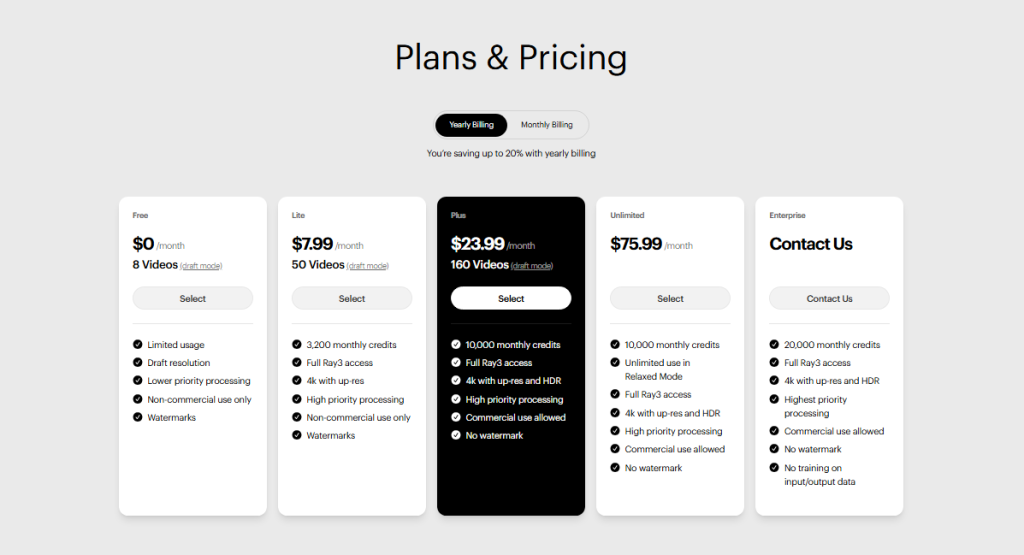
- Cost: Pricing shifts, but the math that mattered to me was time-per-clip. On 11/17/2025, a 5–8 second 1080×1920 render took 1–2 minutes for me on a paid plan. If I storyboard three beats (hero shot, texture macro, lifestyle cutaway), I can generate variants in under 15 minutes and pick a winner. That’s cheaper than a reshoot, or my sanity editing stock b-roll.
- Quality: Highlights, reflections, and soft shadows look surprisingly natural, especially on glossy packaging. It’s not perfect with tiny text or ultra-precise labels (it can smudge), but for social-first ads, it’s good enough to stop thumbs.
- Speed: Iteration speed is the real value. I ran 12 generations in under an hour and trimmed down to three clips that felt broadcast-clean. That pace is the ROI.
Where it struggles: exact logo fidelity, micro-typography, and physics on liquids if you push it too far. For anything legally sensitive (pharma, claims on-pack), keep labels in-camera or add them in post.
Photo-to-Video Workflow in 5 Steps
Here’s the tight loop that worked best for me when I started with still images of the product.
Step 1: Import Images
I shot simple product photos on a white sweep (iPhone 15, 4K HEIF, November 18, 2025). I then uploaded the cleanest 1–3 to Luma. Tip: give it a sharp, well-lit “anchor” image. Luma uses it like a north star for the product’s shape and material.
Step 2: Apply AI Motion & Transitions
In Dream Machine, I used image-to-video with gentle camera moves: a 15–25° arc or a slow push-in. Motion strength: medium. I avoid aggressive camera rolls: they look cool but scream “AI” on shiny packaging.
Step 3: Add Audio and Voiceover
I mock the vibe early. A tight percussion bed at 92–110 BPM helps make motion feel intentional. If you’re doing VO, write it before you generate more clips, timing your beats around VO phrases saves you from painful re-edits later.
Step 4: Fine-Tune Timing
I target 5–7 seconds per beat. Hero shot (2s), macro texture (2s), lifestyle context (2s), logo resolve (1s). Luma’s variations help you find the right rhythm, generate 2–3 alternates and pick the smoothest path.
Step 5: Preview and Export
I do a quick pass in a timeline editor (CapCut/Premiere) to lock pacing and add a logo end card. Export per platform (more on that below). If the label looks mushy, I composite a crisp PNG of the pack over the last 0.5–1s in post.
6 Product Ad Prompt Templates
I built these prompts while testing between Nov 17–18, 2025. Paste them into Luma Dream Machine and swap in your product details. Keep nouns concrete: avoid abstract adjectives like “innovative.”
- “Premium coffee bag on a matte black surface, soft studio top-light, slow push-in, steam drifting behind, shallow depth of field, 24fps, cinematic product ad, emphasize foil highlights.”
- “Stainless smartwatch rotating 30° on a reflective glass turntable, neon rim light, macro focus on crown and bezel, subtle lens flare, clean background, seamless loop feel.”
- “Ceramic mug with rich latte pour in slow motion, warm morning window light, wood table, micro foam texture close-up, gentle handheld drift, cozy lifestyle tone.”
- “Matte skincare bottle hovering with soft cloth ripples, airy daylight, soft shadows, minimal set design, macro texture pass, elegant typography reveal at end.”
- “Wireless earbuds case opening with magnetic snap, glossy white plastic, dramatic top-down spotlight, orbit camera 20°, product hero framing, crisp reflections.”
- “Running shoe suspended, dust motes, backlight rim, quick 3-beat sequence: heel macro, outsole texture, full silhouette, bold kinetic move, high-contrast commercial style.”
If you need consistency across variants, add: “lock product colors and proportions, maintain label geometry.” If Luma smudges text, plan to overlay the label in post.
Pro E-commerce Settings for Luma Dream Machine
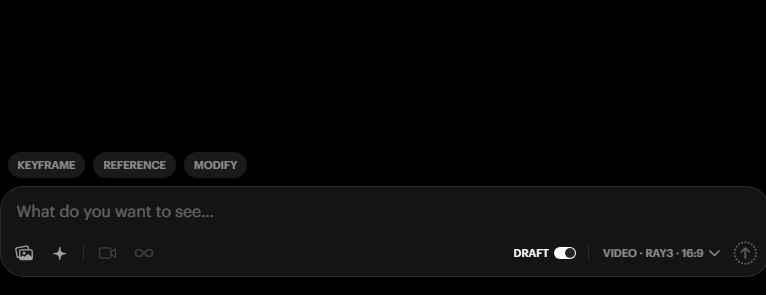
These are the settings that gave me the most usable results for storefronts and social storefronts.
- Aspect ratio: 9:16 for Reels/Shorts/TikTok, 1:1 for square feeds, 16:9 for landscape product pages.
- Duration: 5–8 seconds per clip. Chain 2–3 clips for a 15–20s ad.
- Frame rate: 24fps for cinematic mood: 30fps if you’re matching existing brand assets.
- Motion strength: Medium. High can distort packaging edges.
- Camera: Arc or push-in: avoid fast barrel rolls unless you’re doing a hype montage.
- Lighting: Ask for “soft top-light + subtle rim light.” It flatters edges and reduces plastic-looking glare.
- Consistency: Use the same seed or upload the same hero image across clips.
- Logos/text: Keep on-screen for max 1.5s at the end: if fidelity matters, composite the real logo in post.
On Nov 18, my cleanest coffee-bag results came from a 9:16, 7s clip with medium motion, soft studio top-light, and a slow push-in. The first try with high motion gave me a wobbly bag silhouette, cool, but unusable for e-com.
Exporting for Social Media Platforms
Here are export specs that played nice with algorithmic compression and looked crisp on mobile:
- TikTok/Reels/Shorts: 1080×1920, 24–30fps, H.264, 10–16 Mbps VBR, AAC audio 320 kbps. Keep under 15s if you’re testing hooks: under 30s for narrative.
- Instagram Feed (square): 1080×1080, 8–12 Mbps, 24–30fps. Add a 3px outer glow to white logos so they don’t vanish on light UIs.
- YouTube (landscape): 1920×1080, 15–20 Mbps, 24–30fps. If you upscale to 4K, YouTube gives you better VP9/AV1 encoding, which looks cleaner.
- Amazon/e‑commerce PDP: 1920×1080 or 1080×1080, conservative motion, neutral background, clear pack shot in first 1.5s. Export a still thumbnail with the same lighting for visual continuity.
One more tiny trick: if the platform over-sharpens, add a 0.2–0.3 Gaussian blur before export. Sounds wrong, looks right.
Not sponsored, just honest results. If you want to dig into official details, Luma’s site (lumalabs.ai/dream-machine) has the latest feature notes. And if you hit a wall with label clarity, don’t fight it, overlay the real pack in post and move on.
If you try any of the prompts above, send me your best 7-second hero shot. I’ll trade you my coffee bag clip: it still makes me weirdly proud.
Previous posts:






