
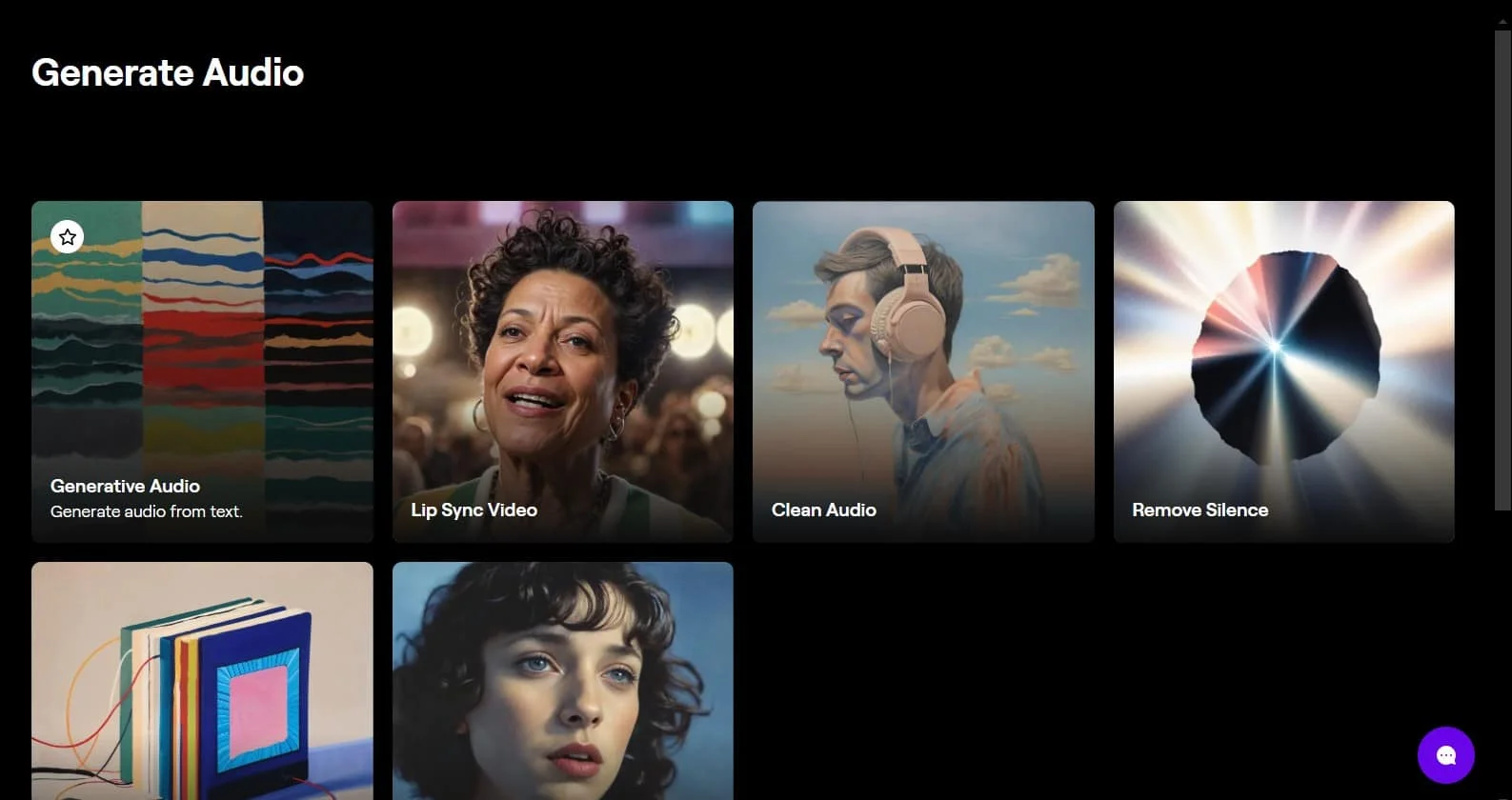
I opened Runway because my video rough cut felt empty, pretty visuals, zero voice. And I kept seeing people mention “runway gen4 voiceovers” like it was a magic button. So I did what I always do: made coffee, blocked an hour, and decided to see if Gen‑4 could actually help me narrate without sounding like a robot. Spoiler: it’s not perfect, but a few things clicked hard enough that I’d use it again. Here’s the messy, honest tour, what worked, what tripped me up, and the small tricks that saved me time.
Gen-4 Audio Features

| Tool | LUFS Measurement (Recommended Range) | Output Loudness (Generated Voice) | Notes |
| Runway Gen-4 | -14 LUFS | -12 LUFS | Slightly higher than standard but ideal for social media content |
| Adobe Audition | -23 LUFS | -23 LUFS | More aligned with broadcast and audio production standards |
| Descript | -16 LUFS | -14 LUFS | Flexible loudness standard, adapts well to different content |
| Murf | -18 LUFS | -15 LUFS | Offers a variety of voices but lacks strict loudness normalization |
AI Voice Generation
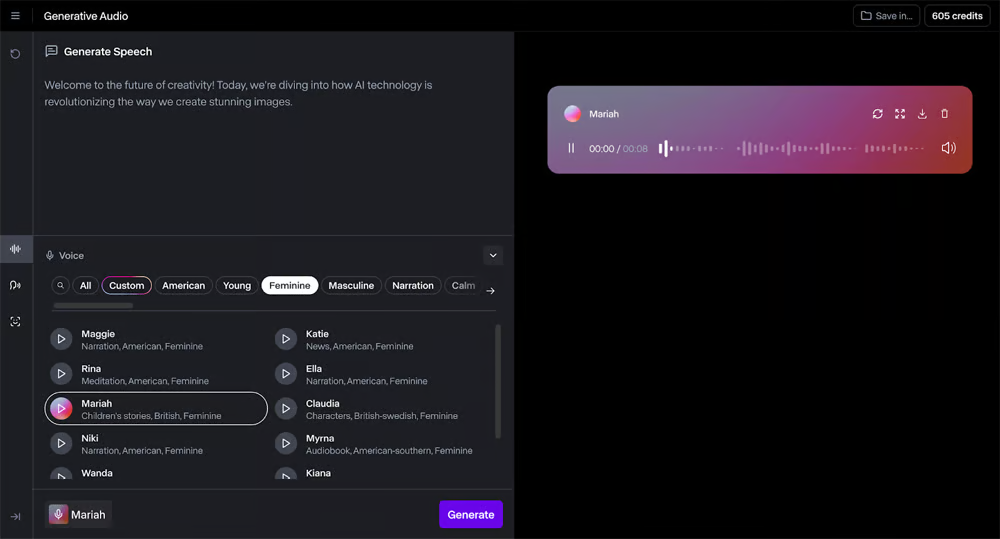
First impression: the voice library isn’t enormous, but it’s… usable. I tested a friendly female voice for a travel reel, a neutral American male for a tutorial, and a softer British option because my brain associates British voices with authority (don’t @ me). The texture felt less plasticky than older AI voices I’ve tried: sibilance control is decent, and the breathing isn’t dramatic. You still get occasional flatness on long sentences, especially when I crammed too many commas, but it’s miles better than the monotone text-to-speech from last year.
What surprised me:
- Pacing. When I added short punchy lines (5–10 words), Gen‑4 handled emphasis better. It “lands” a line if you give it room.
- Emphasis tokens aren’t a thing here (at least not in a clunky way), but punctuation and sentence length change the read more than you’d expect. Ellipses and em dashes help.
- Pronunciation. Brand names are hit or miss. I had to adjust “Qi” charging to “chee” to get the right sound. Acronyms are okay, but I sometimes spell them with periods (A.I.) to slow the delivery.
Where it stumbled: emotional range. If you want warm, wry, a little mischievous, you’ll still need manual tweaks. I ended up splitting my script into chunks and nudging tone by rewriting lines conversationally. Small contractions helped (“I’m,” “we’re,” “you’ll”).
Auto Subtitle Sync
| Tool | Voice Styles | Supported Languages | Subtitle Sync | Pricing (Starting) | Ideal Use Cases |
| Runway Gen-4 | Neutral, Female, Male | English, French, Spanish, etc. | Auto-sync, works well with short sentences | Free version, Paid (based on usage) | Social videos, tutorials, product demos |
| Murf | Diverse, Professional | English, French, German, etc. | Auto-sync, needs minor tweaks | Paid (about $15/month) | Professional voiceovers, e-learning, advertisements |
| Descript | Neutral, Female, Male | English, Japanese, etc. | Auto-sync, very accurate | Free, Paid (from $12/month) | Podcasting, content creation |
| Speechelo | Male, Female | English, German, etc. | Manual sync | One-time purchase (around $47) | Ads, quick voice generation |
Auto captions are… honestly pretty good. I tossed in a 90‑second voiceover and the subtitle timing snapped into place with only a few micro-fixes. It recognizes filler words (when the voice generation adds a light “uh” vibe) and usually ignores them. Accuracy dropped when I used niche jargon or mixed languages inside a sentence.
Tiny notes from the field:
- It sometimes over-commits to long lines. I split them at natural breath points, every 6–10 words worked best for my viewers.
- Timing nudges are easy. Dragging a caption block by a few frames is faster than re-generating.
- Auto line breaks are fine, but manual breaks look cleaner if you care about readability on phones.
If you’re doing short-form content with burned-in captions, Auto Subtitle Sync saves you from Premiere gymnastics. It’s not magical, but it’s reliable enough for daily posts.
Workflow Tutorial
Import & Voice Setup
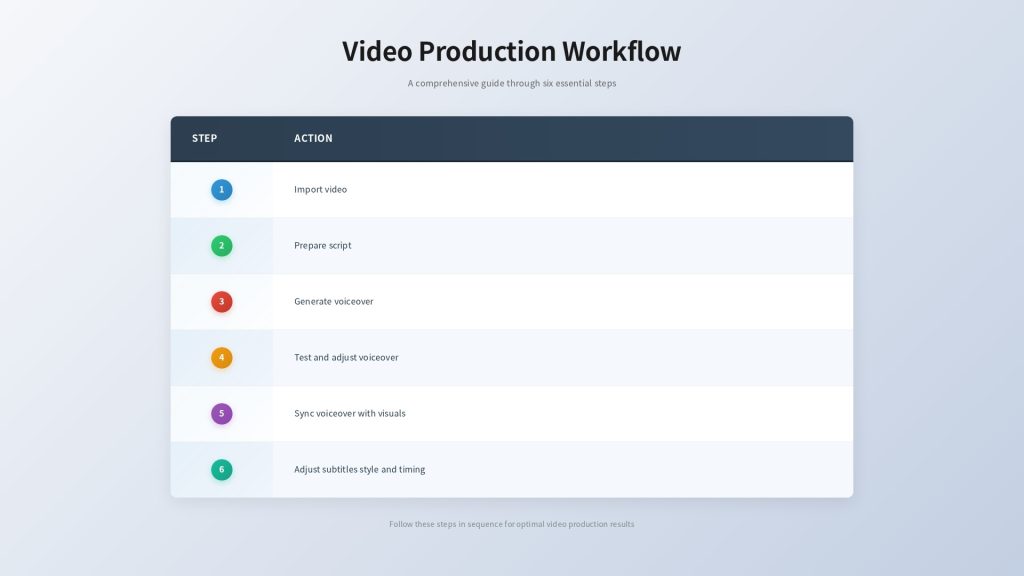
Here’s the quick workflow I ended up repeating:
- Prep your script first. Keep lines short. Write like you talk, because runway gen4 voiceovers lean on punctuation for rhythm.
- Import your video rough cuts (or even just stills if you’re testing).
- Generate the voiceover from text. Pick a voice that matches the vibe, not just the gender. Neutral voices blend best with B‑roll.
- Do a 10–20 second test read. If it sounds stiff, rewrite the sentence, don’t just switch the voice. I shaved off filler words and swapped formal phrases for casual ones (“use” → “use”).
- Lay the voiceover under the edit. Trim visual beats to the voice, not the other way around, you’ll get a cleaner flow.
Settings that actually mattered:
- Speed: I nudged pacing to 0.95x for a calmer read. Faster than 1.05x started to sound cramped.
- Volume: I settled around -6 dB for the VO and -18 dB for background music, with a gentle ducking automation.
- Room tone: I layered a subtle room tone beneath the VO: it softens the “super clean” AI edge. A 30–40 Hz high-pass on the tone avoids mud.
Subtitle Customization
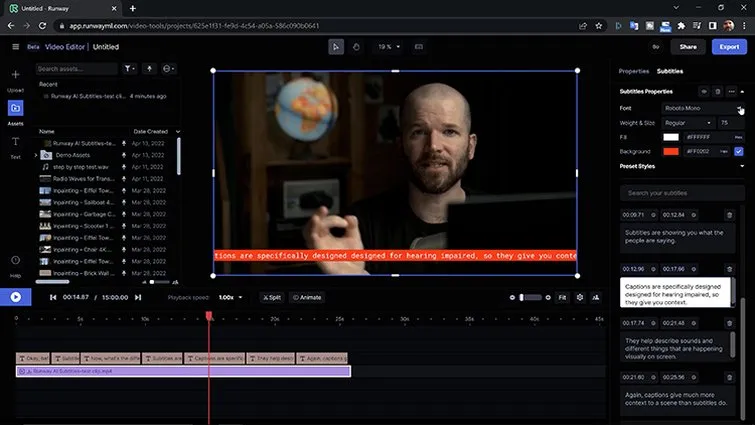
Captions are where Gen‑4 felt pleasantly no-drama. My tweaks:
- Style presets are fine, but I customized font weight and background opacity. 80–85% opacity looks crisp on busy footage.
- I bumped font size by 2–4 points for vertical video. People squint less. Engagement goes up. Science-ish.
- I color-coded a few keywords (brand names, calls to action), lightly, like one word per line. Any more and it screams “promo.”
Timing tips:
- Keep captions on screen at least 1.2 seconds, even for short words. Anything faster is blink-and-miss.
- When a line continues over a cut, I add a 2–3 frame overlap so the eye tracks smoothly.
- If the voiceover slightly anticipates the cut, that’s fine, it makes the edit feel intentional.
One small annoyance: the default line width sometimes feels too long on 9:16. I narrowed the caption area to the center 60% and it instantly felt more premium.
Multilingual Options
Global Language Support
I ran a little stress test: English script, then Spanish, then a mixed English–French line because I like chaos. Runway’s multilingual support handled clean language switches better than mid-sentence mashups. If you plan bilingual captions, do two passes, one native line per card rather than mixing.
For creators doing international shorts: runway gen4 voiceovers are good enough to ship in multiple languages if you keep sentences simple and check names/places. The Spanish and French voices sounded natural to my ear, with minor intonation quirks on questions.
Practical use cases I’d actually keep doing:
- Localized product explainers (one project, multiple voiceovers). Reuse the same edit: swap VO + subs.
- Travel content with city names that need correct pronunciation, run a quick test and manually nudge spellings to guide the model.
- Course snippets for global audiences: record English live, then generate translations for teasers.
Timing Adjustments
Different languages expand or shrink. Spanish lines ran ~10–15% longer than English. I fixed this three ways:
- I trimmed visual padding: extend a shot by 6–8 frames or use a still.
- I slightly increased VO speed (up to 1.05x) on long lines where it still sounded natural.
- I rewrote. Shorter sentences beat awkward fast reads every time.
And here’s a small trick: generate subtitles first in the target language, then tweak the VO to match those timings. It’s easier to read clean subs than to force the timing around a too-long voiceover.
Export Tips
Format Optimization
Exports were straightforward, but a couple settings saved me re-renders:
- For TikTok/Reels, I used 1080×1920 H.264 with a slightly higher bitrate than default (10–14 Mbps). Captions look sharper, especially white text on busy backgrounds.
- If you’re mixing external audio later, export a separate WAV of the voiceover at 48 kHz. Keeps it clean for DAW tweaks.
- Burned-in vs. sidecar: burned-in captions are safer for cross-platform consistency: sidecar files (SRT) are great if you’re posting to YouTube with searchable captions.
- Headroom: aim for around -1 dB true peak on the final. Gen‑4’s limiter is decent, but I still like one last listen on headphones.
One gotcha: if your subtitles drift after export, check your project frame rate. I had a 29.97 vs 30 mismatch once and thought I was losing it.
If you care about SEO and accessibility, keep the transcript. It helps with descriptions, chapter markers, and posts around the video.
If you’re skimming, here’s my friend-to-friend take: runway gen4 voiceovers are solid for quick, clean narration and auto subtitles that don’t waste your evening. They won’t replace a seasoned human VO for nuanced storytelling, but for tutorials, explainers, social shorts, or multilingual snippets, it’s honestly kind of perfect. If you love tinkering with micro-emotion and character, you’ll want more control than it gives right now. But if you’re like me and you just need something that sounds good, syncs fast, and lets you publish today, this is worth a try.
Previous posts:






