Hey! Dora is back. Two weeks ago (Nov 7, 2025), I was staring at a messy stick‑figure storyboard for a short chase sequence and thinking, “There’s no way this matches the energy in my head.” I wanted to feel the cuts and the camera moves before I bothered anyone for a location scout. That’s what pushed me to explore Sora 2 for previsualization. Could an AI video model help me block scenes faster and make smarter choices before I spend real money?
Quick note: I don’t have private access to Sora 2. I studied OpenAI’s official Sora examples and docs, then stress‑tested a similar previz workflow with current video models (Runway Gen‑3 Alpha, Pika 2.1, Luma) on Nov 8–12, 2025, to approximate what Sora 2 promises. Not sponsored, just honest results.
How Previsualization Changes Filmmaking with Sora 2
Previz, when it works, is like a rehearsal you can rewind. With Sora 2‑style generation, the big shift isn’t just speed, it’s how close you can get to the emotional rhythm of the scene before you book a crew.
What surprised me first was iteration. Traditional boards give you beats: AI video gives you timing. On Nov 9, I tweaked the same alley chase description five times and got five different versions with distinct pacing and lens feel. That let me quickly choose a tone (tense vs. kinetic) without arguing over thumbnails.
Second, you can test camera language early. Want a 28mm handheld push-in? Or a 65mm locked‑off with a slow parallax of background lights? When the model respects camera prompts, you can audition lenses and moves and see how they affect blocking and lighting. Even if Sora 2 isn’t perfect, the “good enough” motion lets you spot continuity issues (crossing the line, awkward eyelines) before they’re expensive mistakes.
Finally, previz clarifies budget. If a 6‑second drone rise sells the beat better than a 12‑second crane, you know what to rent, or skip. That’s real money back in your pocket.
Sora 2 vs Traditional Storyboards
Key Differences in Speed and Accuracy
My typical timeline for a simple 10‑shot sequence with boards is 1–2 days (sketches, notes, revisions). With AI video, I got to a passable cut in under 2 hours on Nov 10 (about 8–12 minutes per shot including prompt tweaks and render time). That’s not scientific, but the delta is obvious.
Accuracy is mixed. Where AI wins: timing, parallax, and blocking experiments. Where boards still win: exact composition and continuity you can lock. If Sora 2 matches the control hinted in OpenAI’s releases, expect “direction-level” prompts (lens, move, framing) to land 70–80% right on a first pass, and then tighten with iteration. When it’s wrong, it’s usually because the prompt is ambiguous about action beats or camera intent.
Visual Fidelity Comparison
Boards are readable: AI video is watchable. That sounds glib, but it matters. When I cut my AI previz in Premiere with temp music, I could actually judge whether a 3‑frame hold before a whip‑pan felt right. That kind of micro‑timing is hard with stills.
Caveats: hands and micro‑physics can still glitch across models. Crowds and precise choreography are hit‑or‑miss. For realistic human faces, you may want stylized previz (slightly abstract) to avoid uncanny valleys distracting your team. If Sora 2 follows OpenAI’s published direction on long, coherent shots, it may handle continuity better than current public tools, but I’d still verify tricky blocking with a quick phone camera rehearsal.
Pre-Production Workflow with Sora 2 (5 Steps)
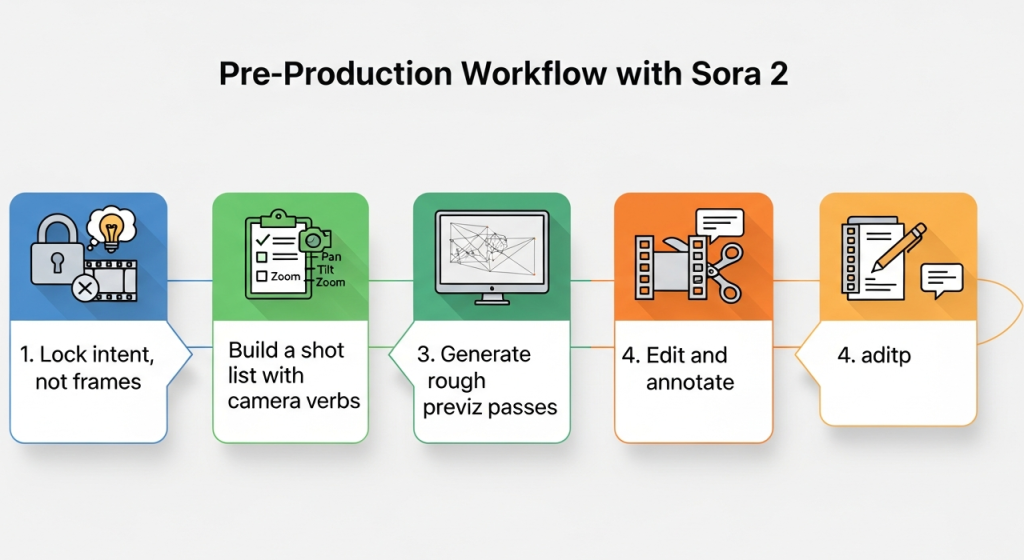
Here’s the 5‑step loop I used (Nov 8–12) and would apply to Sora 2 as soon as it’s available:
Lock intent, not frames
- Write a 1‑paragraph scene intent: tone, key beat, what the audience must feel. Keep it in the bin so every prompt traces back to story.
Build a shot list with camera verbs
- Translate the intent into 8–12 shots with verbs: “whip‑pan reveals,” “dolly in,” “over‑shoulder hold.” Add rough durations (e.g., 3.2s) to guide rhythm.
Generate rough previz passes
- For each shot, prompt for lens, move, subject, and lighting. Expect 2–3 passes before it clicks. Keep filenames versioned like S02_SH05_v03_2025‑11‑10.
Edit and annotate
- Drop clips into Premiere/Resolve, add temp music/SFX, and annotate timecode notes: “00:02:13, cut 4 frames earlier.” Export a watermarked MP4.
Validate against reality
- Sanity‑check with production: can we fit a 12‑foot dolly in that hallway? If not, revise the move now. Previz is a negotiation, not a promise.
Prompt Architecture for Accurate Previsualization
I stopped writing “poetic” prompts. Previz wants structure. This template worked best:
- Scene capsule: one sentence on place and time. “Nighttime alley, wet pavement, sodium vapor spill.”
- Action beats (ordered): “Runner enters frame left: security light flicks on: camera whip‑pans to reveal pursuer: runner vaults trash can.”
- Camera grammar: lens, height, move, framing. “28mm, shoulder height, handheld push‑in, ends in MCU.”
- Continuity tokens: “Runner jacket: red. Trash can: right of frame. Maintain screen direction left→right.”
- Constraints: “Max 6.0 seconds. No face close‑ups. Maintain rain streaks.”
- Output: aspect ratio, FPS, style. “2.39:1, 24fps, realistic, slightly desaturated.”
Example prompt I used on Nov 10 (adapt for Sora 2):
“Night alley, wet asphalt, sodium lamps. Action: subject sprints L→R: light pops on: camera whip‑pans to reveal chaser 10m behind: subject vaults trash can: camera keeps pace. Camera: 28mm, shoulder height, handheld, ends in medium‑close. Continuity: red jacket on runner, blue jacket on chaser, rain consistent, reflections on ground. Constraints: 5.5s duration, 2.39:1 at 24fps, realistic, no slow‑motion.”
Tips:
- Time is a first‑class citizen. Always specify shot length.
- Use “maintain screen direction” to reduce flip‑flops.
- Lock wardrobe colors and props so adjacent shots stitch.
- If faces distract, request “stylized human” or “silhouettes” for clean reads.
Sharing Previz With Production Teams
I share previz like I share a good recipe: short, labeled, and editable.
- Formats that travel: MP4 H.264 (2–5 Mbps) with burned‑in timecode. Still frames as JPEG boards for fast skims.
- Overlays: lens, move, and duration in the top‑left (e.g., “28mm | handheld push‑in | 5.5s”). Keeps camera and art on the same page.
- Notes live with the cut: I drop comments at exact timestamps (Frame.io or a Google Doc with 00:MM:SS). “00:00:04: vault starts too early, try +6 frames.”
- Version hygiene: Sxx_SHxx_vxx_YYYY‑MM‑DD. People thank you later.
- Hand‑off bundle: previz MP4, shot list CSV, prompt file (yes, share the exact prompt), and risks. Example risk note: “Whip‑pan blur may hide the chaser, consider a practical light cue.”
When the team can see the move and read the reasoning, meetings get shorter and the scout gets sharper. That’s the whole point.
If you want official capabilities and safety specs, check OpenAI’s Sora page and policy docs. I’ll update this once Sora 2 is publicly testable.
Final thought as a friend: if your scene lives or dies on timing, try this previz loop, even with today’s models. It won’t replace your DP’s eye, but it will save you three coffees’ worth of second‑guessing.
Previous posts: