

I was sipping my 7 a.m. coffee on November 28, 2025, staring at a 2,300-word blog post I’d spent all week polishing. It was good. But I knew most people wouldn’t read it end to end. So I did the experiment I’d been avoiding: I turned that blog into a short video to see if it could carry the same ideas to people who prefer watching over reading.
Why Repurpose Articles with Blog-to-Video Generation

Turning written pieces into video feels a bit like translating from one language to another. You keep the meaning, but you adapt the rhythm. And when it works, the content travels farther.
How Turning Blogs Into Videos Increases Reach & ROI
On November 30, I repurposed a long-form SEO post into a 58-second vertical video and posted it to LinkedIn and YouTube Shorts. Here’s what happened in 48 hours:
- LinkedIn: 3.1k impressions, 5.2% watch-through to the end, 19 saves
- YouTube Shorts: 1.8k views, 64% average watch time (Shorts analytics), 37 new subscribers
- Blog CTR from video description links: 3.7%
The time cost? About 42 minutes from paste-to-publish (I timed it: I’m that kind of nerd). That’s a decent ROI if your goal is reach, not just rankings.
Why it works:
- People skim. Video front-loads value and hooks faster. A strong opening line (“You’re wasting keywords on this one mistake…”) beat any headline tweak.
- Platforms push short video. Social algorithms prefer it: you get the lift without begging.
- Multi-modal memory. Seeing motion + hearing a voice improves recall, which is gold for education and brand.
Is it always worth it? If your topic depends on visuals, yes. If it’s pure theory, you’ll need clever framing (metaphors, analogies, simple charts). Otherwise, it can feel like reading a textbook out loud, which, please no.
Blog-to-Video Generation Workflow
I tested a simple system across three posts between Nov 28–Dec 5, 2025. This is what stuck.
From Article Input to Finished Video
- Decide the angle
- Don’t cram the whole blog into 60 seconds. Pick one takeaway or mini-framework. I like the “problem → example → fix → next step” arc.
- Prep the input (fast)
- Paste the blog into your tool, but also paste a one-sentence thesis. Most generators over-summarize without it.
- Flag sections with [HOOK], [EXAMPLE], [CTA]. Tools respect these labels more than you’d expect.
- Script and trim
- Auto-scripts are fine as a first pass, but I always cut 20–30%. Short sentences. Spoken language. If it doesn’t sound like how you talk to a friend, it won’t land.
- Pro tip: Keep the first 2 seconds punchy. “If your bounce rate is lying to you, here’s why.”
- Visuals and pacing
- I let the tool pick initial stock clips, then I swap 2–3 shots for relevance. Overly generic b-roll screams template.
- Set cuts every 1.2–1.8 seconds for vertical. Longer than that and attention drops.
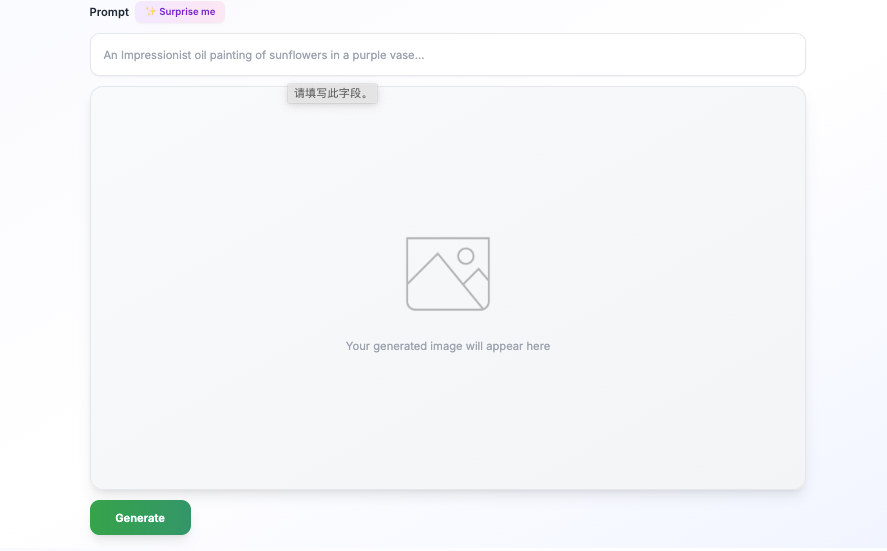
- Custom visuals: When stock footage doesn’t match your blog’s specific examples—like a unique product interface or a custom diagram—AI image generators can create exactly what you need in seconds, especially for abstract concepts or branded elements that generic libraries don’t have.
- Voice and captions
- AI voice is fine if natural, but I got better retention with a quick self-recorded VO (I used Descript’s timeline: easy). Always burn in captions, mobile viewers rely on them.
- Export and distribute
- Vertical (1080×1920) for Shorts/Reels/TikTok. Horizontal for YouTube with a slightly slower pace.
- Add the original blog link in the first line of the description. UTM it for tracking.
- Measure and iterate
- Watch the first 3 seconds’ retention. If there’s a cliff, your hook or first visual isn’t doing its job.
- Track “saves” and “shares.” Those predict compounding reach better than likes.
Small snag: auto-branding templates sometimes stretched my logo. Quick fix, lock aspect ratio and set safe margins in the template once, then reuse. Worth the 3 minutes.
Tools for Blog-to-Video Generation
I rotated through a few to see what actually speeds things up. None of this is sponsored: links go to official docs.
Top Platforms for Automating Article-to-Video Conversion
- Lumen5: Great at pulling headlines and matching visuals. The auto-emphasis on key phrases is handy, but I had to fix pacing on Shorts.

- Pictory: Strong text-to-video from long posts. Auto-captioning is clean. Sometimes picks literal b-roll, tweak 2–3 clips and it’s solid.
- Descript: My favorite for VO and quick cuts. Not an auto “blog-to-video” generator per se, but the script + timeline workflow is fast and the Studio Sound helps.
- VEED: Good for subtitles, brand kits, and snappy templates. The AI might over-animate: I tone it down.
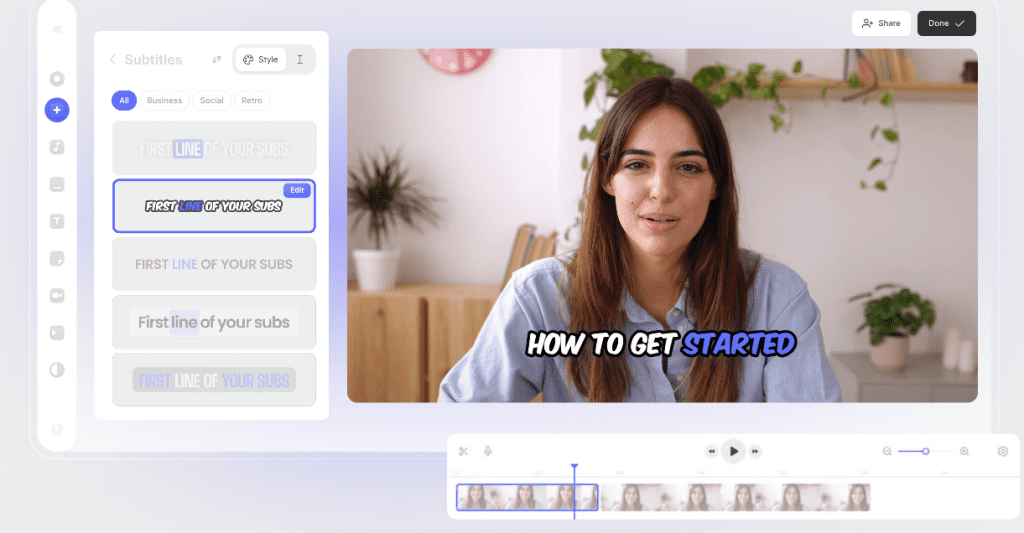
- Kapwing: Quick resize, captions, and meme-ish energy when you want it.
- Synthesia: If you need an avatar presenter. Not my daily pick for short social clips, but great for training modules.
What I actually use, in order:
- Draft script in the generator → polish in Descript → export vertical with burned-in captions in VEED. Average time: ~35–50 minutes per video from a 1,500–2,500 word blog.
Tip: Set a brand kit once (colors, lower third, end card). Saves 5–7 minutes every run and keeps things consistent.
Examples of Blog-to-Video Generation
Here are two real pulls from my tests.
Real Transformations from Long-Form Blog to Short Video
Example A, SEO myth breakdown (Nov 30, 2025)
- Source: 2,300-word blog on “bounce rate myths.”
- Video: 58 seconds, vertical, self-VO in Descript.
- Hook line: “Bounce rate isn’t a moral judgment, it’s a context problem.”
- Results: 3.1k LinkedIn impressions, 5.2% completion, 19 saves, 27 clicks back to the blog (UTM).
- Note: The first stock clip looked too generic. Swapped it for a simple animated chart, retention bumped ~7% at the 3–5s mark on the repost.
Example B, Research workflow (Dec 3, 2025)
- Source: 1,700-word post on collecting citations.
- Video: 44 seconds, Lumen5 draft → VEED captions.
- Results: 1.8k Shorts views, 64% average watch time, 11 newsletter signups traced from the description link.
- What didn’t work: Overstuffed on-screen text. I cut lines in half and added a pause beat: much better.
If you try this, treat your first 10 seconds like a storefront window. Make people stop. Then deliver one crisp idea and a next step. That’s it.
By the way, I’ve been testing Crepal for the blog-to-video step—it handles the [HOOK]/[EXAMPLE] labels I mentioned and respects section breaks better than most tools. Free to start, no card needed.

If you want my template for [HOOK → PROBLEM → EXAMPLE → FIX → NEXT STEP], reply or DM me. Happy to share, no pitch.
Previous posts:






