Hey everyone, Dora here! I almost missed a whole wave in AI video because I assumed “Chinese AI tools” were off-limits outside China. That assumption cost me months of catching up — and I only realized how wrong I was after stumbling on a clip that looked like a $20,000 production… made with a tool I’d never heard of: Hailuo.
That night, I went down a rabbit hole and came out completely shocked. Not just by one tool, but by how many of these AI video models were quietly available to creators globally — often free, and in some cases outperforming the Western tools I’d been paying top dollar for.
So, I spent the last few weeks running tests and digging deep. Here’s everything you need to know about the best free Chinese AI video generators in 2026 — how to access them outside China, what the free tiers really offer, and the limits you need to be aware of.
Why Chinese AI Video Models Are Worth Watching
Let me be blunt: for most of 2024, Western creators were sleeping on these tools. That’s changing fast.
The four models I’m covering — Kling, Wan, Hailuo, and Hunyuan — come from some of the largest tech companies on the planet (Kuaishou, Alibaba, MiniMax, and Tencent). They’re not scrappy startups trying to catch up. They’re billion-dollar organizations that decided AI video was a core strategic priority and threw serious engineering resources at it.
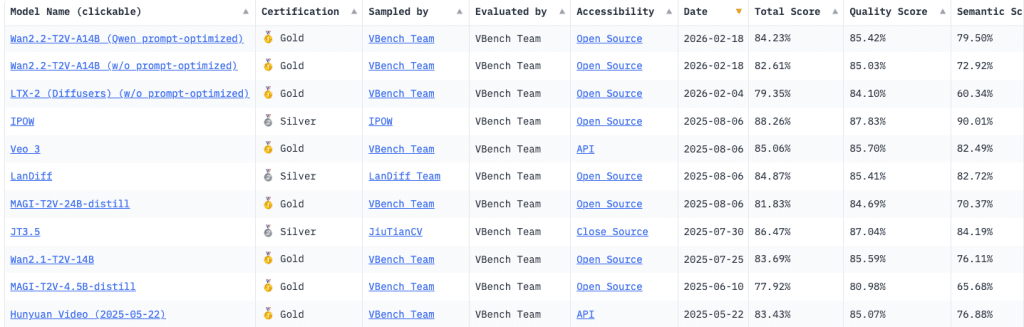
The proof is in the benchmarks. Wan 2.1 topped the VBench leaderboard — the standard evaluation framework for video generation models, covering 16 dimensions from motion smoothness to text alignment — as the only open-source model in the top five. Kling 3.0 holds the #1 ELO score in motion realism as of April 2026. Hailuo 2.3 just dropped with what MiniMax is calling a new cost-effectiveness record.
What really caught me off guard was the pricing. You’re looking at $6.99/month for Kling’s Standard plan with commercial rights — a fraction of what comparable Western tools charge. And several of these models are fully open-source, meaning you can run them locally or use third-party platforms for cents per clip.
The question for most creators isn’t “are these good?” anymore. It’s “which one fits my workflow, and how do I actually get in?”
Best Free Chinese AI Video Generators
Kling AI (Kuaishou)

Access: klingai.com — International version, no China phone number required
I’ll say this upfront: Kling 3.0’s motion quality is the best I’ve tested in any AI video tool, period. When I generated a clip of someone walking through rain, the way the coat moved, the umbrella shifted, the puddle reflections rippled — it was the kind of output that makes you double-check if you accidentally uploaded real footage.
Kling 3.0 dropped February 5, 2026, built on a Multi-modal Visual Language (MVL) architecture that processes text, images, audio, and video in one unified system. The headline new features: clips up to 15 seconds, native 4K output, Chain-of-Thought scene reasoning, and multi-character dialogue with lip-sync.
But honestly? The feature that makes Kling irreplaceable for me is Motion Brush. You draw a path on a still frame, and the model follows it. I’ve spent embarrassing amounts of time in other tools trying to get a camera to do a specific arc through a scene using only text prompts. Motion Brush just… does it. Nothing else I’ve tested comes close.
The free tier reality check:
You get 66 credits per day, which resets daily (no rollover). On the free plan, videos are capped at 5 seconds, output at 360p–540p, and have a visible watermark. Prompts and reference images on the free tier are processed through a public queue and may be visible to other users — worth knowing if you’re uploading anything sensitive.
Professional Mode (higher quality) is limited to 3 trial uses before you need to upgrade. The free tier is genuinely useful for testing prompts, but not for production work. No credit card required to sign up, which I appreciate.
One real frustration: the credit system is confusing. The advanced Kling 3.0 model with native audio costs roughly 5x more credits than basic generation — a trap that catches basically every new user. Budget using the real per-clip cost, not the headline credit number.
Best for: Creators who need the highest motion quality and directional control. Absolutely the top choice for human subjects, product shots with text, and any clip where camera movement matters.
Wan (Alibaba)
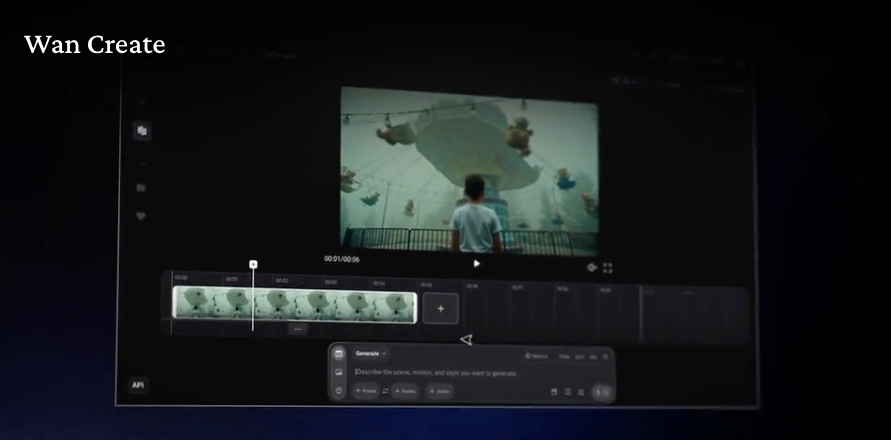
Access:wan.video for the hosted version; Hugging Face for local/API access
Wan is the wild card on this list, and it’s the one I keep coming back to for a very specific reason: it’s genuinely free. Not “free with a credit limit” — the model weights are released under the Apache 2.0 open-source license, meaning free commercial use, free modification, no royalties.
The current version is Wan 2.6. The 14-billion-parameter flagship outperforms closed-source models on VBench benchmarks, scoring 86.22% overall versus Sora’s 84.28% at the time of that comparison. The 1.3-billion-parameter version runs on consumer GPUs — I’ve seen people getting it working on an RTX 3060 with some optimization.
For creators who don’t want to run things locally, cloud APIs are the practical route. DashScope (Alibaba Cloud) offers the latest versions at roughly $0.10–0.15 per 5-second clip at 720p. Third-party platforms like SiliconFlow and Replicate offer similar pay-per-clip pricing.
What I liked: The output is remarkably consistent clip-to-clip. With Kling, you occasionally get a bad generation you have to throw out. Wan 2.6 has lower variance — what you see in test generations is roughly what you’ll get in production. For creators building workflows around predictable output, that consistency matters more than absolute peak quality.
What annoyed me: If you want to use Wan through Alibaba’s own tools (rather than third-party platforms), the onboarding is oriented toward the Chinese market. Documentation and interfaces have rough edges for international developers. Not a dealbreaker, but plan for some friction.
Best for: Developers who want API access, creators comfortable with cloud platforms, and anyone who needs truly free commercial use without per-clip fees.
Hailuo (MiniMax)
Access:hailuoai.video — Available internationally; mobile app also available
This is the one that started my rabbit hole, and after weeks of testing it’s still the model that surprises me most.
Hailuo’s thing is human motion physics. The “sports prodigy” reputation the Hailuo 02 model built is legitimate — athletic movements, rapid gestures, complex choreography hold up in a way that makes other models look stiff. With Hailuo 2.3 (the current version as of April 2026), they’ve pushed further into micro-expressions. I ran several portrait clips and the character’s face — subtle eye movements, the way a smile builds — felt genuinely human rather than smoothly artificial.
MiniMax also just launched a Media Agent alongside Hailuo 2.3, which lets you input content and have it automatically match multi-modal models. I tested it for a short promo concept: fed it a brief, it handled scripting, shot selection, and generation. Not perfect, but faster than my manual workflow for draft iterations.
The platform has been expanding international partnerships — Hailuo 2.3 is now integrated into VEED.io and InVideo AI, which means you might already have access through tools you’re using.
Free tier: Hailuo operates on a freemium model with daily login bonus credits. The exact daily allocation varies, but it’s enough to run several test generations. Free tier outputs are limited to shorter clips and lower resolution.
One thing I didn’t love: Maximum clip length tops out at 6 seconds on the standard model. For short-form social content that’s fine, but if you’re building anything longer you’re stitching clips together. Also, no native audio — a genuine limitation compared to Kling 3.0.
Best for: Portrait work, human subjects, athletic/dynamic movement, anime-style content, and anyone who wants the most cinematic-looking free output for social media.
Hunyuan (Tencent)
Access: Official Tencent site requires China phone verification. International access: fal.ai, Replicate, or run locally via HuggingFace
Hunyuan is the most technical entry on this list, and also the most underrated by non-developers.
The original HunyuanVideo model has 13 billion parameters — the largest open-source video generation model when it launched in December 2024. Tencent detailed the architecture and training methodology in their HunyuanVideo research paper on arXiv, which is worth reading if you want to understand what’s happening under the hood. The current HunyuanVideo-1.5 is a leaner 8.3B parameter version that generates 1080p video (vs. 720p for the original), runs about 40% faster, and works on consumer GPUs with as little as 14GB VRAM.
On fal.ai, you’re looking at $0.40 per video — a fixed cost, no subscription, no credits system to decode. The open-source license means full commercial rights.
I ran Hunyuan-1.5 through a set of environment and nature scenes — the kind of thing where you want physics to look right. Water, fabric, smoke, fire. The results held up well, better than I expected for a model you can run locally. The 3D VAE architecture does something useful here: motion consistency across the full clip length is noticeably stronger than some more expensive models.
The honest limitation: The official Tencent platform is essentially not available outside China without a +86 phone number. International creators have to go through third-party platforms (fal.ai, Replicate, Segmind) or run locally. That’s workable — but it’s an extra step compared to Kling or Hailuo’s direct international access.
Best for: Developers wanting API access with commercial rights, creators comfortable running models locally, and anyone who wants environment/nature/physics-heavy video at a predictable per-clip cost.
How to Access These Tools Outside China
This was the question I got most often when I started testing — and it’s genuinely less complicated than people assume.
Kling AI: The international version at klingai.com works globally with email signup. No VPN, no China phone number. The free tier works out of the box.
Wan (Alibaba): The model is open-source and on Hugging Face, so access is unrestricted globally. For the hosted API, DashScope works internationally but has some onboarding friction. The easiest international path is SiliconFlow or Replicate.
Hailuo (MiniMax): hailuoai.video is available internationally with email signup. The app is on both iOS and Android globally.
Hunyuan (Tencent): The official site at aivideo.hunyuan.tencent.com requires +86 phone verification. For international access, fal.ai and Replicate are the practical routes — both accept standard payment methods and don’t require any China credentials.
One note: I tested all of these from a US-based connection without a VPN. Everything worked as described. If you’re in a region with different network restrictions, your experience may vary.
Free Tier Comparison Table
| Tool | Free Tier | Daily Limit | Resolution | Watermark | Commercial Use | Source |
| Kling AI | ✅ Yes | 66 credits/day | 360p–540p | Yes | No | kling.ai |
| Wan (via API) | ✅ Open-source | Unlimited (your GPU/budget) | Up to 1080p | No | Yes | wan.video & HF |
| Hailuo | ✅ Yes | Daily login credits | 720p (limited) | Yes (free tier) | No | hailuoai.video |
| Hunyuan (fal.ai) | ✅ Paid credits | ~$0.40/clip (pay-per-use) | 720p–1080p | No | Yes | fal.ai |
Pricing verified April 2026. Credit allocations subject to change by each platform.
Output Quality Comparison
This is the part that matters most and varies most by use case, so I’ll be direct about what I actually observed:
- Motion quality: Kling 3.0 leads, especially for human subjects. The Motion Brush feature is unique and genuinely useful for directional control. Hailuo 2.3 is the closest competitor, with an edge on rapid athletic movements and micro-expressions.
- Prompt adherence: Hailuo surprised me here — it follows camera direction instructions (slow zoom, pan, tracking shot) more consistently than I expected. Wan is solid and consistent, if less spectacular at the top end.
- Consistency across generations: Wan 2.6 wins this one. Lower variance, fewer bad outputs, more predictable results for production pipelines.
- Physics accuracy: Hunyuan handles environment physics (water, fire, fabric) well for an open-source model. Kling 3.0 also performs well here, particularly with reflective surfaces and lighting.
- Text rendering in video: Kling 3.0 is notably better at rendering legible text within generated clips — brand names, prices, signs. If this matters for your use case (product content, ads), Kling is the clear choice.
- Speed: Hailuo’s Fast model generates 6-second clips in under 55 seconds. Wan 2.6 via API typically runs 20–60 seconds depending on clip length and complexity.
Which Chinese AI Video Tool Should You Use?
I get this question constantly and the honest answer is “it depends” — but here’s how I’d route most creators:
- Pick Kling AI if: You’re creating content featuring people, need Motion Brush for directional control, care about text rendering in video, or want the highest motion quality on any free tier. Start with the free tier to test, then the $6.99/month Standard plan for commercial work.
- Pick Wan if: You’re a developer or comfortable with API workflows, need unlimited commercial use without per-clip fees, or want to run a model locally. The Apache 2.0 license is a genuinely significant advantage for anyone building products or selling generated content.
- Pick Hailuo if: Portrait work and human subjects are your primary focus, you’re creating anime or stylized content, you want cinematic-looking clips for social media, or you like the idea of having access to a growing platform through tools you already use (VEED, InVideo).
- Pick Hunyuan if: You want predictable per-clip pricing through fal.ai, you’re comfortable with cloud APIs, or you’re specifically working on nature/environment content where the physics simulation shines.
Honestly? I run all four depending on the project. Kling for hero shots with people, Wan for concept sketching without burning credits, Hailuo when the motion needs to be athletic or expressive, Hunyuan when I need consistent environment backgrounds. None of them do everything perfectly — that’s the real answer in 2026.
FAQ
Q: Can I use these Chinese AI video tools outside China? Yes! Kling AI, Hailuo, and Wan are accessible internationally via email sign-up or API platforms like Hugging Face, SiliconFlow, and Replicate. Hunyuan requires third-party platforms like fal.ai or Replicate for international use, as the official Tencent site needs a +86 phone number.
Q: Are the free tiers of these tools really useful for production? Free tiers are great for testing prompts, experimenting with features, and generating short clips. However, for longer videos, higher resolution, or commercial use, upgrading to paid plans or using open-source local deployment is usually necessary.
Q: Which tool is best for human motion or portrait content? Hailuo 2.3 excels in human motion, micro-expressions, and athletic movements. Kling 3.0 is also strong for directional control and motion quality. For anime or stylized content, Hailuo offers cinematic-looking free output.
Previous Posts: