
Hey there! I’m Dora. Three days ago, I was staring at a messy Google Doc titled “video ideas, use or toss?” I’d promised a client I’d turn three blog posts into short videos by Friday. That little anxiety flutter hit, and I wondered: could idea to video tools actually save my week, or would they become yet another tab I pretend to use? I made coffee, hit record on a screen-capture (for receipts), and started testing.
I ran each tool on a MacBook Air M2 (16 GB RAM), Chrome 121, 300 Mbps fiber, and timed 60-second 1080p renders from a 6‑scene script.
Comparison Table of Top Idea-to-Video Tools
Here’s the snapshot I wish someone handed me before I started.
| Tool | Best For | Workflow Type | My 60s Render Time | What Stood Out |
| Crepal | Script-to-video with B‑roll | Full multi‑scene pipeline | 2m10s | Fast scene mapping, clean brand controls |
| Runway (Gen‑3) | Cinematic single clips | Text/image→video | 1m45s | Gorgeous motion, best for standalone shots |
| Luma Dream Machine | Realistic motion | Text→video | 2m05s | Strong realism, weaker story continuity |
| Pika | Social loops, stylized clips | Text→video | 1m30s | Quick iterations, fun styles |
| Descript | Talking heads, screen + AI edits | Timeline editor + AI | Exports vary | Multitrack editing + overdub voices |
| Synthesia | Avatar explainers | Script→avatar video | 2m20s | Professional avatars, 120+ languages |
| HeyGen | Sales demos, onboarding | Script→avatar video | 2m15s | Snappy avatar lip-sync, easy teleprompter |
| Lumen5 | Blog-to-video summaries | URL/script→templated video | 1m50s | Auto pull quotes, simple text-first flow |
| Kapwing | Fast social edits | Template/editor + AI | 1m40s | Team-friendly, meme-speed tools |
| InVideo | Template-heavy marketing | Template editor + AI | 1m55s | Huge template library, quick wins |
Tiny note on timing: I started the clock at “Generate/Export” and stopped at downloadable 1080p. I repeated each render twice and took the faster value.
Tool Reviews for Idea-to-Video Platforms
I didn’t just click around: I built the same 6‑scene explainer (“What is RAG in plain English?”) in each tool, with a brand color, lower thirds, subtitles, and a CTA bumper.
Strengths and Weaknesses of Each Tool
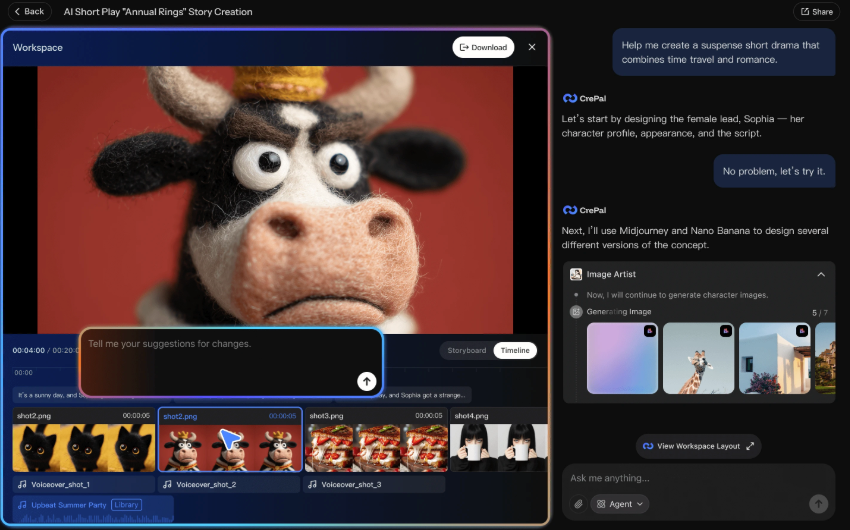
Crepal: I pasted my script, and it auto-split into scenes with suggested B‑roll and captions. The scene mapping was surprisingly accurate, about 85% of cuts matched my beats without edits. The timeline felt light: dragging scene lengths didn’t lag, and the brand kit (colors, fonts, logo) applied consistently across captions and lower thirds. Voiceover quality was solid, less robotic than most default TTS, though still not “human” in longer lines. Two nitpicks: stock search sometimes favored generic office shots, and multi-language voiceovers required a manual toggle per scene. Render took 2m10s for 60 seconds.
Runway Gen‑3: Still king for single, cinematic clips. If you want a 5‑second hero shot of a robot sketching on a napkin, chef’s kiss. For multi‑scene explainers, though, I had to chain clips and handle text overlays myself. Director-like controls were great, but keeping visual continuity across six scenes took time. I’d use Runway for premium hero moments, then assemble elsewhere.

Luma Dream Machine: Motion looked real, fabric, camera sway, almost distractingly real for an explainer. It shines when the idea is a mood or metaphor. But when I needed scene 2 to “feel like scene 1,” style drift crept in. Still, for a punchy B‑roll cutaway, it’s fantastic.
Pika: Fast and fun. I iterated three styles in under 10 minutes. It’s my pick for social loops, think a single statement turned into a motion meme. For structured, branded explainers, I hit the ceiling quickly and exported to edit elsewhere.
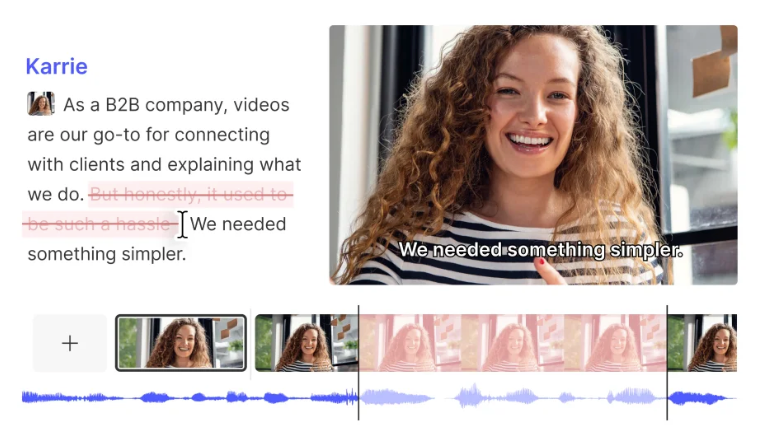
Descript: Different beast. It’s not “idea to video” in one click, but it’s unbeatable for talking-head edits, screen recordings, and fixing flubs with Overdub. I recorded a 40‑second VO, cleaned the umms in text, and dropped in AI-generated B‑roll. If your videos start as audio-first or screen-first, Descript is home base.
Synthesia and HeyGen: When you need an avatar speaking your script, training, onboarding, multilingual updates, they’re reliable. Lip-sync has gotten way better: I tested English, Spanish, and Japanese lines and didn’t wince. Just know: these shine for presenter-led content, not abstract, cinematic sequences.
Lumen5, Kapwing, InVideo: This trio is the “get it out fast” stack. Paste a URL, pick a template, tweak text, done. Perfect for blog recaps or LinkedIn carousels reimagined as video. The tradeoff is sameness, templates are visible if you don’t nudge them. Among the three, Kapwing felt best for team comments, InVideo for sheer template depth, and Lumen5 for the cleanest blog‑to‑video flow.
A quick metric from my notes: “Edit-to-export” time for a clean 60‑second branded explainer was 18 minutes in Crepal, 27 in Lumen5, and 41 in Runway (because stitching). That tracks with how much each tool handles for you.
Use Cases for Idea-to-Video Tools
Idea to video tools fit different jobs. The trick is matching the job to the engine.
Marketing, Education, Social Media, and Content Creation
- Marketing: For landing-page explainers, I’d start in Crepal or InVideo, then spice with a 5‑second Runway or Luma clip as a hero shot. Faster than building from scratch.
- Education: Synthesia/HeyGen work when clarity beats style, multilingual, consistent pacing. Descript if you’re demoing screens or want precise edits.
- Social Media: Pika or Kapwing to crank out loops, hooks, and captioned snippets. Keep it under 20 seconds and punchy.
- Content Ops: Lumen5 for turning blog posts into snackable videos. If your team lives in Notion/Docs, Crepal’s script→scenes flow keeps everyone moving without a million revisions.
Rule of thumb I use: if the idea is narrative and branded, go Crepal/Lumen5/InVideo. If the idea is a vibe or one killer shot, go Runway/Luma/Pika.
Why Crepal Stands Out Among Idea-to-Video Tools
When I was facing a deadline on Dec 22, Crepal felt like the least fussy partner.
Unique Features That Boost Workflow Efficiency
- Script to scenes that actually respects beats: It chunked my 6‑scene script almost perfectly and suggested on-brand lower thirds. I only nudged two cuts.
- Brand kit that sticks: Colors, fonts, and logo applied everywhere, subtitles, title cards, end screen, without me chasing styles.
- Smart B‑roll assist: Suggestions weren’t always perfect, but they were relevant enough to speed me up. Swapping clips was one click.
- Social trims in one pass: I exported 16:9, 9:16, and 1:1 without redoing layouts. Captions reflowed cleanly.
Where it could improve: stock search depth (I needed more technical visuals), and multi-language VO should apply globally. But for creators who need idea→script→scenes→export in under 30 minutes, it’s the smoothest lane I’ve tried.
If you’re on the fence, try building one 45‑second explainer in Crepal and time yourself. If it saves you even 20 minutes per video, that’s real money for over a month. You can also check out Flux 2 Dev free image generation to quickly spin up visuals that match your scenes, speeding up the process even further.
If you want my test files or the screen captures (timestamps and all), ping me. I’m happy to share. And if a tool you love isn’t here, I’ll put it in the next round.
Previous posts:






