
I held my cold tea, staring at the waves on the screen and wondering: Am I surfing, or just waiting for the render to finish? I tried to coax a 15‑second surf clip out of LTX‑2 in ComfyUI. I’d seen “4K at 50fps with audio sync” all over my feed and, honestly, I wanted to see if it was real or just another pretty demo. Not sponsored, just me, my RTX 4090 (24GB), and a stubborn streak.
Here’s what I found after a weekend of testing, plus what “day‑0 native support” in ComfyUI actually means when you’re the one hitting Run.
What LTX-2 is (4K@50fps, 20s, audio sync)

LTX‑2 is an open text‑to‑video model designed to generate up to 20‑second clips, with a headline promise of 4K output at 50fps and optional audio‑conditioned lip/beat sync. The big idea: you feed text (and optionally an audio track), and it renders motion that feels less jittery and more coherent than earlier open models.
On my rig, I could preview at 576p–720p quickly, then push to 1080p reliably. 4K worked with tiling and some patience, but it’s not one‑click magic unless you’ve got serious VRAM and you’re okay with longer renders. The audio sync part is real, but you need the right weights (more on that below).
Key specs vs other open-source models
- Clip length: Up to ~20s out of the box. Many open models top out around 6–12s unless you hack context windows.
- Resolution and fps: LTX‑2 advertises 4K@50fps. Practically, most creators will iterate at 720p–1080p, 12–24fps, then upscale/interpolate. It’s still an edge over models that crumble past 512p.
- Audio conditioning: Native path for audio alignment (lip/beat) when you supply an audio track. A lot of models still treat audio as an afterthought.
- Latency: Comparable to the better open models at similar resolutions. My 12‑second 1080p test with moderate motion took ~7.5 minutes/frame batch on a 24GB GPU, tiled. That’s not fast, but the consistency was better than I expected.
If you’ve used models like SD‑Video forks or the earlier text‑to‑video baselines, LTX‑2 feels like a generation bump in motion stability. Not a silver bullet, but a meaningful step.
What “Day-0 native support” means in ComfyUI
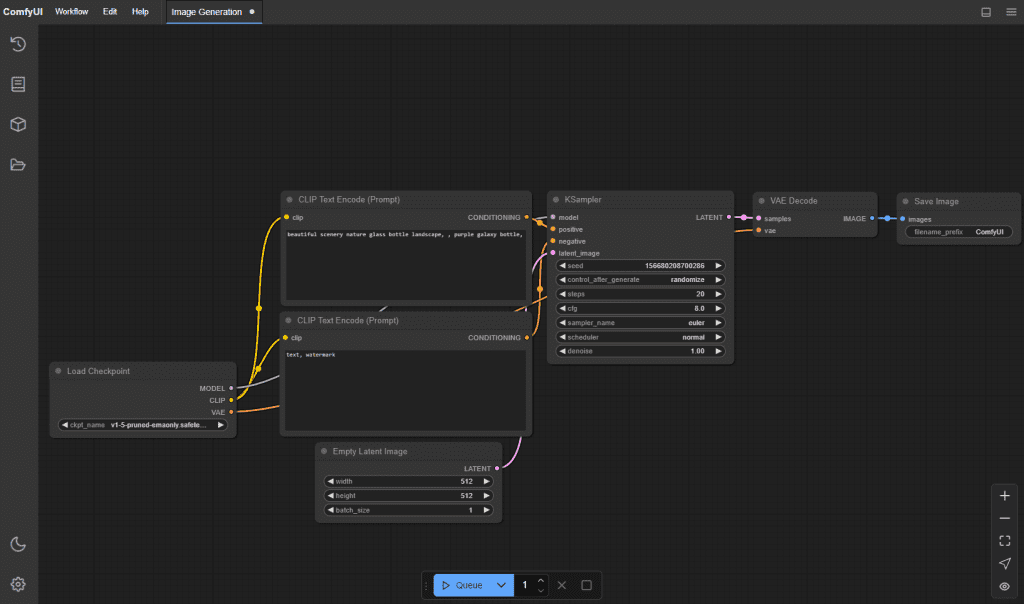
ComfyUI pushed LTX‑2 nodes and example workflows the same day the model dropped. That “day‑0” bit matters because you don’t need a third‑party custom node pack just to get started.
What works out of the box
- New LTX‑2 loader/inference nodes appear after you update ComfyUI to the latest main branch (as of Jan 6–7, 2026).
- Example workflows include text‑only generation and text+audio conditioning. I loaded the sample JSON, swapped my prompt, and it ran without wiring drama.
- Basic schedulers, tiling, and VRAM‑friendly settings are already exposed in node inputs. Nice touch.
What still requires downloads (weights, models)
- Core LTX‑2 weights: You still have to download them. ComfyUI will point you to the official repo/checkpoints and cache them under models/ (paths vary by setup).
- Audio encoder/alignment weights: For audio sync, there are extra files (audio conditioning encoder + tokenizer/config). ComfyUI will throw a clear missing‑weights message the first time. Grab them from the official LTX‑2 docs.
- Optional: VAE/upsamplers/interpolators. If you want crisp 4K@50fps without waiting ages, you’ll likely chain an external upscaler (e.g., video‑aware ESRGAN variant) and a frame interpolator (RIFE/IFRNet). Those aren’t bundled.
Audio sync: what’s included vs what needs setup
Included in the ComfyUI graph: a clear path to feed an audio waveform alongside your prompt. The model uses audio features to guide lip movement or rhythmic motion.
What you still set up:
- Audio weights: Download and place them where ComfyUI expects (the error message includes the path). After I added the audio encoder files, the next run picked them up automatically.
- Input format: 16‑bit WAV at 44.1k or 48k worked best for me. I kept clips under 20s to match the model window.
- Alignment expectations: It’s “good enough” for social clips, think vlogger‑style talking or beat‑matched gestures. It’s not frame‑perfect dubbing. Short plosive sounds (b/p) can drift if the prompt pushes extreme motion.
Quick note from testing on Jan 6, 2026: a 12‑second talking‑head sample aligned surprisingly well, upper lip dynamics matched syllables, jaw motion lagged by a frame or two. For music, head bobs and camera moves synced to kicks better than I expected.
Quick checklist: update ComfyUI + verify version
- Pull the latest ComfyUI main branch (Jan 6–7, 2026): git pull origin master or main, depending on your clone.
- Install/update dependencies when prompted. If you use a venv: pip install -r requirements.txt.
- Launch and check the right‑click Add Node menu for LTX‑2 nodes. If they’re missing, restart ComfyUI or clear the node cache.
- Open an official LTX‑2 example workflow JSON to confirm nodes and connections load without red errors.
- First dry run at 512–720p to validate weights and audio encoder paths before you waste time on 4K.
How to load LTX-2 in ComfyUI (high-level steps)
Here’s the flow I actually used on Jan 5–6, 2026:
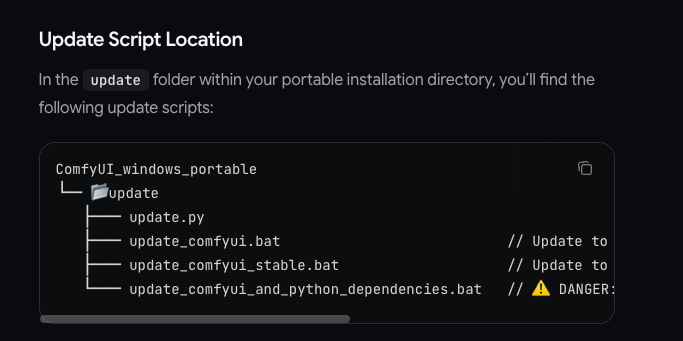
- Update ComfyUI, then open the LTX‑2 example workflow.
- In the LTX‑2 Loader node, select the base checkpoint path (download from the official model page). Same for the audio encoder if you plan to sync.
- Set prompt and negative prompt. I kept it concrete: “sunlit surfer carving a glassy shoulder, telephoto, gentle camera pan.”
- Choose a sane preview size (576p/720p). Switch on tiling if VRAM is tight.
- For audio: import a 10–15s WAV of your voice or a beat. Enable audio conditioning in the node.
- Render a short low‑res pass. If it looks stable, bump to 1080p. For 4K, either enable model‑native high‑res (slow) or upscale after render. For 50fps, I often render 25fps and run frame interpolation.
- Save seeds and settings in the node comments. ComfyUI makes it easy to retrace your steps later.
Practical tip: If motion looks “floaty,” lower CFG slightly and add a camera‑anchor hint in the prompt. It reduced micro‑jitter in my beach tests.
Common misconceptions
- Day‑0 native support ≠ bundled weights. You still download checkpoints. The win is that the nodes are maintained in the main repo.
- 4K@50fps isn’t effortless. It’s possible, but you’ll pay with VRAM, time, or both. I got it via 1080p render + upscale + interpolation faster than pure 4K generation.
- Audio sync doesn’t create a voice track. It aligns motion to audio you provide: it won’t invent vocals or lyrics.
- “20 seconds” isn’t a hard law. You can try longer, but quality and coherence drop. I found 8–15s to be the sweet spot.
- More steps aren’t always better. Past a point, I saw diminishing returns, try smarter prompts and steadier camera cues instead.
If you want a single‑sentence read: LTX‑2 in ComfyUI is usable today, just respect the hardware math. And if you hit a wall, the official docs and GitHub issues are worth a skim before you assume it’s broken.
To prototype ideas faster before committing to full renders, I sometimes use Crepal.ai. It lets you mock up visuals from a prompt in minutes, so you can test composition, timing, and framing before running LTX‑2 locally.

Useful links:
- ComfyUI GitHub (latest nodes)
- LTX‑2 model/docs: check the official repo linked by the project maintainers.
If you’ve tried LTX-2, leave a comment telling me your wildest 10-second wave experience—I want to see whose “surfing” is the craziest!
Previous posts: