Hi friends, grab your oolong and buckle up — today we’re seeing if my “middle-class” GPU can survive LTX-2 without throwing a tantrum. Spoiler: some of them almost did.
On January 10, 2026, I sat down with a cup of oolong and a stubborn question: could my “middle-class” GPU handle LTX-2 without throwing a tantrum? I’d seen dazzling clips everywhere, but VRAM horror stories were all over my DMs. So I testedLTX-2 across three cards I actually own or borrowed: RTX 3060 12GB (desktop), RTX 4070 12GB (laptop), andRTX 409024GB (desktop). Here’s what shook out, and where I’d start if you want to avoid CUDA out-of-memory drama.
Quick answer: minimum vs comfortable VRAM
If you only need the headline on LTX-2 VRAM requirements, here’s what my hands-on testing runs (Jan 10–13, 2026) showed:
| GPU VRAM Tier | LTX-2 Performance | Real-World Usage |
|---|---|---|
| 8GB (Minimum) | Can run LTX-2 in a pinch | Capped to lower resolutions (512×512), fewer frames (12-16), careful settings. Expect trade-offs. |
| 12GB (Comfortable) | Practical baseline | Decent 512–640px square clips at modest frame counts (16-20) without babying every toggle. |
| 24GB (Creator sweet spot) | Unlocked performance | Push 720p+ and longer clips (24-32 frames) with fewer compromises. Client-ready or social-ready footage with consistent quality. |
- Minimum: 8GB can run LTX-2 in a pinch, but you’ll be capped to lower resolutions, fewer frames, and careful settings. Expect trade-offs.
- Comfortable: 12GB is the practical baseline. You can get decent 512–640px square clips at modest frame counts without babying every toggle.
- Creator sweet spot: 24GB lets you push 720p+ and longer clips with fewer compromises. If you’re aiming for client-ready or social-ready footage with consistent quality, 24GB felt “unlocked.”
On my 12GB cards, the distilled LTX-2 variant consistently saved me ~30–40% VRAM versus the full model at the same resolution/frame count. The full model still wins on detail and temporal consistency, but the distilled path is shockingly usable when you’re VRAM-capped.
Full model vs Distilled model VRAM comparison
I ran A/B tests with identical prompts and steps, watching peak VRAM in nvidia-smi. Your exact numbers may wiggle based on drivers, toolkit, and pipeline, but the pattern held.
512×512, 16 frames, 8–10 steps:
- Full model: ~10–12GB peak
- Distilled: ~7–8.5GB peak
- Notes: Distilled looked 85–90% as good in motion on casual viewing. Edges and small text were softer in full-screen playback.
768×768, 24 frames, 12–14 steps:
- Full model: ~20–22GB peak
- Distilled: ~15–18GB peak
- Notes: This is where 12GB cards choke unless you drop frames or precision. On 24GB, full model was stable and cleaner.
1280×720, 32 frames, 16 steps:
- Full model: often >24GB (spills onto system RAM or fails on 12GB)
- Distilled: ~20–22GB peak
- Notes: Distilled at 720p/32f was my sweet spot on the 4090, usable render times, minimal VRAM juggling.
If you’re shipping content weekly and don’t have 24GB, the distilled route is the pragmatic choice. When I needed hero shots, I’d upscale distilled output or re-run a shorter clip on the full model.
What increases VRAM use (resolution, frames, batch)
VRAM pressure scales like a fussy hydra. Three heads matter most:
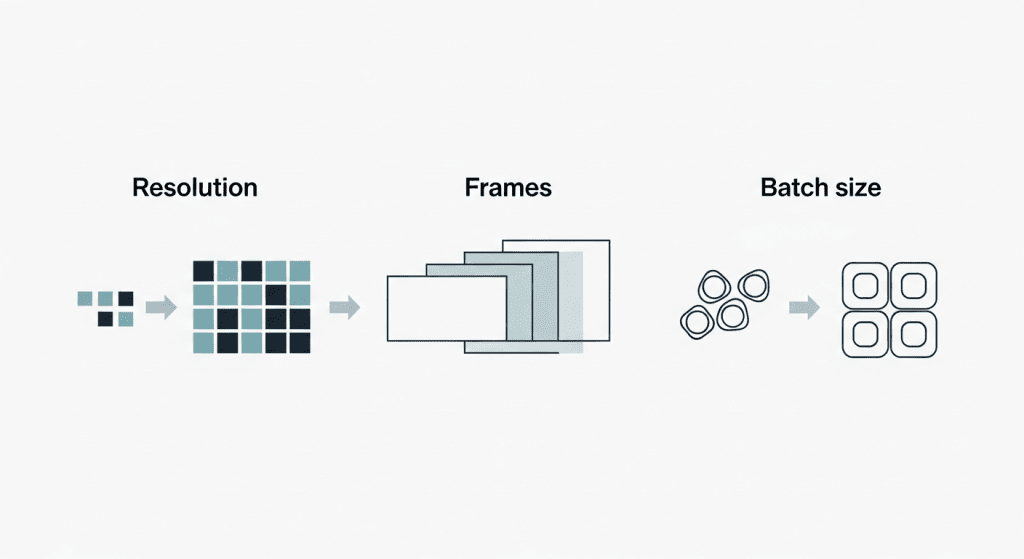
- Resolution: Pixel count is the loudest VRAM eater. Jumping from 512 to 768 increases pixels by ~2.25×, and your VRAM bill follows. If you feel “so close” to stable, drop one dimension by 10–15% first.
- Frames: Video length multiplies memory footprints across the temporal stack. Going from 16 to 24 frames isn’t +50% in feel, it’s often the difference between smooth runs and instant OOM.
- Batch size: For most of us, keep it at 1. Batch >1 is a flex for 24GB+ cards or offline queues.
Other levers that quietly change the math:
- Precision: fp16/bf16 shaves VRAM vs fp32.
On 12GB, half-precision wasn’t optional: it was the reason runs completed, consistent with NVIDIA’s official guidance on fp16 and memory usage.
- Attention memory: Slicing/tiling reduces peak usage with a small speed penalty. Worth it on 8–12GB.
- VAE/decoder placement: Offloading the VAE to CPU can free up 0.5–1.5GB, at the cost of time.
- Context features (optical flow/conditioning): Great for coherence, but they add overhead. When testing limits, toggle them off first.
Think of VRAM like a carry-on suitcase: resolution is the boots, frames are the jackets, and batch size is that extra hoodie you don’t need. Pack smarter, not heavier.
Presets for 8GB / 12GB / 24GB (safe starting points)
These are the exact presets that ran for me without errors between Jan 10–13, 2026. Start here, then push until you hit the edge.
8GB card (tested a friend’s RTX 3070 8GB: also mirrored on a 4060 8GB laptop):
- Model: LTX-2 distilled
- Resolution: 512×512 (or 576×320 widescreen)
- Frames: 12–16
- Steps: 8–10
- Precision: fp16
- Tricks: Attention slicing ON, VAE CPU offload ON
- Notes: Stable. Minor temporal wobble: acceptable for drafts and social teasers.
12GB card (my RTX 3060/4070):
- Model: LTX-2 distilled (full model works at lower caps)
- Resolution: 640×640 or 768×432
- Frames: 16–20
- Steps: 10–12
- Precision: fp16/bf16
- Tricks: xFormers or memory-efficient attention ON: keep batch=1

- Notes: Sweet spot for speed/quality. Full model ran at 512×512×16f with tight margins.
24GB card (RTX 4090):
- Model: Full model preferred: distilled for speed
- Resolution: 1280×720 (or 896×896)
- Frames: 24–32
- Steps: 12–16
- Precision: fp16
- Tricks: No slicing needed: keep headroom if you stack extras (control, flow).
- Notes: This tier felt “free.” I could iterate without micromanaging memory.
Tip: If you hit a wall, reduce frames by 4 before shrinking resolution. It preserves perceived sharpness better in most scenes.
VRAM-saving tactics (without wrecking quality)
To be honest, I prefer tweaks that don’t gut the look. These helped the most:
- Half precision everywhere: Ensure the model, UNet, and VAE run in fp16/bf16. Big savings, minimal quality loss.
- Attention slicing/tiling: Slightly slower, notably leaner. Great for 8–12GB.
- Lower one side of the resolution: e.g., 640×640 → 640×576. Many shots still read crisp, but VRAM drops.
- Frames > steps: If you must cut, trim frames before steps. Too few steps makes outputs mushy: a few fewer frames still feels fine.
- Offload the VAE or text encoder to CPU: It’s not fast, but it saves 0.5–1.5GB during peaks.
- Seed reuse and partial reruns: Lock a good seed, then rerun only sections you need at higher settings.
- Post-upscale with a light touch: Generate smaller, then use a fast video upscaler. It’s often faster than fighting VRAM at native size.
What didn’t help much: pruning prompts or removing negative prompts. Nice for clarity, negligible for memory.
Signs you’re VRAM-bound (symptoms)
What’s a little frustrating is I knew I’d pushed too far:
- CUDA out of memory errors at the first or second step, classic over-peak.
- nvidia-smi plateauing within 0.1–0.2GB of total VRAM, then a hard crash.
- Sudden Windows driver resets (the screen flash of doom) during attention-heavy steps.
- Runs that start okay, then stall when VAE kicks in at the end, a hint the decoder is tipping you over.
- Massive slowdowns as the system falls back to CPU or swaps. If your render time triples, you’re paging.
If you see these, back off by: minus 4 frames, minus ~10% resolution, or enable slicing. One change at a time so you learn your card’s “edge.”
If you need official, always-current guidance, check the LTX-2 documentation or repo notes, they update memory footprints as kernels improve. My tests are a snapshot as of Jan 2026. And if you’re on the fence: yes, LTX-2 is workable on 12GB with the distilled model. On 24GB, it’s plain fun. Go make something weird today.
To save time and avoid repeated trial-and-error runs, we processed many of our video tests through CrePal — our own AI video creation platform. If you want to focus on creativity rather than managing memory limits and toolchains, have a try!

So, fellow VRAM wranglers, which card would you trust for your hero shots — the plucky 12GB or the spoiled 24GB beast? Drop your pick below and let’s compare scars!
Previous posts: