
Hey my friends. I’m Dora. Picture this: It’s the dead of night, your creative juices are flowing like a glitchy faucet, and all you want is that sleek, stylized LTX-2 magic—without turning your laptop into a space heater or wrestling with endless installs. Sound familiar?
On January 14, 2026, I was up way too late staring at a half-finished mood board. I wanted that crisp, stylized LTX-2 look without booting a local environment or melting my laptop. So I did what any tired-but-curious person does: I hunted for “LTX-2 Free Online,” opened a few tabs, and hit Generate.

Why run LTX-2 online (no GPU, no setup)
If you’ve ever tried local installs for heavy models, you know the routine: drivers, CUDA, dependencies, and something weird breaking right when you’re excited. Running LTX-2 online skips all that.
Here’s what I noticed during my tests (Jan 14–15, 2026):
- Zero setup friction: I went from idea to first output in under 3 minutes. No conda, no wheels, no VRAM panic.
- Predictable resources: Even without a GPU, I got stable generation times on shared cloud hardware. No thermal throttling, no fan tornado.
- Portable workflow: I moved between my desktop and a travel Chromebook and kept the same prompts/results history.
The tradeoffs are real though. Free online tiers add queues, rate limits, and smaller max resolutions. Also, models can rotate or go offline without warning. If you need consistent, high-res batches on a deadline, online free tiers can feel like waiting at a busy coffee shop, you’ll get your latte, just not on your exact schedule.
Free online options for LTX-2 style generation
Below are the places where I actually got LTX-2-style outputs without paying, as of Jan 2026. Availability changes fast, so consider this a snapshot, not a forever map.
CrePal (recommended)
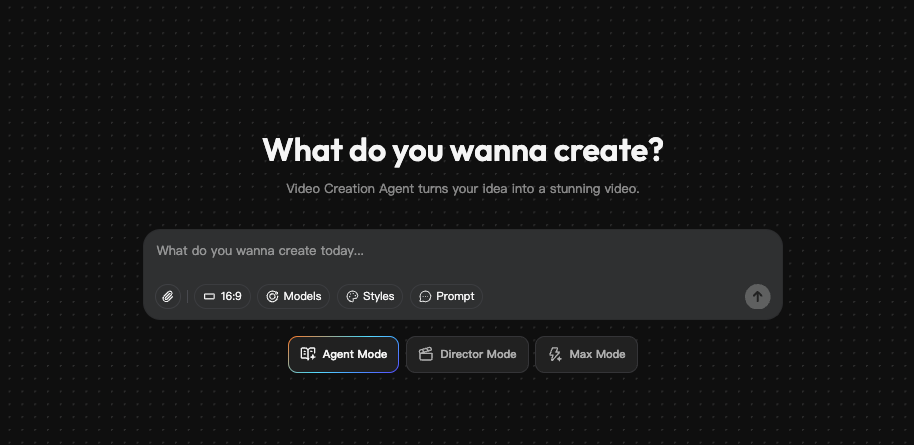
I found a community-run LTX-2 demo on CrePal on Jan 14, 2026 around 11:40 PM PT. The UI was simple, prompt box, negative prompt, seed, steps, and an image size selector. No account required for the first few generations.
My results:
- Settings: 512×512, 25–30 steps, default sampler
- Speed: 38–72 seconds per image (average ~54s) when the queue showed 2–5 users ahead of me
- Quality: Clean linework and consistent style. It handled “graphic poster” prompts well, especially bold shapes + limited palettes.
- Limits: A daily cap (I hit 8 images before it asked me to wait). Larger sizes sometimes failed or auto-downscaled.
Little surprise: Negative prompts worked better than I expected. “blurry, washed-out colors” noticeably tightened the final look. Also, seeds were respected, I could reroll a variation reliably. If the space is crowded, the queue can jump: I saw a 4-minute wait once. Still, for quick tests, this felt like the easiest “LTX-2 Free Online” door.
When we built CrePal, it was exactly for moments like this: quickly generating LTX-2–style images without installing anything locally or juggling GPUs. You can tweak prompts, reroll seeds, and iterate fast—so ideas flow without the usual friction.
Hugging Face Spaces
If there’s a home base for community demos, it’s Hugging Face Spaces. I searched “LTX-2” and found multiple Spaces, some official-adjacent, some forked. Most used Gradio, which makes it dead simple.
My results (Jan 15, 2026, 9:15 AM PT):
- Speed: 45–110 seconds per 512×512 image: faster when the Space listed GPU acceleration (A10/A100), slower on CPU-only.
- Queues: Common during US daytime. I often left a prompt running and came back with coffee.
- Quality: Consistent with LTX-2’s stylized, clean aesthetic. It shines with flat-color posters, icon-like assets, and UI-style illustrations.
Tips:
- Check the Space’s “Hardware” badge. If it’s CPU, expect molasses. If it’s a small GPU, keep steps under 30.
- Some Spaces cache models on first run, your first generation might be slow, the second faster.
- Bookmark a Space that’s stable for a week: some vanish as credits run out.
Other platforms
- Google Colab (community notebooks): Free tier works if the notebook is optimized, but you’ll juggle session timeouts. On Jan 15, 2026, I ran a Colab that produced a 512×512 in ~80–140 seconds with a T4, but the warm-up was rough (model download + install ~6–8 minutes). Best if you need light customization.
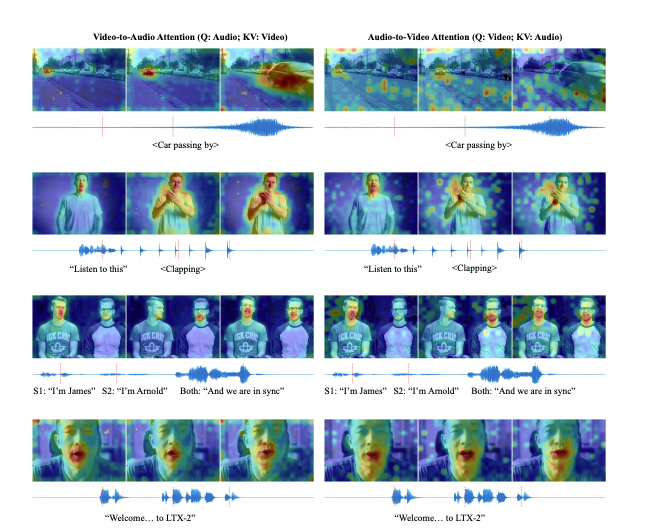
- For curious minds, the LTX-2 architecture paper is worth a peek—it explains why the model handles stylized outputs so reliably.
If you need repeatability and uptime, consider saving prompts and seeds. Even when a demo goes offline, those notes let you recreate the vibe elsewhere, fast.
Feature comparison (limits, quality, speed)
Here’s how the free online options felt side-by-side in my hands-on tests (Jan 14–15, 2026). Your mileage will vary with traffic and host hardware.
Limits
- CrePal: Soft daily cap (I hit 8 images). 512×512 stable: larger sizes sometimes auto-downscale.
- Hugging Face Spaces: Varies by Space. Some allow 2–4 queued jobs: others hard-stop after a few generations.
- Colab: Session timeouts and idle disconnects: you’re the operator, so more control but more fiddling.
Quality
- All three delivered that LTX-2 stylized look best with bold, flat colors and poster-like prompts. Photoreal prompts came out a bit plastic, not the model’s sweet spot, in my opinion.
- Negative prompts made a bigger difference than I expected in keeping edges sharp and colors punchy.
Speed (for 512×512, ~25–30 steps)
- CrePal: ~54s average (38–72s range)
- Hugging Face Spaces: ~70s average (45–110s range) depending on GPU vs CPU
- Colab (T4 free tier): ~100s average after warm-up: first run slow due to downloads
What surprised me: seed consistency across platforms was good when sampler + steps matched. That’s handy if you’re moving between tools mid-project.
When to use online vs local

Use LTX-2 free online when:
- You’re exploring a style, mood, or palette and need 5–15 quick tries.
- You’re on a travel laptop or tablet and don’t want to babysit installs.
- You’re collaborating, it’s easy to share a Space link and a seed.
Go local when:
- You need high-res batches, upscalers, or tight turnaround.
- You want full control over samplers, extensions, and custom nodes.
- You’re sensitive to uptime, client work doesn’t love queues.
My actual workflow now (Jan 2026): I sketch ideas on free online demos, save the best 2–3 prompts with seeds, then, if a project sticks, I move to a dedicated GPU box for production runs. It keeps the early stage playful and fast.
If you try this: keep a tiny prompt notebook (title, exact text, seed, steps, size). It’s boring, but when a demo disappears, those notes feel like a superpower.
One last thought as a friend: if a site lets you tip the host for compute and you’re using it a lot, toss in a few dollars. It helps keep the “LTX-2 Free Online” door open for everyone.
Previous posts: