Editor’s & Technical Methodology Note :
In video post-production, transcription is rarely an isolated deliverable; it serves as the operational spine for rough cuts (selects), paper edits, lower-third naming, and timed subtitle burn-in. This commercial investigation analyzes Google’s specialized audio model, Gemini 3.5 Transcribe, officially announced on August 26, 2026. Rather than publishing an abstract API walkthrough, this evaluation measures a single core production test: Can a raw interview or podcast recording processed by Gemini 3.5 Transcribe hand off cleanly into an editor’s timeline without extensive manual cleanup? All capabilities, endpoint parameters, and operational constraints reflect official documentation published on the Google Keyword Blog and developer portals.“Its word-level timestamps provide the structured timing data needed to build automated EDLs or timeline markers through a downstream script.”
Important limitation: You cannot currently combine custom vocabulary with speaker diarization or word-level timestamps in the same transcription configuration.
For video editors, content creators, and corporate media teams, turning spoken audio into an actionable edit list has historically required a fragmented stack of third-party SaaS transcription platforms, local Whisper wrappers, or manual human listening passes. While general-purpose multimodal LLMs can ingest audio snippets, they frequently drop short verbal interjections, hallucinate punctuation across long silences, or lack the exact millisecond-level precision required to align timeline playheads.
Google’s introduction of Gemini 3.5 Transcribe establishes a dedicated, audio-first intelligence endpoint within the Gemini model family. Engineered specifically for automated speech-to-text (STT) tasks, it pairs high-fidelity linguistic transcription with structural timeline metadata: word-level timestamps, automated speaker diarization, smart formatting, and custom phrase biasing.
For production teams evaluating whether to swap existing transcription services for this API-driven endpoint, this review isolates its official feature set, practical editorial handoff mechanics, latency trade-offs, and current preview limitations.
Quick Verdict for Transcript-to-Edit Workflows
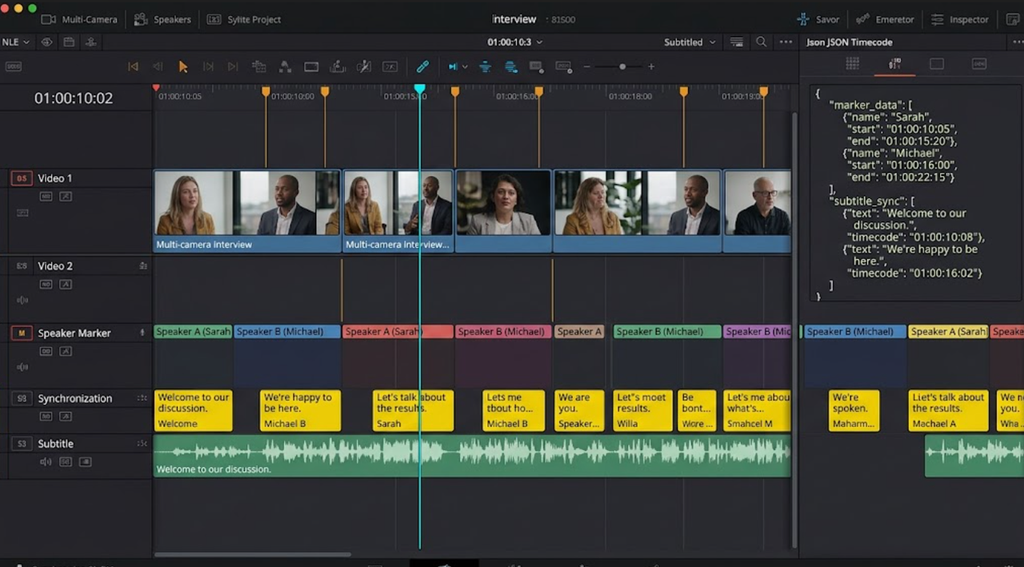
Gemini 3.5 Transcribe provides an exceptional architectural foundation for automated rough-cut generation and caption preparation. Its primary strength lies in its unified multi-speaker labeling and millisecond word-level timing, which allows editors to transition directly from an interview transcript into an Edit Decision List (EDL) or timeline markers without intermediary alignment scripts.
However, it is currently an API-level tool, not an out-of-the-box turnkey NLE plugin. Editorial teams must have access to internal developer tooling, Python scripts, or workflow middleware to wrap the JSON output into native .SRT, .VTT, or XML marker files for DaVinci Resolve or Adobe Premiere Pro. Furthermore, production leads must actively monitor preview quotas and token usage to prevent pipeline stalls during large multi-camera batch ingests.
What Gemini 3.5 Transcribe Officially Supports
According to official developer documentation on the Google AI for Developers portal, Gemini 3.5 Transcribe departs from general multimodal chat models by optimizing its compute path exclusively for acoustic token decoding.
| Technical Parameter | File Transcription (/v1beta/files) | Live Streaming Transcription (/v1beta/live) |
| Primary Ingestion Vector | Asynchronous batch upload via File API | Bidirectional WebSocket / gRPC audio stream |
| Target Production Use | Finished dialogue stems, multi-cam interviews | Live event logging, real-time stage teleprompters |
| Speaker Diarization | Native multi-speaker clustering (Speaker 1, 2…) | Sequential turn-taking estimation |
| Timestamp Precision | Millisecond-accurate word & sentence arrays | Chunk-level temporal windowing |
| Custom Vocabulary | Contextual phrase biasing (up to 1,000 terms) | Real-time domain dictionary injection |
File Transcription and Live Streaming
The API exposes two distinct operational pathways:
- File Transcription: Designed for post-production. Editors upload pre-recorded audio stems (mono or stereo master exports) via the Files API. The model processes the full recording contextually, resolving retroactive acoustic ambiguities across multi-minute conversations.
- Live Streaming: Designed for live broadcasts and multi-stage production setups. It ingests low-latency linear PCM audio chunks, returning incremental transcript tokens with real-time text updates suitable for live captioning or stage teleprompters.
Timestamps, Speakers, and Custom Vocabulary
Three specific features elevate the model for video editors:
- Word-Level Timestamps: The JSON response pairs every individual token with exact
start_timeandend_timemillisecond offsets. This eliminates manual syncing when generating animated kinetic subtitles or rough-cut timeline splices. - Speaker Diarization: The acoustic encoder automatically identifies distinct vocal timbres, assigning speaker labels (
Speaker_0,Speaker_1) across rapid dialogue exchanges without requiring pre-enrolled biometric voice profiles. - Custom Vocabulary (Phrase Biasing): Creators can pass an explicit array of brand names, product SKUs, creator usernames, and technical acronyms. This prevents the acoustic engine from phonetically mangling proprietary keywords.
Evaluate One Video Editorial Handoff
In a commercial video workflow, an automated transcript must serve two distinct post-production phases: the creative paper edit (selects) and the final technical delivery (closed captions).
┌────────────────────────────────────────┐
│               Gemini 3.5 Transcribe Editorial Pipeline                 │
├──────────────────────────────────────┤
│ RAW AUDIO STEM ──► Gemini 3.5 Transcribe (Files API)                  │
│                          │                                             │
│                          ├──► JSON Response Payload                    │
│                          │    ├── Word-Level Timestamp Offsets         │
│                          │    ├── Diarized Speaker IDs                 │
│                          │    └── Normalized Smart Text                │
│                          │                                             │
│                          ├──► Downstream Python Formatting             │
│                          │    ├── .SRT / .VTT Subtitle Track           │
│                          │    └── EDL / Final Cut XML Cut Markers      │
│                          │                                             │
│                          └──► Downstream AI Director (e.g. CrePal)     │
└─────────────────────────────────────┘
Transcript Accuracy for Selects and Captions
Official vendor benchmarks cite significant word error rate (WER) reductions over earlier Gemini iterations, particularly in noisy background environments. For creating “selects”—where a director highlights key narrative soundbites from a 60-minute interview—the smart transcription layer automatically normalizes spoken filler words, handles capitalization, and standardizes numerical currency formats, allowing directors to read the script like a clean publication manuscript.
Metadata Needed by the Editor
A standard text file is insufficient for modern video workflows. A video editor requires timecode-indexed metadata:
- Silence & Pause Thresholds: Because timestamps are returned per word, automated editing scripts can detect conversational pauses longer than 800 milliseconds, automatically generating timeline cut markers to ripple-delete dead air.
- Lower-Third Identification: By mapping diarized speaker tags (
Speaker_1) against project call sheets, editorial templates can automatically trigger lower-third graphic animations when a new speaker begins talking.
Choose Between File and Live Transcription
Selecting the appropriate endpoint directly impacts pipeline stability and compute costs:
| Decision Factor | File Transcription Mode | Live Streaming Mode |
| Recommended Pipeline | Post-production editing, podcast rough cuts, captioning | Live streams, webinars, instant stage prompters |
| Audio Pre-requisite | Complete render file (.WAV, .MP3, .AAC, .FLAC) | Continuous streaming connection (PCM / gRPC) |
| Latency Expectation | Turnaround in a fraction of media duration | Sub-second token delivery per speech burst |
| Punctuation & Context | High (evaluates full conversational context) | Incremental (provisional tokens stabilize over time) |
Where the Model Fits and Where It Stops
While Gemini 3.5 Transcribe introduces powerful acoustic capabilities, studios must recognize its operational boundaries:
┌─────────────────────────────────────┐
│                   Capabilities vs. Operational Limits                  │
├─────────────────────────────────────┤
│ WHAT IT ACCOMPLISHES              │ CURRENT OPERATIONAL HARD STOPS     │
├───────────────────────────────────────┤
│ • High-accuracy multi-speaker STT │ • No graphical standalone app (GUI)│
│ • Precise millisecond timestamps  │ • No native .SRT/.EDL export files │
│ • Robust custom vocabulary biasing│ • Preview API rate limits apply    │
│ • Simultaneous audio translation  │ • Shared project token buckets     │
└─────────────────────────────────────┘- Format Transformation Overhead: The API returns structured JSON arrays. It does not export broadcast
.SRTor Final Cut Pro.FCPXMLmarker files natively; studios must integrate lightweight parsing scripts. - Video Model Orchestration: Gemini 3.5 Transcribe processes speech into text, but it does not assemble scenes. In modern automated video pipelines, creators feed the resulting structured transcripts into workflow orchestration layers like CrePal. Within CrePal, approved narrative soundbites and timecoded scripts serve as structural anchors, allowing AI Directors to storyboard, generate matching B-roll visuals, and assemble multi-scene video drafts.
Who Should Evaluate Gemini 3.5 Transcribe
- Media Agencies & Multi-Cam Editors: Teams logging hours of dialogue daily who require structured speaker labels to accelerate paper edits and rough assemblies.
- Social Video Operations: Fast-turnaround creator studios generating short-form vertical content requiring frame-accurate word animations and dynamic subtitle timing.
- Workflow Automation Developers: Engineers building custom post-production tools, internal MAM (Media Asset Management) indexing engines, or cloud editing pipelines.
FAQ
Does Gemini 3.5 Transcribe support asynchronous batch requests?
Yes. Through the Gemini Files API, users can upload multiple large media files concurrently, executing transcription jobs asynchronously without keeping local client connections persistently open.
Are Gemini 3.5 Transcribe quotas shared with other Gemini models?
In the Google AI Studio and Google Cloud Vertex AI consoles, audio transcription calls consume platform quotas based on audio compute seconds and input/output tokens, which are governed by the project’s overall tier tier limits.
Which audio containers does Gemini 3.5 Transcribe accept?
Official documentation lists support for major audio formats, including uncompressed .WAV (linear PCM), .MP3, .AAC, .FLAC, and .OGG, as well as standard video containers like .MP4 and .MOV where the audio track is extracted directly.
Can failed transcriptions resume without uploading the audio again?
Yes. Once an audio file is staged via the Google Files API, it is assigned a persistent resource URI. If an inference call times out or encounters rate limits, developers can re-trigger transcription referencing the existing file URI.
How does Gemini handle code-switching within one recording?
Gemini 3.5 Transcribe natively supports multilingual audio and dynamic code-switching, automatically identifying language transitions (e.g., toggling between English and Spanish mid-sentence) within a single transcription pass.
Conclusion
The release of Gemini 3.5 Transcribe delivers a dedicated, high-precision speech-to-text engine tailored to the structural realities of post-production. By uniting automated speaker diarization, word-level timestamps, and custom vocabulary biasing inside a single multimodal architecture, it significantly streamlines the handoff between raw production audio and the editing timeline.
While taking advantage of its capabilities requires custom pipeline wrappers or integration with downstream orchestration platforms like CrePal, engineering teams and video creators can leverage this endpoint to eliminate manual logging, automate rough cuts, and accelerate timeline delivery.