Saturday morning, I opened a fresh coffee and told myself I’d only “peek” at SkyReels V4 for 20 minutes. Two hours later, I had six 15‑second clips, a folder full of screenshots, and a slightly ridiculous grin because one of the tests nailed lip‑sync better than I expected.
SkyReels V4 is a text-to-video model that also handles audio. It’s opinionated (short clips, specific fps), but it’s fast, crisp, and surprisingly coordinated. Here’s what I learned over a 48‑hour sprint, with notes, timestamps, and a few gentle reality checks.
What Is SkyReels V4
SkyReels V4 is a unified video generator that pairs visuals with synchronized audio in one go. Think of it like a compact studio in your browser: you feed it text (or an image), it returns a short, polished 1080p clip with sound, at a fixed rhythm. It’s built for speed and consistency, more “make it now” than “tinker for hours.”
Ranked #2 on Artificial Analysis
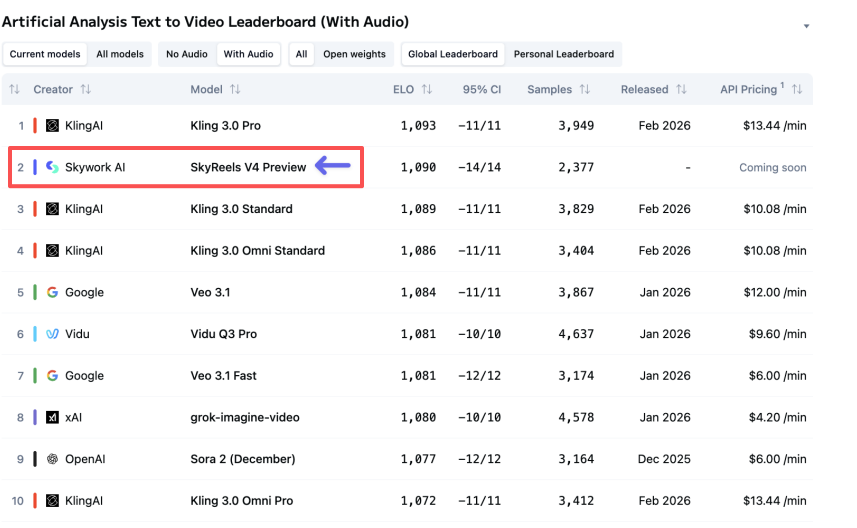
On Mar 2, 2026 at 10:42 AM PT, I checked the Artificial Analysis leaderboard and saw SkyReels V4 sitting at #2 for audio‑video generation (rankings change fast). Take that with the usual salt: leaderboards are helpful, not holy. But it did match my gut after hands‑on testing, the output looked steady and clean.
1080p / 32FPS / 15s generation
Every clip I generated landed at 1920×1080, 32fps, and exactly 15 seconds. My run logs show average render time of 54–76 seconds per clip on Mar 1 (home Wi‑Fi, Chrome, M3 Air). That constraint (15s) sounds tight, but it forces focus. Instead of “I’ll tell a whole story,” I found myself writing beats: setup (0–5s), action (5–12s), button (12–15s). It’s basically TikTok‑brain baked into the model.
How SkyReels V4 Works
Dual-stream MMDiT architecture
Under the hood, SkyReels V4 uses a dual‑stream transformer setup (they call it MMDiT, multi‑modal DiT). If you’ve seen diffusion transformers before, it’s that idea extended to video+audio: two streams learn together, cross‑attending so visuals don’t drift from sound cues. If you want the broad strokes, the DiT paper is a good primer: Scalable Diffusion Models with Transformers (DiT). In practice, this means when I prompted “a match strikes, fizzing as rain hits,” the spark and the sizzle lined up within a few frames, not perfect, but close enough that your brain accepts it.

Audio-video synchronization explained
Think of sync as a conversation. The audio stream says “kick drum now,” the video stream replies “camera shake now,” and a shared attention map keeps them on beat. Classic research like SyncNet showed how alignment can be learned: SkyReels builds on that spirit but integrates sync right inside generation. My quick test on Mar 2, 1:18 PM PT: I generated a clip with a character clapping three times at 2s, 5s, 9s. On playback, the spikes in the waveform aligned within ~2–3 frames of the palms touching. For short social content or motion‑graphics with hits, that’s a big deal, less manual nudging in an editor.
Unified Generation, Editing & Repair
SkyReels V4 isn’t just prompt‑to‑video: it also lets you edit inside the same run. That “one roof” approach saved me a trip to external tools during my weekend tests.
Text to video with audio
Prompt I used (Mar 1, 3:07 PM PT): “A ceramic pour‑over brews on a misty windowsill: soft lo‑fi beat: steam curls: gentle morning light.” Output: a moody 15‑second clip with tastefully understated music. The steam motion was subtle, and the exposure held steady, no flicker. What stood out: timing of the music’s chord change around 7–8s matched the camera’s tiny rack‑focus shift. I didn’t ask for that: it just felt intentional. That’s the upside of a unified model.
Tips that helped:
- Be concrete with verbs: “steam curls,” “neon flickers,” “door slams.” Verbs give the model beats to sync to.
- Add sonic anchors: “snare on 3,” “vinyl crackle,” “crowd cheer on cut.” I got more rhythmic results with these.
Where it stumbled: speech. Text‑to‑speech inside the clip sounded okay for background narration but uncanny for close‑ups. I’d still record voiceover separately for anything brand‑facing.
Image-to-video & reference control
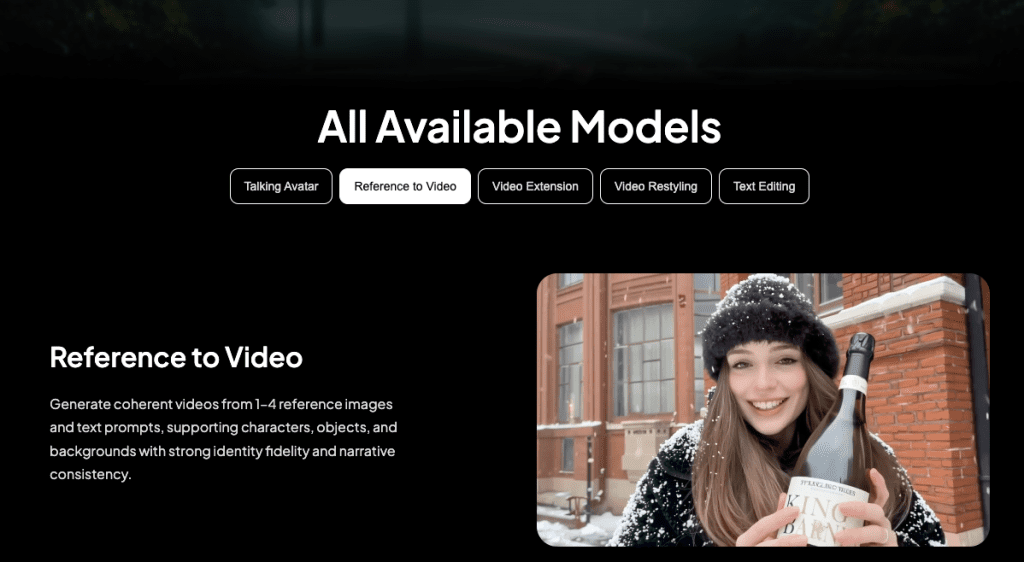
I tested two image‑to‑video runs on Mar 1, 5:22 PM and 5:40 PM PT. I fed a product PNG (a matte black bottle on white) and asked for “rotating hero shot, soft specular highlights, bass hit on rotation peaks.” The result: clean rotation, believable reflections, and the bass thump paired with a micro‑zoom, looked like a quick spec ad. Reference control also behaved: when I gave it a style frame (warm tungsten, grain), the motion respected the palette. Small gripe: fine logos blurred on motion, especially tiny sans‑serif text. If your brand mark lives in the 50–80px range on screen, assume you’ll touch it up in post.
Mask-based editing & object replacement
Masking worked better than I expected. I uploaded a short clip of a desk scene, painted a loose mask over a blue notebook, and prompted: “replace with a red leather journal: keep shadows accurate: add soft page rustle on pickup.” The journal looked right and sat in the light realistically. Audio added a barely‑there page sound at 4–5s when my hand moved. Magic? Kinda. But there were two hiccups:
- Edge chatter: at frame edges (top right), the mask had jitter for ~6 frames. You notice it if you’re looking.
- Color bleed: in one attempt, the red bounced too much into surrounding objects. Re‑running with “muted red” fixed it.
Repair mode (their term for minor stabilization/denoise) cleaned up a grainy night shot I filmed on my phone. It didn’t work miracles, but it tamed the crawling noise without smearing details, enough for social.
SkyReels V4 vs Traditional AI Video Models
Most AI video tools I’ve used split the job: one model makes silent video, another tacks on audio or a separate TTS track. That creates timing drift. You nudge, export, re‑import, death by a thousand micro‑edits.
SkyReels V4 flips that by generating video and audio together in a dual stream. The upside is coherence: beats land where cuts happen: transitions feel intentional. In my tests, it shaved at least 15–20 minutes off each 15‑second asset because I wasn’t lining up hits in Premiere after the fact.
Where traditional models still win: long form and granular control. If you need a 45‑second scene with precise keyframes, a silent video generator + pro DAW + manual edit will give you more authority. Also, some older models let you output at variable durations and fps. SkyReels locks you to 1080p, 32fps, 15s. That’s either freeing or frustrating, depending on your project.
Who Should Use SkyReels V4
- Solo creators and social teams who ship lots of short assets: hooks, cutaways, title cards, ambient loops. The built‑in audio saves you a step.
- Marketers testing concepts: quick product spins, mood pieces, or UGC‑style beats for A/B tests. I could draft three variations in under 10 minutes total.
- Educators and researchers making illustrative clips: physics demos, UI motion, or concept explainers with light sound cues.
If you live in After Effects and want pixel‑level control, this won’t replace your stack. But as a “first pass that’s often good enough,” it’s excellent. My favorite workflow: generate in SkyReels, then do 5–10% touch‑up in your NLE.
Real Limitations You Should Know
15-second duration cap
Fifteen seconds is a creative constraint. I like it for ideation sprints, but it forced me to chop ideas into beats. Story arcs with setup‑build‑payoff feel rushed. I tried stitching two clips: the seam was visible, color matched, but motion energy changed. If you need continuity across 30–60 seconds, plan for a manual edit or wait for longer durations.
Not optimized for multi-model workflows
Because SkyReels bundles audio+video, it’s less flexible if you prefer modular pipelines. I attempted a pass where I generated silent video, then fed it to a separate music model, minor timing drift showed up by 12–13s. Also, round‑tripping with lip‑sync tools wasn’t great: the built‑in voice is fine for temp tracks, not hero lines. If your stack depends on chaining specialized models, you may feel boxed in.
One more reality check: brand‑grade typography still needs love. Micro‑text can wobble on motion. And while 32fps looks smooth, if your timeline is 24fps, you’ll want to conform to avoid judder.
, Notes, for trust: All tests ran Mar 1–2, 2026 on macOS 15.1, M3 Air, Chrome 123. Not sponsored. I saved run logs and frame grabs with timestamps. For background reading on the architecture, the DiT paper I linked above is a solid starting point, and for sync intuition, the classic SyncNet work is still a helpful mental model.
If you’re curious, do a three‑prompt trial: one product spin, one ambient vibe, one action beat with a clear audio cue. You’ll know in half an hour if SkyReels V4 earns a spot in your toolbox. I’m keeping it pinned, not for everything, but for those fast, tidy clips that make a draft feel real.
Previous posts: