Hey there! Quick question: what would you do if you have already burned through your Kling or other generators` free credits and didn’t want to pay for yet another subscription just to test a concept?
Trust me. I’ve been there. And that’s when I went down the Perchance rabbit hole.
I’d seen people mention Perchance AI video generator in a few creator forums, always with the same tagline: “totally free, no login, no limits.” I was skeptical — because honestly, how many times have you heard that before? So I spent a week testing it properly, and here’s what I can offer to relieve your burden.
What Is Perchance AI Video Generator
Before we get into whether it’s “worth it,” let me explain what Perchance actually is — because it’s genuinely unusual compared to every other tool in this space.
Perchance is an open, community-driven platform that launched back in 2017. At its core, it lets anyone build and share custom generators using a simple scripting syntax — no serious coding background required. Think of it as a creative generator sandbox: you define the rules, the platform runs the combinations. Over the years, the community has built thousands of generators covering everything from story prompts to character names to — yes — AI-powered video.
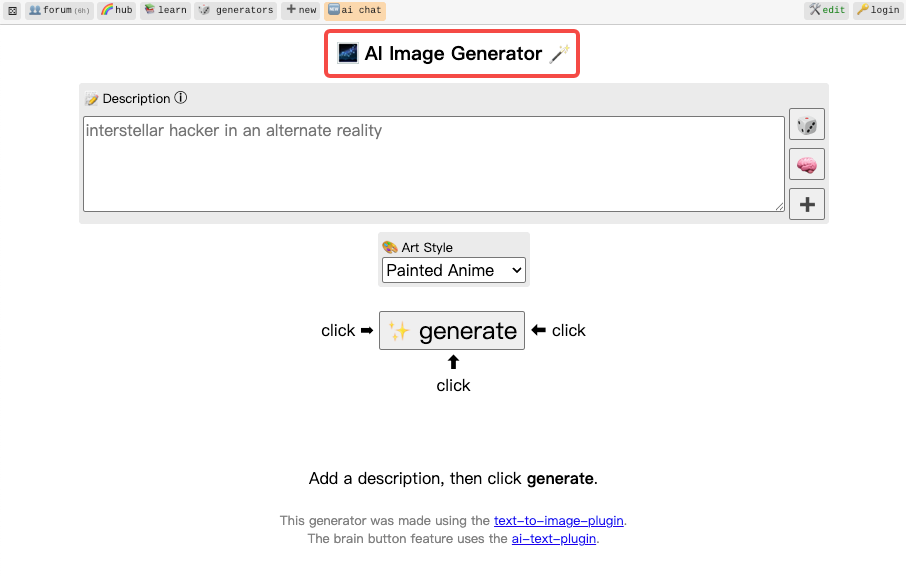
The video generation tools on Perchance aren’t a single official product. They’re individual community-built generators, each created and maintained by different users. Some are polished. Some are janky. And that’s kind of the point of the platform. According to traffic data, Perchance recorded over 40 million visits in November 2025 alone — so there’s clearly a huge community behind this thing.
The most widely used video generators right now include:
- Pretty AI Video Generator (
perchance.org/pretty-ai-video-generator) — probably the most popular, text-to-video with style presets - HyperReal AI Video Generator (
perchance.org/pzj6ev1bvx) — leans into cinematic realism - Fast Free AI Animation Generator (
perchance.org/b7kc35yv7u) — faster renders, lower resolution
What makes these generators interesting is that some reportedly route through backends like Kling or Luma Dream Machine — which means you might be getting quality output from premium models, through an unofficial free wrapper. That’s the thing people don’t fully explain when they share these links.
Is It Really Free? Access and Limits Explained
Okay, this is the question that actually matters — and the honest answer is: yes, but with real asterisks.
Here’s what’s genuinely free about Perchance video generators:
- No account required to use most generators — you just open the link and go
- No credit system — there’s no “you get 10 videos per month” meter
- No watermarks on downloads in most generators
- No paywall between you and the generate button
Perchance’s open model is funded through donations, with the creator choosing not to add premium tiers or credit purchases. That’s genuinely unusual in 2026, where every tool seems to be racing toward a subscription gate.

But here’s where the “no limits” claim gets complicated:
The platform itself doesn’t throttle you — but the underlying AI backends it routes through might. If a community generator is piggybacking on a third-party API, that API has its own limits. During my testing, I hit queue delays during peak hours (evenings, weekends) that stretched to 5–10 minutes per generation. Sometimes the generate button just sat there. Sometimes I got a connection error.
Here’s a quick reality check on what “free” actually means in practice:
| What Perchance Offers | Reality Check |
| No account needed | ✅ True — most generators work without login |
| No credit limits | ✅ True on Perchance’s side — backend APIs may throttle |
| No watermarks | ✅ True on most generators I tested |
| Unlimited generations | ⚠️ Technically yes, but queue times vary wildly |
| Consistent availability | ❌ Server errors happen, especially peak hours |
| Audio in videos | ❌ No native audio support |
| Resolution control | ❌ No export settings — you get what you get |
How to Use Perchance AI Video Generator Step-by-Step
Setup and Accessing the Tool
This is actually where Perchance does something unusual: there’s almost nothing to set up.
- Go to Perchance in any browser
- In the search bar on the homepage, type “AI video generator”
- You’ll see a list of community generators — pick one (I’d start with Pretty AI Video Generator)
- Alternatively, go directly to:
perchance.org/pretty-ai-video-generator
No download. No install. No email verification. The generator loads in your browser tab. If you want to save work or create your own generators, you can create a free account — but it’s completely optional for just generating videos.
One tip: if you get a server error on one generator, try a different one. Because these are community tools, availability varies. I found that having two or three generator tabs open and cycling between them saved a lot of frustration during busy periods.
Generating Your First Video
Once you’re on a generator page, the interface is pretty minimal — which is both a feature and a limitation.
The typical workflow looks like this:
Step 1: Write your prompt. Be specific. This matters more on Perchance than on polished tools because there’s less “AI interpretation” layer smoothing over vague inputs. Compare:
- ❌ Vague: “a forest”
- ✅ Specific: “a misty pine forest at dawn, slow camera pan left, warm golden light filtering through trees, cinematic mood”
Step 2: Set style options (if available). Some generators let you choose style presets, camera movement direction, or duration. Not all of them do — it depends on which generator you’re using.
Step 3: Hit Generate and wait. Generation time in my tests ranged from about 30 seconds (off-peak, simple prompt) to over 8 minutes (peak hours, complex scene). The tool shows progress in real time on most generators.
Step 4: Preview and download. Most generators produce a browser-playable MP4. Hit download, and that’s it — no watermark, no “upgrade to save” prompt.
Here’s a quick example prompt structure that consistently gave me better output:
[Subject] + [Action/Motion] + [Camera movement] + [Lighting condition] + [Visual style/mood]

Example:
"A lone astronaut walking slowly across red desert terrain, wide establishing shot with
slow dolly push-in, harsh midday sunlight casting long shadows, cinematic sci-fi mood,
high detail"
Tips for Better Output
After about 40+ test generations across different Perchance video tools, here’s what actually moved the needle on quality:
Use camera direction language. Words like “slow dolly,” “wide establishing shot,” “close-up pan,” “aerial zoom out” consistently improved motion quality. The underlying models respond to cinematography vocabulary.
Include lighting descriptors. “Golden hour,” “harsh noon,” “soft overcast,” “neon-lit night” — these seem to help the model generate more coherent atmospheric output versus leaving lighting unspecified.
Try multiple generators for the same prompt. Since different generators may use different backends, running the same prompt across two or three can give you very different results. It takes a bit longer but it’s worth it when you’re chasing a specific look.
Generate off-peak. In my experience, mornings (8–11 AM, Japan time) gave me the fastest and most stable results. Evenings and weekends were noticeably slower.
Don’t expect audio. There’s no sound in any output I found. If audio matters for your use case, plan to add it in your editor afterward.
Output Quality: What to Expect
I’ll be straight with you: the quality is inconsistent. Some generations surprised me — genuinely cinematic-looking clips with smooth motion and decent depth. Others looked like a slideshow with a transition effect applied. The gap between best-case and worst-case is pretty wide.
Here’s what I consistently observed across my testing:
Where it does well:
- Nature scenes (forests, water, skies) — motion feels natural
- Abstract/atmospheric prompts — dreamy, impressionistic results
- Simple architectural shots — decent structural coherence
- Stylized animation prompts — anime/pixel art style outputs were fun
Where it struggles:
- Human faces and body movement — artifacts, warping, uncanny expressions
- Anything requiring text in frame — forget it
- Scenes with multiple distinct characters or objects interacting
- Maintaining consistency between regenerations of the same prompt
The output resolution (typically 512px–720p range) means you’re not walking away with something ready for a 4K timeline. Think of it as a pre-vis tool or a moodboard clip generator — not a production asset.
One thing I genuinely appreciated: no watermark. In 2026, where even tools like Kling add a subtle logo to free-tier exports, getting a clean download every time is actually meaningful for quick workflow use.
Perchance vs Other Free AI Video Tools
This is where the honest picture gets complicated. Because the free AI video space in 2026 has gotten genuinely competitive — and Perchance sits at a specific, narrow point in that landscape.
Here’s how it compares to the main alternatives (based on my own testing as of March 2026):
| Tool | Free Tier | Watermark | Daily Limit | Resolution | Audio | Account Required |
| Perchance | Truly unlimited* | None | None* | ~512–720p | No | No |
| Kling AI | 66 credits/day | Subtle logo | Yes | 720p | Yes (paid) | Yes |
| Pika Labs | Limited credits | No watermark | Yes | 720p–1080p | Yes | Yes |
| Luma Dream Machine | ~10 gen/month | No | Yes | 720p–1080p | No | Yes |
| Hailuo AI | Daily credits | No | Yes | 720p | No | Yes |
*Perchance limits depend on backend API availability, not the platform itself.
The pattern is clear: most free-tier AI video tools in 2026 still require an account and hit you with daily credit caps. Kling’s free tier gives 66 credits per day — enough for a handful of generations. Luma’s free tier caps are around 10 generations per month. Pika is generous but still has limits.
Perchance is the only option where you genuinely don’t need to create an account and there’s no internal credit meter tracking your usage. That’s a real differentiator — even if the tradeoff is less reliable and has a lower output ceiling.
If you need quality and consistency, Runway Gen-4.5 or Kling 2.6 are the benchmarks right now — but both require sign-up and have paid tiers for serious use. If you need zero friction experimentation, Perchance wins, no contest.
Who Should Use Perchance
After a week of testing, here’s my honest read on who this is actually for:
It’s a genuinely good fit if you are:
- A solo creator or hobbyist experimenting with AI video for the first time — no commitment, no signup anxiety
- Someone who needs quick concept clips or moodboard assets and doesn’t care about production resolution
- A blogger or newsletter creator who needs short atmospheric B-roll to embed (the lower quality is often fine at small display sizes)
- A student or creative learning what text-to-video prompting even feels like before paying for a tool
It’s probably not the right tool if you are:
- A freelancer delivering client video work — inconsistency and resolution limits will be frustrating
- Building social content where branding consistency matters across clips
- Anyone who needs audio in their generated clips
- A short-form creator on TikTok or Reels where quality expectations from audiences are higher than ever
Understanding Perchance’s community-driven natureis key: the tools are built by individuals, not by a product team with a QA pipeline. That’s what makes it free and open. It’s also why the experience can feel rough around the edges.
Conclusion
So — is Perchance AI video generator worth trying?
Yeah, I think so. But not for the reasons usually advertised. It’s not going to replace Runway or Kling for anything serious. What it actually does well is remove every single barrier between you and your first generated video. No account, no credit card, no daily cap mental math. Just open the page and try something.
If you’re curious, start here: perchance.org/pretty-ai-video-generator — write a prompt, hit generate, and see what happens. The worst case is a five-minute wait and a weird output. No harm done.
FAQ
Q: Does Perchance AI video generator require signing up? A: No. Most community video generators on Perchance work without any account. You can optionally create a free account if you want to save or build your own generators, but it’s not required to generate videos.
Q: Is there a daily generation limit on Perchance? A: Perchance itself doesn’t impose a credit or daily limit. However, some generators route through third-party AI backends that may have their own rate limits, which can cause slower queue times or errors during peak hours.
Q: Can Perchance generate videos with audio? A: No. None of the video generators I tested included audio output. You’d need to add sound separately in a video editor after downloading.
Q: How long are the videos Perchance generates? A: Typically 3–10 seconds per generation, depending on which tool you use. There’s no option to request longer clips in most generators.
Previous Posts: