Not sponsored — just honest testing from someone who spent way too many late nights figuring this out.
Hey there! I’m Dora. I was staring at a reference image at midnight — this incredible piece of AI art with lighting I’d never managed to replicate — and I kept thinking: what prompt did they use? That rabbit hole is how I ended up deep in the world of Image to Prompt NSFW tools, testing every converter I could find.
Here’s what I actually learned.
What Image-to-Prompt Means for NSFW AI
Image-to-prompt (also called reverse prompting) means feeding an existing image into an AI tool and getting back text that could plausibly recreate something similar. It’s not magic — the AI is analyzing visual patterns and translating them into language that text-to-image models understand.
For mature content specifically, the tools that work best focus on style signals: lighting quality, composition structure, color temperature, focal depth. The useful output is almost never “generate X doing Y.” It’s more like “dramatic studio lighting, rim light at 45 degrees, shallow depth of field, high contrast shadows.”
That distinction matters. The prompt you extract tells you how something was built, not what it literally shows. Once I understood that, my workflow changed completely.
Best Image-to-Prompt Tools and Converters
CLIP Interrogator-Style Tools
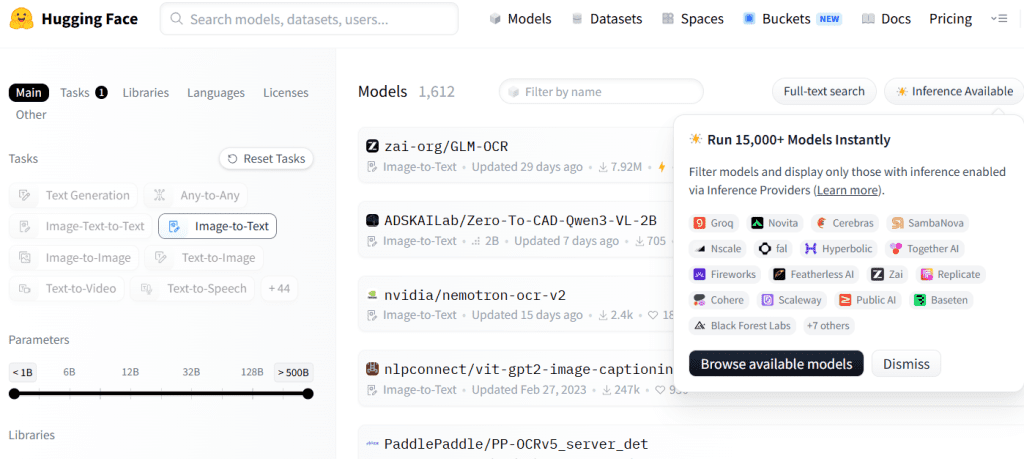
The most widely tested option is the CLIP Interrogator — an open-source tool combining OpenAI’s CLIP model with Salesforce’s BLIP to analyze images and suggest matching prompts. Run it locally or use it through Hugging Face Spaces with no setup.
I ran about 40 reference images through it over two weeks. Honestly mixed results — in a useful way.
What it nails: art style keywords, medium descriptors, mood language. Feed in a dramatic chiaroscuro piece and it returns things like “deep shadow, candlelight, Baroque influence, oil painting texture.” Genuinely useful as a draft starting point.
What it fumbles: photorealistic images. It overloads on artist name suggestions, many of which are stylistically off. I strip about 60% of the artist tags from every output before using it.
There’s also CLIP Interrogator 2 on Hugging Face — slightly faster, a bit better with photos, no local install needed. Good for quick passes when I don’t want to spin up my local setup.
Prompt Extractor Workflows
If you’re in AUTOMATIC1111, there’s a built-in “Interrogate CLIP” button in the img2img tab. I ignored it for the first year — big mistake. It’s the fastest way to pull a rough prompt from any reference and immediately put it to work.
My workflow:
- Drop the reference into the img2img tab
- Hit “Interrogate CLIP” — get a base prompt
- Edit heavily (keep the good tags, cut the noise)
- Set denoising strength to 0.55–0.65 — not so low it copies the reference, not so high you lose the composition
The img2img guide on Stable Diffusion Art has a solid breakdown of how denoising strength actually works. Short version: lower values keep you closer to the source, higher values let the prompt take over.
Image Captioning Tools for Style Analysis
A few options beyond CLIP are worth knowing:
WD14 Tagger — built for anime and illustration styles. If that’s your visual space, it consistently beats CLIP on tag accuracy. Output comes in Danbooru format, which translates cleanly to most fine-tuned anime models.
Multimodal captioning (GPT-4o or Claude) — this is what I reach for with photorealistic references now. Drop the image in, ask it to describe lighting setup, composition, and camera angle — not the subject matter. You get clean, usable prompt language with none of the tag noise. Reads like a photographer’s brief, which is exactly what strong prompts should sound like.
How to Use a Reference Image Responsibly
The tools above are useful for learning from a reference — understanding what visual decisions created a result. Using them to replicate a real person’s likeness or reproduce content without consent is a different thing.
Two lines I don’t cross:
Real people without consent. Extracting a prompt from a real, identifiable person’s photo to generate explicit content isn’t a gray area — it’s harmful. Fictional characters and consenting creators only.
Copying another creator’s specific style at scale. Learning from visual technique (lighting, composition) is how art education has always worked. Systematically extracting someone’s signature style to reproduce their work commercially is closer to plagiarism, even if the law hasn’t fully caught up.
My rule: I use these tools to understand technique, not reproduce content. What I build from that reference is something new.
From Extracted Prompt to Better Output
The extracted prompt is never the final prompt. It’s a rough sketch — useful for direction, but it needs editing.
Strip the noise first. CLIP dumps 20–40 tags. Keep lighting, composition, rendering quality, and color palette. Cut the rest.
Add what CLIP can’t see. Camera lens characteristics, aspect ratio intent, model-specific quality tags. The tool describes what’s in the image, not the generation parameters that produced it.
Test with img2img first. Run the extracted prompt through img2img at low denoising (0.3–0.4) with the reference image. If the output moves toward your reference, the prompt is working. If it barely changes, keep editing.
One thing that still surprises me: CLIP picks up on compositional patterns I wouldn’t have thought to describe. I’ve built a library of around 200 refined prompts from reference analyses — it’s become one of the more useful parts of my process.
Limits, Risks, and Compliance Boundaries
The prompt isn’t the original. CLIP extracts an approximation based on visual categories it was trained to recognize — not the actual generation parameters. You will not get the exact original prompt. It doesn’t exist in the image file.
Platform policies still apply. Whether you’re generating for OnlyFans, Fansly, or anywhere else, their content rules apply to your output regardless of how you generated it. “I used a reference image” changes nothing about what the output is.
Results vary by tool. CLIP Interrogator 2.4 outputs differently than WD14 or a multimodal captioning approach. Test the same reference across tools — you’ll quickly see which one fits your specific model’s vocabulary.
FAQ
Can AI recover the exact original prompt?
No. The image file doesn’t store the original prompt as metadata. CLIP-style tools pattern-match the visual content against their training data — educated guessing, not retrieval. That said, the guesses are often useful enough to get you in the right neighborhood.
Are image-to-prompt tools accurate?
Consistent on style categories and compositional language, unreliable on artist attributions. My benchmark: does the extracted prompt produce output that feels like the reference? By that measure, CLIP tools are 40–60% useful out of the box, and 70–85% after cleanup. Worth using, not worth trusting without editing.
Can I use someone else’s image as reference?
Technically yes. Whether you should depends on intent. Learning from technique — fine. Reproducing someone’s style commercially at scale — murky. Using a real person’s photo to generate explicit content of them — no.
Conclusion
Reverse prompting feels gimmicky until you actually build it into your process. Then you wonder how you worked without it. The ability to pull usable prompt language from a reference image cuts real time off trial-and-error.
The nsfw image to prompt converter space is more mature than it was even a year ago. Between CLIP Interrogator, WD14 Tagger, and multimodal captioning, there’s a real toolkit here — not just workarounds. The right nsfw image prompt tool for you depends on your model, your reference material, and your setup.
The judgment calls around consent and copyright don’t get easier with better tools. Those stay human problems.
I’ll keep using this reverse prompt nsfw workflow, especially on days when I’m staring at a reference and can’t figure out where to start. But I build with these tools — I don’t just extract from them. That’s the difference between using AI as a crutch and using it as a collaborator.
Tested May 2026 using CLIP Interrogator 2.4, AUTOMATIC1111 WebUI, and WD14 Tagger on local SDXL setup.
Previous Posts