I’ve been running the same test across faceless AI tools for about six months: same Reddit-story script, same target length, same niche, same posting schedule. Different tool every two weeks. The point isn’t to crown one “winner” — anyone telling you there’s a single best faceless AI video generator for everyone is selling something. The point is figuring out which tool fits which kind of channel, and where the free options actually save money instead of just delaying the inevitable subscription.
Leo here. This is the shortlist I’d give a friend in 2026. No affiliate links. No “game-changer” theater. Just what I’d pick for each use case, what I’d skip, and where the free-tier traps live.
What Makes a Good Faceless AI Video Tool
Script quality, voice, visual variety, editing control, and export
Before naming names, here’s the rubric I actually use. Most “top 10” lists grade these tools on feature counts. Feature counts are a trap — a tool can have 40 features and still produce slop. Five things actually matter for faceless content:
Script quality. Can the AI write a hook that doesn’t sound like every other AI hook? This is where most tools fail by video four. The script engine has a template it likes, and once you’ve seen it twice, your viewers have too.
Voice. Listen to a 30-second sample before you pay. Some tools still ship with text-to-speech that sounds like a 2019 GPS. Others integrate ElevenLabs-quality voices that pass for human in short-form. The gap is huge and it’s the single biggest quality lever in faceless content.
Visual variety. Stock-only tools produce stock-only-looking videos. The strongest 2026 tools mix licensed stock with generative AI clips — Veo 3.1, Sora 2, Kling — so your B-roll doesn’t look recycled. This matters for the algorithm more than people realize.
Editing control. Can you swap a single clip without regenerating the whole video? Edit a caption without re-rendering audio? Tools that lock you into “regenerate or accept” workflows feel fast until your fifth retry.
Export and posting. Watermarks on paid plans are a dealbreaker. Auto-posting is great when it works and a liability when it doesn’t. I lean toward tools that export cleanly and let me schedule through a separate posting tool I trust.
Hold every option below up against those five. You’ll see why my picks aren’t the most-advertised tools.
Top Faceless AI Video Generators
Best for YouTube Shorts
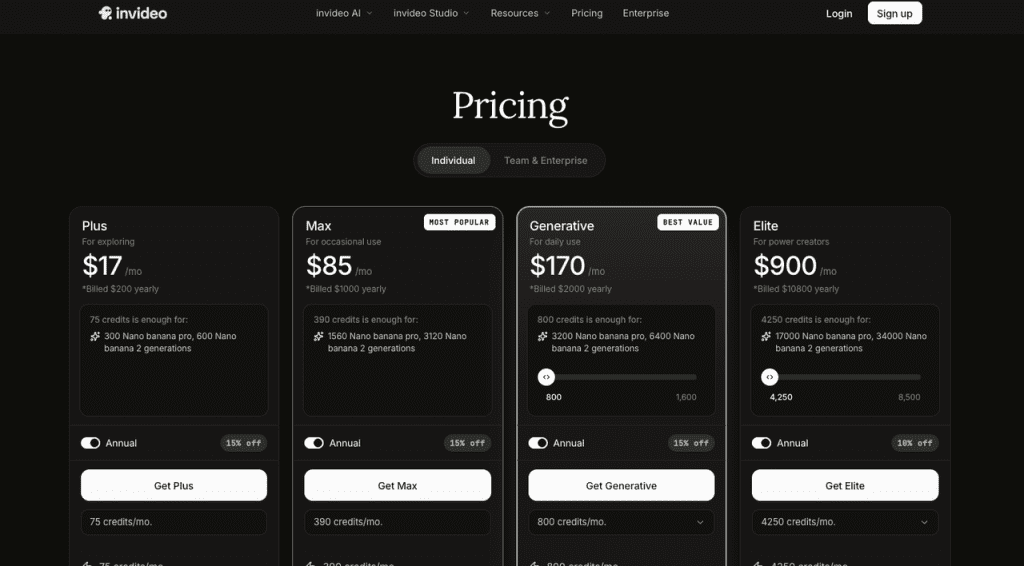
InVideo AI is my default recommendation here. The Plus plan, around $17/month on InVideo’s official pricing page, bundles Sora 2 and Veo 3.1 access into one subscription. Standalone access to those generation models, even at consumer rates, costs five to ten times that. For Shorts specifically — 30-60 seconds, fast-cut, generative visuals — this matters.
What it does well: prompt-to-finished-draft in under ten minutes, decent script engine, voice cloning from a 30-second sample, multi-format export. What it does badly: roughly one in four editing commands needs a retry, and for niche topics, you’ll manually replace 30-50% of B-roll. The monthly credit expiry also pinches if you batch-produce.
Over 30 short videos a month, the Plus credit pool will run out — look at Max, or pair InVideo with a cheaper batch tool for volume.
Best for long-form narration
Pictory is the unglamorous workhorse for long-form. Article-to-video, blog-to-video, podcast-to-video — that lane. The 2026 Auto-Summary feature turns a 2,000-word post into a usable 60-second cut, but the real value is in longer formats: 8-10 minute history narrations, top-10 listicles, summary explainers.
It’s not visually exciting. The library leans stock-photo-and-Ken-Burns-pan. But for narration-heavy formats where viewers listen more than watch, that’s fine. Pricing starts around $25/month on Standard (Pictory pricing page has the live numbers — they’ve shifted a couple of times).
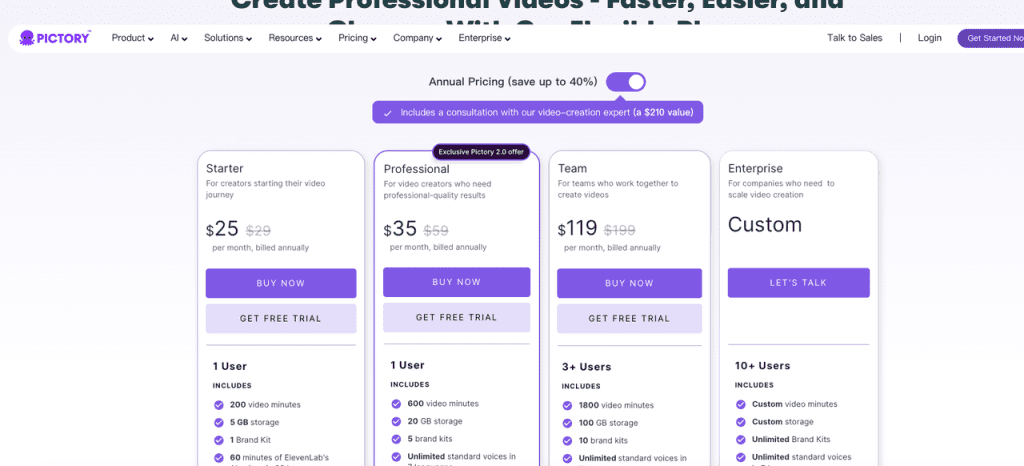
Honest limitation: the free trial is three watermarked videos total. That’s a demo, not an evaluation. Plan to commit a month to actually test it.
Best for low-effort publishing workflows
For pure autopilot — pick a niche, connect socials, walk away — there’s a cluster of tools (FlowShorts, Syllaby, AutoFaceless, faceless.video itself) competing for the same lazy-Sunday creator. Honestly? Haven’t found one I fully trust yet. Every test I’ve run has had at least one silent auto-post failure per week, and unedited output looks like every other AI-generated channel, which is now a content quality risk on YouTube.
If you want hands-off and accept the quality compromise, Syllaby is the least-bad of the cluster. The script engine pulls trend signals before generating, which is more than most peers do, and the calendar/scheduling layer is functional. But I’d never publish unedited output from any tool in this category to a channel I cared about.
Best Free Alternatives
What free tools can and cannot replace
The honest framing: there is no fully free best ai faceless video generator that gives you scripted, voiced, captioned, exportable video at meaningful volume without a watermark. That tool doesn’t exist in 2026. Anyone advertising it is either using it as a loss leader or hiding watermarks in fine print.
What free can replace, if you stitch carefully:
CapCut (free tier). Best free editor for short-form, period. Auto-captions are genuinely good. Free exports without a watermark. It won’t generate the script or visuals — you bring those — but for the final assembly step, hard to beat. The CapCut official page covers the current free vs. Pro split.
Canva (free tier). Strong for slideshow-style and infographic-style faceless videos. Template library is huge, AI image generation on the Pro tier is decent. For niches that lean visual-static rather than visual-motion, Canva is hard to outgrow.
Veed.io and Kapwing free tiers. Both export watermark-free at 720p with caveats. Useful for one-off projects, less so for sustained volume.
Putting it together as a free stack: ChatGPT (or Gemini) for scripts → free ElevenLabs tier for voice (10k characters/month, enough for 3-4 shorts) → CapCut for assembly → manual posting. Total cost: $0. Total time per video: 45-90 minutes vs. 10-15 minutes on a paid tool.
That’s the honest faceless video free alternative path. It works. It costs you time instead of money, and the moment your channel grows past three videos a week, the math flips.
Common pitfall: people stack four “free” tools and end up with watermarks, low resolution, and three accounts to manage. Pick one or two free tools that genuinely export clean, accept manual work for the rest. Don’t free-stack your way into a paid-tool workflow — that’s the path most people quit on.
Comparison Table
Workflow, voice quality, visuals, pricing model, and control
| Tool | Best for | Starting price | Voice | Visuals | Edit control | Watermark on free |
| InVideo AI | Shorts + ad creative | ~$25/mo | Cloning + 30+ AI voices | Stock + Sora 2 / Veo 3.1 | Mid (prompt edits) | Yes |
| Pictory | Long-form narration | ~$23/mo | Decent TTS | Stock library + Ken Burns | Mid (timeline lite) | Yes |
| Syllaby | Hands-off scheduling | ~$49/mo | Decent TTS | Stock + AI clips | Low (autopilot) | Yes |
| HeyGen | Avatar-led faceless | ~$29/mo | Top-tier + cloning | Avatar + AI B-roll | High | Yes |
| CapCut (free) | Editing layer only | Free | None (editor only) | None (editor only) | High | No |
| Canva (free) | Slideshow / infographic | Free | None | Template + stock | High | No |
| Free DIY stack | Bootstrappers | $0 | ElevenLabs free | CapCut + free stock | High | No |
Numbers shift quickly in this category — verify on the vendor page before subscribing.
The pattern that jumps out: the paid tools win on speed, the free stack wins on control and cost, and there’s no tool that wins on both. That’s the actual decision you’re making.
How to Choose
Pick by channel type, editing skill, and content volume
Three questions, in order:
- What format is your channel?
- Shorts/Reels/TikTok with generative visuals → InVideo AI
- Long-form narration over stock footage → Pictory
- Avatar-led explainers (still faceless if it’s not your face) → HeyGen
- Slideshow/infographic style → Canva
- Anything where visuals carry specific meaning → free stack with manual asset sourcing
- How much editing are you willing to do?
- “I want to press one button” → you’re compromising on quality; pick Syllaby or similar autopilot and accept the risk
- “I’ll spend 10-20 minutes per video tweaking” → InVideo or Pictory
- “I’ll spend an hour and want full control” → free stack
- How many videos per month?
- Under 10 → free stack is fine; paid tools waste their credits
- 10-30 → paid mid-tier (InVideo Plus, Pictory Standard) is the sweet spot
- 30+ → upgrade higher, or accept that you need two tools (one for batch volume, one for premium pieces)
Single most common mistake: creators pick the best ai for faceless youtube videos based on the marketing page, then realize three weeks in that their channel format doesn’t match the tool. Pick format first. Tool second.
Monetization and Policy Notes
Avoid reused-content and low-value automation risks
This is the part of every “best of” list nobody wants to write because it kills affiliate revenue. But here it is.
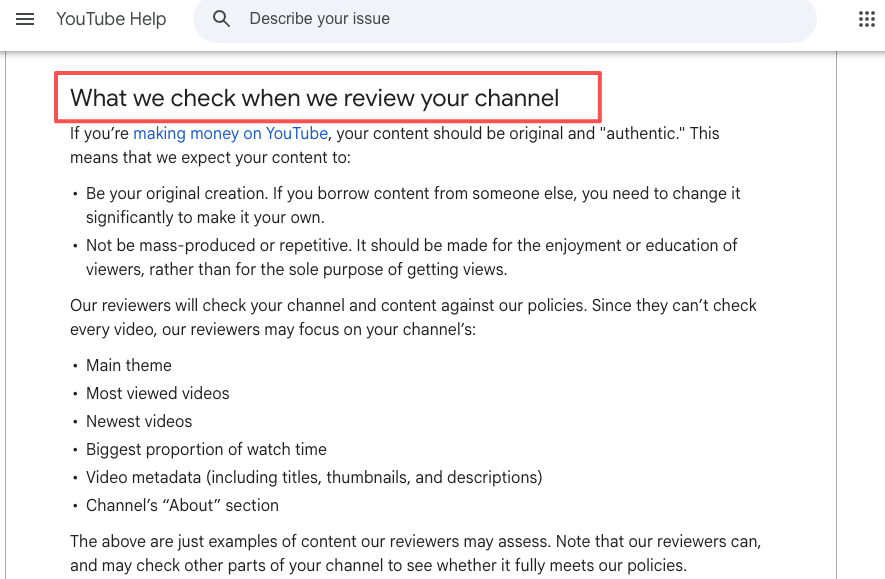
YouTube updated its policies in mid-2025 to target what it calls “inauthentic content” — mass-produced, repetitive, AI-generated channels with little human input. The YouTube Partner Program rules have steadily tightened. If your channel is 100% AI output with no edits, you’re skating on thin ice for monetization, no matter which tool you use.
What this means practically:
- Don’t publish unedited AI output. Every successful faceless channel I’ve audited in 2026 has a human in the loop on every video — script tweaks, custom thumbnail, swapped B-roll, original intro.
- Don’t run the same script template across hundreds of videos. The algorithm catches the repetition before your audience does.
- Don’t stack stock footage with stock voiceover and call it original. Google’s helpful content guidance signals what they reward, and pure aggregation isn’t it.
- Treat AI tools as drafting tools, not channel automation. The best faceless AI video generator in your stack should compress your first-draft time, not replace you entirely.
Creators making real money from faceless channels in 2026 spend more time on script, hook, and thumbnail than on generation. The tool is the cheapest part of the workflow.
FAQ
Are there good free alternatives to Faceless.video?
Yes — with one clear caveat. The best faceless video alternative free path in 2026 is a stitched stack: ChatGPT or Gemini for scripts, ElevenLabs free tier (10k characters/month) for voice, CapCut free for editing and captions, manual posting. Total cost: zero. Total time: 45-90 minutes per video. For specific use cases, Canva free covers slideshow-style content, and Pictory’s three-video trial is enough to test the article-to-video workflow before paying. If you want autopilot for free, that doesn’t exist — the closest you’ll get is free tiers with watermarks or strict export caps. Treat “free” as “free in cash, paid in time.”
Which tool actually delivers the highest quality output?
It depends on your format. InVideo AI currently leads for short-form generative visuals (thanks to Sora 2 + Veo 3.1 integration). Pictory performs best for long-form narration with stock footage. HeyGen wins for avatar-based faceless content. No single tool dominates everything — the highest quality channels usually combine one strong generation tool with manual editing in CapCut or Runway.
Can I make monetizable faceless videos with AI?
Yes, but the rules have shifted. The 2025-2026 YouTube policy updates explicitly target low-effort, repetitive AI output. To stay monetizable you need real human input on every video — original script edits, custom thumbnails, manual B-roll swaps, distinct voiceover styling. Pure autopilot AI channels are getting demonetized or terminated at much higher rates than 18 months ago. The faceless channels making real money in 2026 use AI to compress workflow from 15 hours to 3 hours per video, not to remove themselves from it. For why pure-automation tools struggle here, the faceless.video review goes into specifics.
Previous posts: