Hi, Dora is here. I spent three nights last month running the same reference photo through every nsfw image to image generator setup I could find, just to figure out which one actually preserves what I want while changing what I ask it to.
The short version: most of them overcorrect. Feed them a reference at the wrong denoising strength and you get something that barely resembles the source. Too low and you basically just get a noisier version of your original. There’s a narrow window that works — and finding it is the whole job.
This is the breakdown I wish I’d had before wasting six hours on it. Not sponsored. Just my actual test notes.
What Image to Image Means in NSFW AI Workflows
Before the tool list: this matters.
Img2img (image-to-image) is a generation mode where you provide an existing image as a starting point, and the model generates a new image that takes direction from it. It’s different from inpainting, which fixes a masked region inside an existing image. In img2img, the whole output is new — the source is a structural or stylistic reference, not a file you’re editing.
The key variable is denoising strength — a slider usually set between 0.0 and 1.0. Lower values stay closer to the source image’s composition and detail. Higher values let the model drift further from the original. In practice:
- 0.2–0.4: minimal changes, mostly texture and color shifts
- 0.5–0.65: noticeable variation while keeping the basic structure
- 0.7–0.85: significant divergence — good for style transfer
- 0.9+: almost a fresh generation; the reference is barely a suggestion
For nsfw img2img specifically, this setting is where most people get confused. They crank denoising high expecting stylistic freedom and get outputs that share almost nothing with their reference. Or they keep it low expecting fidelity and end up with something that looks like a compressed JPEG of the original.
The sweet spot for most creative use cases is 0.55–0.7. That’s where the model holds enough structure to be useful while giving you real variation.
Best NSFW Image to Image Generators
These are tools I’ve personally run tests on, not just tools I’ve read about. Hardware used: RTX 4090 (24 GB VRAM) and Apple M3 Max (36 GB).
Best for Variations
AUTOMATIC1111’s img2img tab is still the easiest entry point for generating nsfw image variations from a source. You load your image, set your prompt, adjust denoising strength, and run. The AUTOMATIC1111 stable-diffusion-webui on GitHub has detailed documentation on all img2img parameters, including batch mode — which is useful for generating 8–12 variations in one run to find the best output before committing.
What I like about it for variations specifically: the Variation seed and Variation strength sliders let you generate a controlled range of outputs from the same starting point without re-running the full prompt each time. You can lock the composition and vary only texture or lighting. That’s a workflow I use regularly.
Known caveat: the default interface feels dated and batch comparison is awkward. If you’re generating large variation sets, you’ll spend a lot of time clicking through individual files. A dedicated image browser plugin helps.
Batch img2img in ComfyUI is the better option once your variation workflow gets complex. The ComfyUI repo supports feeding a folder of source images through the same workflow in one run, which is how I do large variation rounds. The node-based setup means you can build quality checks into the pipeline — auto-upscale anything that passes a resolution threshold, skip outputs that don’t.
Best for Style Transfer
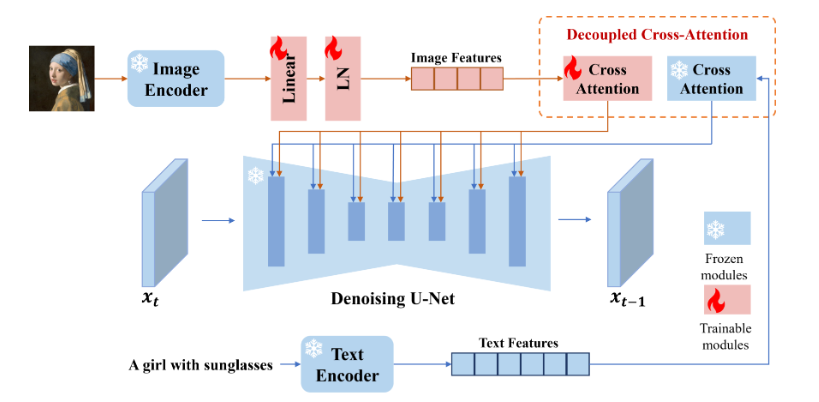
This is where the IP- Adapter changes things significantly. IP-Adapter conditions the generation on the visual style of a reference image rather than just its composition. The IP-Adapter model page on Hugging Face has multiple model variants — the ip-adapter_sd15.bin handles general style, while ip-adapter-plus_sd15.bin gives stronger style fidelity with slightly more identity bleed.
My test setup for style transfer: ComfyUI + IP-Adapter at 0.6–0.75 weight, with denoising at 0.65–0.75 on the img2img pass. This combo is the most reliable way I’ve found to take a style reference and apply it to a new subject — keeping the color grading, lighting logic, and texture feel without locking in the original subject’s identity.
The failure mode here is style bleed onto unintended elements. A reference image with a strong background color will often pull the background of your output toward that color even when you don’t want it. Prompt weighting can counteract this, but not always cleanly.
Best for Guided Edits
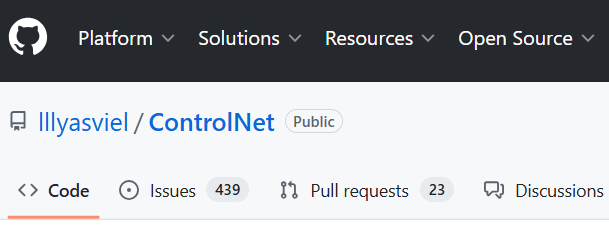
When you want to control pose or composition while still doing a full image to image nsfw generation pass, ControlNet is the right layer to add. The ControlNet repository by lllyasviel documents the conditioning types — OpenPose for pose extraction, Depth for spatial structure, Canny for edge guidance.
My typical guided edit workflow: extract a pose from the reference image using ControlNet OpenPose, run the img2img pass with the pose map as a conditioning input at 0.8–1.0 weight. The model generates a new image that follows the original pose but applies whatever style and content changes you’ve prompted. Denoising can go higher here (0.75–0.85) because the pose conditioning handles structure — the model isn’t relying on the source image for composition.
This is the most technically demanding setup of the three, but it produces the most controllable results for reference image nsfw ai workflows. If you’re doing character consistency work or need to match a specific pose across multiple outputs, ControlNet guidance is not optional.
How to Use a Reference Image Well
A few things I’ve learned from running a lot of these that aren’t obvious from documentation.
Image quality matters more than you expect. Blurry, heavily compressed, or low-resolution source images produce worse img2img results even at moderate denoising strength. The model extracts structural information from the reference — if that information is degraded, your output will be too. I aim for at least 512×512 source images; 768×768 or larger is better.
Aspect ratio should match your output target. If you feed a portrait-oriented reference and set an output resolution to landscape, the model will usually crop or distort badly. Match or crop your source before running.
Prompt should describe the output, not the source. This trips up a lot of people. Your text prompt isn’t describing what the reference image looks like — it’s describing what you want the output to look like. The reference handles the composition; your prompt handles the content direction. Redundant prompting (“a photo of [exactly what the reference shows]”) wastes your token budget.
For style transfer specifically: use a style reference that has clear, dominant visual characteristics. Subtle styles don’t transfer well. High-contrast, distinctive lighting, or strong color grading — those transfer reliably. Moody neutrals usually get lost.
Comparison Table
| Tool | Best for | Local/Cloud | Filter level | Complexity | Cost |
| AUTOMATIC1111 img2img | Variations, quick iteration | Local | Model-dependent | Low–medium | Hardware only |
| ComfyUI + IP-Adapter | Style transfer, batch workflows | Local | Model-dependent | High | Hardware only |
| ComfyUI + ControlNet | Guided pose/composition edits | Local | Model-dependent | High | Hardware only |
| InvokeAI (self-hosted) | Cleaner UI, model flexibility | Local | Model-dependent | Medium | Hardware only |
| Cloud img2img tools | Fast prototyping | Cloud | Usually filtered | Low | Free tier / $10–20/mo |
The pattern you’ll notice: the most capable nsfw image to image generator setups are all local. Cloud tools are faster to access but apply content filters that block a significant portion of legitimate creative inputs. For professional or ongoing work, local is the only setup that doesn’t break mid-workflow.
Limits, Risks, and Compliance Boundaries
Real people without consent. Using img2img with a photo of a real, identifiable person to generate altered versions is legally problematic in most jurisdictions — and increasingly covered by specific legislation. The model’s lack of a filter doesn’t change your legal exposure. This applies even if you own the source photo.
Model licensing. Models sourced from Hugging Face’s model hub vary significantly in their commercial use terms. Some are CreativeML OpenRAIL licensed (permissive), some are non-commercial only, and some have NSFW restrictions in the license terms regardless of what the model can technically generate. Check before you build a commercial workflow on top of any specific checkpoint.
Platform distribution. Output images may face restrictions on the platforms where you’d publish them regardless of how they were created. The generation method doesn’t change the platform’s content policies.
Data and privacy. Any cloud-based img2img tool receives your source image on their servers. If you’re using reference images you don’t own outright — stock images, client assets, personal photos — local generation is the only genuinely private option.
FAQ
What is img2img in NSFW AI?
Nsfw img2img is the image-to-image generation mode applied to uncensored AI models — you provide a source image and the model generates a new image guided by that source. The key parameter is denoising strength, which controls how closely the output follows the reference. Lower denoising = more similar to the source. Higher denoising = more freedom for the model to diverge. Most practical NSFW workflows live in the 0.55–0.75 denoising range.
Can image-to-image preserve identity?
Partially, and with caveats. Standard img2img preserves composition and rough structure but drifts on identity — faces, specific textures, and fine detail change even at moderate denoising. IP-Adapter improves identity retention when used as a style/face reference input, but it’s not a face lock. ControlNet with face-specific conditioning (like IP-Adapter Face ID) is the most reliable current approach for cross-image identity consistency, but it still fails on challenging angles and expressions.
What source images are safe to use?
For reference image nsfw ai workflows, the clearest safe categories are: images you created yourself, images licensed for your intended use (including commercial use if applicable), and AI-generated images where you hold the output rights under the platform’s TOS. Images of real, identifiable people — even your own photos — carry consent and legal risk when used as img2img reference for NSFW generation. When in doubt, use purpose-built reference images rather than real-world photographs.
Conclusion
The best nsfw image to image generator workflow in 2026 is still a local stack — AUTOMATIC1111 for fast variation runs, ComfyUI with IP-Adapter for style transfer, ComfyUI with ControlNet when pose and composition guidance matter. The cloud tools are fine for testing but hit content walls too often for serious work.
The single highest-leverage thing you can learn is the denoising strength dial. Get comfortable with what 0.5, 0.65, and 0.8 actually produce on your model of choice before you start optimizing anything else. That one setting explains most of the “why didn’t this work” moments.
What use case are you running img2img for — variations, style transfer, or something else? Drop it below. I read everything.
Tested May 2026 | RTX040 (24 GB VRAM), Apple M3 Max (36 GB) | Not sponsored.
Previous Posts