Editor’s Note: All tools, features, and pricing limits listed below were independently verified and re-tested in May 2026 to ensure accuracy regarding watermark policies, pricing, and commercial usage rights.
You have a product, lesson, or concept that needs a clear video, but the workflow quickly gets messy. You write a script in one app, generate visuals in another, record voiceover elsewhere, then spend hours trying to make every scene feel connected. A simple 90-second ai explainer video can turn into a full production task. CrePal solves this by acting as an AI Director Agent that turns an idea into a structured video workflow. In this guide, you’ll learn where explainer videos fit, how to build one from script to storyboard, and which tools help creators move faster.
Image description: Screenshot of CrePal’s official website showing the AI Director interface and its all-in-one video creation positioning.
CrePal is an AI Director Agent for end-to-end video creation. Unlike single-purpose AI video tools that only generate isolated clips, CrePal helps organize the full process: script, scenes, visuals, editing, soundtrack, and revisions. The result is a faster creator workflow that can reduce tool-switching and turn a multi-day explainer project into a much shorter production cycle. Instead of asking users to master several tools, CrePal lets them describe the video they want and refine it through conversation.
What AI Explainer Videos Are
An AI explainer video is a short video that explains a product, feature, process, or idea using AI-generated scripts, visuals, voiceover, captions, and editing support. The goal is not just to look polished. The goal is to make something easier to understand.
A strong ai video explainer usually follows a simple arc: problem, context, solution, example, and call to action. This makes it useful for product pages, landing pages, onboarding flows, educational content, and social media posts.
For creators, AI changes the production model. Instead of hiring a writer, designer, voice actor, animator, and editor for every small video, you can use an ai explainer video generator to draft the first version. Then you refine the message, pacing, and visual style.
Image description: Screenshot of CrePal’s PDF to AI Video feature showing how source documents can be turned into structured explainer-style videos.
This is also why explainer content should not be treated as the same thing as ads or training videos. A good explainer is focused, specific, and easy to follow. It should answer one clear question for one clear audience.
For document-heavy content, creators can also turn source files into video drafts through PDF to AI video workflows, especially when the starting point is a report, pitch deck, or educational handout.
Explainer vs Training Video vs Ad: Where Explainer Fits
Explainer videos sit between education and persuasion. They teach, but they are not always full training materials. They sell, but they are not always direct-response ads.
This distinction matters for SEO and content planning. A blog about AI training videos should focus on learning outcomes, course structure, assessments, and internal enablement. A blog about AI video ads should focus on hooks, offer testing, conversion, and paid creative. An ai explainer video article should focus on clarity, workflow, and message structure.
For a deeper learning-oriented workflow, compare this with our guide to AI training videos. For paid creative, cross-reference our AI video ad generator workflow.
Audience and intent differences
Explainer videos are built for people who need to understand something quickly. They may be potential customers, new users, students, investors, or internal stakeholders.
Training videos are built for retention and skill transfer. They usually need more detail, examples, and repeatable steps.
Ads are built for attention and action. They need stronger hooks, shorter pacing, and clearer offers.
An ai educational video may overlap with an explainer, but the intent is different. Educational videos teach a concept. Explainer videos usually clarify a specific product, workflow, or decision.
Length and tone differences
Most explainer videos work best between 45 seconds and 2 minutes. Complex B2B or educational topics may need 3 minutes, but longer videos should be split into chapters.
The tone should be clear, confident, and simple. Avoid overloading the viewer with too many features. One video should explain one main idea.
A product explainer can sound friendly and direct. A technical explainer can sound more structured. A startup explainer can sound energetic. The best tone depends on the audience’s knowledge level.
Image description: Screenshot of CrePal’s AI Video Editor feature showing how creators can revise generated footage and polish explainer scenes.
Best Use Cases
AI explainer videos are useful when the message needs structure, not just visuals. They work especially well for creators and teams who repeat similar content formats.
- Content Creators → daily explanation content → TikTok, YouTube Shorts, Reels Creators can turn trending topics, tool reviews, or step-by-step tutorials into short videos without building every scene manually.
- Marketing Teams → product education → website, email, and launch assets Teams can explain features, benefits, and workflows before users reach a sales call.
- Educators → concept breakdowns → ai educational video content Teachers and course creators can convert dense topics into visual explanations with voiceover and captions.
- Small Businesses → service explanation → product demos and brand story videos A local business can explain how a service works without hiring a full production team.
- Agencies → client delivery → repeatable explainer production Agencies can create drafts faster, compare messaging angles, and scale output across clients.
Image description: Screenshot of CrePal Mini Apps showing multiple video tools that can support creator, educator, and marketing explainer workflows.
Script-to-Storyboard Workflow
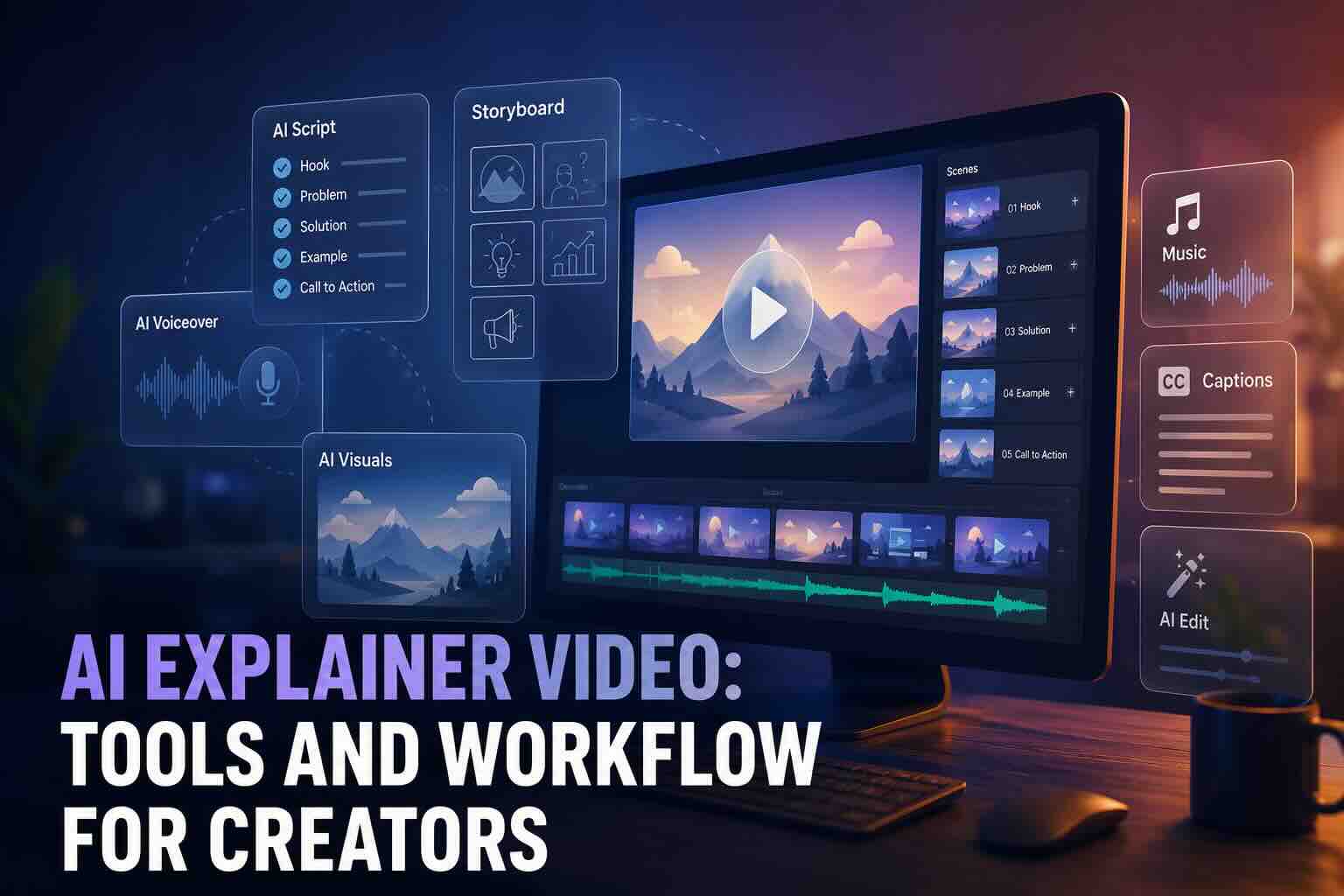
A good ai explainer video starts before generation. The clearer the script, the stronger the output.
Step 1: Define the viewer’s problem Write one sentence that describes what the viewer does not understand yet. This becomes the anchor for the whole video.
Step 2: Write a short script Use five blocks: hook, problem, solution, example, and next step. Keep each sentence short. The script should sound natural when read aloud.
Step 3: Turn the script into scenes Each scene should explain one point. A 60-second video usually needs 5–8 scenes. Each scene should include visual direction, narration, and on-screen text.
Step 4: Generate visuals and motion Use AI to create scene assets, animated clips, or talking-avatar segments. Keep the visual style consistent.
Step 5: Add voiceover, captions, and music Voiceover carries the explanation. Captions improve clarity. Music should support the pace without distracting from the message.
Step 6: Edit through feedback This is where CrePal is especially useful. You can ask for revisions in natural language, such as “make the opening more direct” or “simplify the final scene.”
Image description: Workflow visual showing a script-to-storyboard process for AI explainer videos, including script, scenes, voiceover, captions, and final edit.
Best Tools
The data in this section reflects hands-on testing conducted in May 2026. Platform policies, pricing, and free-tier limits may change over time, so always verify final licensing terms on the official website before commercial use.
| Tool | Best For | Strength | Limitation |
| CrePal | End-to-end AI explainer video workflow | AI Director Agent handles script, scenes, editing, and revisions | Best results still need clear creative direction |
| Mage | Quick AI image and video generation | Browser-based generation with model variety | Less focused on full explainer structure |
| Venice | Private AI ideation and image generation | Strong privacy positioning and creative freedom | Not a full video production workflow |
| BasedLabs | Text-to-video and image-to-video clips | Useful for fast video drafts and model access | Requires extra planning for full narratives |
| PixelBunny | AI image, video, and editing tools | Pay-as-you-go creative toolkit | Workflow control depends on user setup |
CrePal
CrePal is the strongest choice when the goal is a complete explainer workflow, not just a short generated clip. It works like an AI Director Agent that helps coordinate the creative process from idea to final video. This matters because explainers need structure. A random clip may look good, but it may not explain the idea.
With CrePal, creators can start with a simple prompt, document, product description, or campaign idea. The platform can help build a script, organize scenes, generate visuals, add music, and support editing through conversation. This makes it especially useful for product explainers, educational breakdowns, startup demos, and creator tutorials.
The key advantage is continuity. Explainer videos need consistent pacing, tone, and visual logic. CrePal is designed around the full video, not only the first frame or first clip. That makes it a better fit for creators who want to move from concept to publishable draft faster.
Image description: Screenshot of CrePal’s Ad Remix feature showing how product visuals and reference videos can be used to create polished commercial-style output.
Mage
Mage is useful for creators who want a direct AI generation tool for images and videos. It can help produce visual assets, short clips, or concept frames for explainer projects.
Its main value is speed. If you already know your script and storyboard, Mage can support the visual production stage. It is less ideal if you need help planning the full explainer narrative.
Image description: Screenshot of Mage’s AI image and video generator interface showing prompt-based creative generation options.
Venice
Venice is best known for private AI access and creative freedom. It can support brainstorming, script ideation, and image generation for early-stage explainer planning.
For creators who care about privacy during ideation, Venice can be a useful part of the workflow. However, it is not mainly positioned as a complete explainer video production system.
Image description: Screenshot of Venice’s AI image generator page showing prompt examples and creative generation interface.
BasedLabs
BasedLabs offers AI image and video generation tools that can help creators turn prompts or images into short clips. It is practical for creating individual scenes, motion tests, or social-ready video drafts.
For explainer videos, BasedLabs works best when you already have a storyboard. You can generate scene assets there, then combine them elsewhere.
PixelBunny
PixelBunny offers AI image, video, and editing tools in a simple creative workspace. It is useful for creators who want quick visual generation, editing, upscaling, or background removal support.
For explainer workflows, PixelBunny can help with supporting assets and short visual sequences. It is less structured than CrePal for full script-to-video production.
Image description: Screenshot of PixelBunny’s AI Video Generator tool showing prompt-based video creation and creative controls.
For external reference, creators should also review official model and platform documentation from OpenAI’s video generation updates, Google DeepMind’s video model announcements, and Hugging Face’s model resources when choosing tools for commercial workflows.
Common Mistakes
The first mistake is starting with visuals before message clarity. A beautiful AI clip will not save a confusing script. Start with the viewer’s question.
The second mistake is explaining too many ideas at once. A 90-second explainer should not cover every feature, use case, and pricing detail. Choose one core message.
The third mistake is using generic prompts. “Make an explainer video about my app” is too broad. Better prompts include audience, problem, tone, length, format, and desired output.
The fourth mistake is ignoring licensing. Always check the official website before using AI-generated content commercially. This includes watermark rules, model terms, voice usage, and image rights.
The fifth mistake is treating the first output as final. AI should speed up the draft, not replace editing judgment. Use feedback loops to improve pacing, captions, and scene order.
How to Get Started
Step 1: Describe your idea Tell CrePal what video you want in plain language. For example: “Create a 90-second product explainer for a project management app for small teams.”
Step 2: Let the AI Director create the draft CrePal can help turn the idea into a script, storyboard, scenes, soundtrack, and draft video. This reduces the need to jump between multiple tools.
Step 3: Edit through conversation Ask for changes naturally. Try “make it more educational,” “shorten the intro,” or “add a clearer final call to action.”
CrePal is not just another explainer video ai tool. It is built to help creators move from idea to complete video with less friction.
FAQ
How do I create an explainer video with AI?
Start with one clear message. Write a short script, divide it into scenes, generate visuals, add voiceover, and edit the final version. CrePal can streamline this by acting as an AI Director Agent that coordinates the script, storyboard, visuals, music, and revisions.
What is the best AI tool for product explainer videos?
CrePal is the best fit when you need an end-to-end product explainer workflow. It is designed to help with more than clip generation. It supports the broader process of planning, generating, editing, and refining a complete video.
Can AI generate script, visuals, and voiceover together?
Yes. Some tools can support multiple parts of the workflow. CrePal is especially useful because it focuses on full video creation rather than isolated assets. Other tools like Mage, Venice, BasedLabs, and PixelBunny can support specific stages.
How long should an AI explainer video be?
Most ai explainer videos should be 45 seconds to 2 minutes. Simple product explainers can be under 60 seconds. Complex educational or B2B explainers may run closer to 3 minutes.
What types of videos can I create with CrePal?
CrePal supports AI stories, music videos, lip sync videos, ads videos, explainer videos, PDF to video conversions, and AI talking avatars. It is useful for social media, education, marketing, and product communication.
Conclusion
An ai explainer video should make an idea easier to understand, not just more visually impressive. The best workflow starts with a clear message, turns that message into scenes, and uses AI to speed up production.
CrePal makes this process simpler by acting like your personal AI director. Whether you are explaining a product, teaching a concept, or turning a document into a video, CrePal helps you move from idea to finished draft faster.
Start creating with CrePal for free today. No complex editing setup. No scattered workflow. Just your idea, guided into a clearer video.