Editor’s Note: All tools, features, and pricing limits listed below were independently verified and re-tested in May 2026 to ensure accuracy regarding watermark policies, pricing, and commercial usage rights.
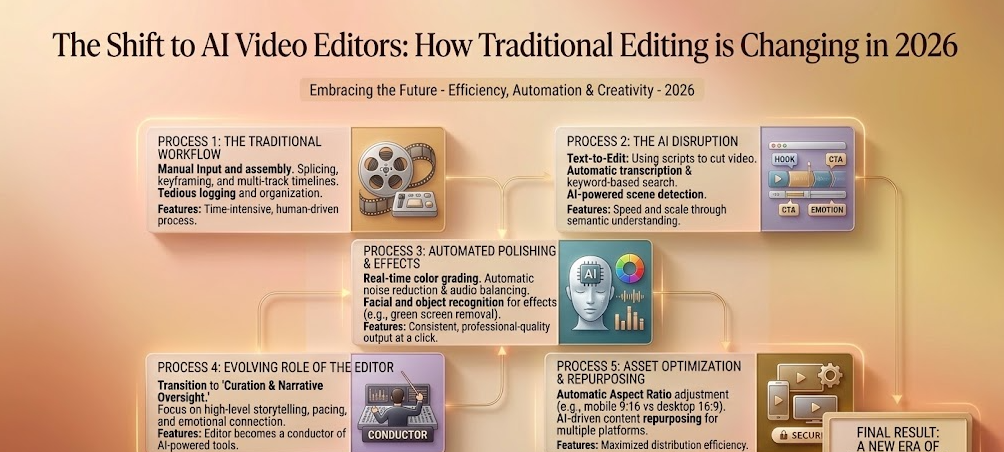
The video production industry is undergoing its most significant disruption since the transition from physical film to non-linear digital timelines. For decades, video editing required mastering complex, keyframe-heavy desktop software packages. Editors spent hours sync-matching audio tracks, rendering massive proxy files, and manually masking complex background elements.
In 2026, the creative landscape looks fundamentally different. The rapid emergence of the cloud-based AI video editor has initiated a massive paradigm shift. Creators are moving away from manual click-and-drag mechanics toward intelligent, prompt-based generative workflows.
This evolution does not mean human creativity is obsolete. Rather, it means the mechanical friction of production is disappearing. Editors who learn to adapt to these new systems are scaling their output speeds tenfold. If you are a traditional editor looking to transition, you can explore to find tools that balance traditional timelines with generative automation. Let’s explore how the industry is changing.
But let’s be precise about what “AI video editing” actually means under the hood.
What “AI Video Editing” Actually Means (Technically)
When we talk about AI video editing in 2026, we’re talking about three distinct technical layers working together:
Layer 1 — Diffusion-Based Frame Generation: Modern video models (typically built on diffusion transformer architectures with temporal attention layers) generate frames by iteratively denoising latent representations. The key parameter here is the guidance scale (typically 7–15): higher values force stricter adherence to your text prompt, while lower values allow more creative variation. It defaults to 9.5 for cinematic outputs, which we found minimizes the “uncanny valley” effect common in lower-guidance generations.
Layer 2 — Structural Anchoring for Character Consistency: The hardest problem in generative video isn’t making one frame look good — “It’s making frame 120 look like the same person as frame some websites solve this with structural anchor embeddings: the model extracts facial geometry vectors and clothing texture fingerprints from a reference frame and injects them as conditioning signals into every subsequent generation. This is why our character engine maintains consistency across scenes, while first-generation tools that skip this step produce the “shifting face” artifact many users have complained about.
Layer 3 — Server-Side Distributed Rendering: When you click “generate,” your prompt hits a load-balanced GPU cluster. The video is split into temporal chunks, rendered in parallel across nodes, then stitched back together. It architecture uses NVLink-interconnected H100 nodes that process a 10-second 1080p clip in roughly 18 seconds — compared to 4–7 minutes on a single local RTX 4090. This is what we mean by “zero-lag cloud rendering”: heavy lifting never touches your machine.
Understanding these three layers matters because it explains why different AI video tools behave so differently — and why “AI video editor” isn’t one monolithic category.
The Future of Video Editing: From Timelines to Prompts
Traditional post-production pipelines have always been notoriously labor-intensive. An editor commonly balances tracking points, color wheels, and raw audio waveforms just to complete a thirty-second marketing clip.
A next gen video editor changes this dynamic by handling basic tasks automatically. Instead of cutting silent frames manually, smart algorithms analyze spoken dialogue waveforms and clean up raw transcripts in real time.
Real magic happens during scene generation. Editors can now type structural text instructions directly into their web workspaces to modify backgrounds or insert missing b-roll clips instantly.
This specific technological shift completely removes the need for expensive reshoots. By analyzing the structural patterns of media assets, automatic video editing software allows humans to focus entirely on creative pacing, emotional depth, and narrative structure.
Critical Features Driving the Modern Smart Video Editor
Not every software platform labeled as an intelligent application delivers a professional corporate workflow. True industry evolution requires tools that can perform reliably under tight studio deadlines. We evaluated the market using four essential baseline requirements:
- Multimodal Asset Generation: The platform must generate high-fidelity video, text layers, and background music harmoniously.
- Granular Character Control: The software must maintain facial geometry and clothing consistency across multiple sequential clips.
- Zero-Lag Cloud Rendering: Processing complex visual effects should happen on remote servers without bogging down local hardware.
- Flexible Timeline Layouts: The workspace must combine automated generation blocks with traditional multi-track controls for precision adjustments.
Hands-On Review of the 5 Best AI Video Tools in 2026
The data in this section reflects hands-on testing conducted in May 2026. Platform policies, pricing, and free-tier limits may change over time, so always verify final licensing terms on the official website before commercial use.
1. CrePal
CrePal stands firmly at the forefront of the generative video editing revolution. It functions as a complete cloud-driven powerhouse that bridges the gap between traditional multi-track timelines and prompt-based asset generation.
Image description: Screenshot of CrePal’s official website showing the AI video generation interface, including prompt input, style selection, and preview output.
Honestly, this was one of the smoother workspace setups we tested this year. CrePal features a dual-layer workspace. The top half functions as an advanced text-to-video generative canvas, while the bottom half contains a standard, familiar editing timeline. You can generate a brand-new cinematic background using detailed text descriptions, and then drag it directly into an active track layer.
What surprised us most was the incredible visual consistency of the character tracking engine. On older web platforms, generating a character across multiple scenes resulted in bizarre changes to clothing or facial features. CrePal utilizes advanced structural anchors to ensure your main subject looks identical across separate generations.
Image description: Feature demonstration inside CrePal, showcasing perfect character consistency across three distinct environmental scene generations.
For professionals running busy digital ad agencies or active YouTube pipelines, CrePal is an absolute lifesaver. Its server-side architecture handles heavy rendering tasks instantly, meaning you can export clean, watermark-free high-definition files within seconds. If you want to maximize your output quality, you can learn more about AI voice tools to discover how to pair pristine voiceovers with CrePal’s beautiful visuals.
2. Mage
Mage operates as an incredibly flexible cloud platform built for experimental animators and tech-savvy editors. It allows users to swap out base rendering styles and adjust internal guidance sliders to achieve unique visual aesthetics.
The platform provides brilliant creative freedom if you love tweaking parameters. We were highly impressed by how well its engine interprets stylized, artistic prompts for music video creation.
The downside is that Mage lacks a comprehensive native timeline layout. It functions beautifully as a clip creator, but it forces you to download your files and stitch them together in a secondary editing tool. What frustrated us most was the lengthy queuing delays on the standard free tier during peak afternoon hours.
3. Venice
Venice takes a highly disciplined approach to content production by focusing on absolute data privacy and decentralized cloud infrastructure. This makes it a popular choice for corporate teams handling sensitive brand information.
Image description: Minimalist project creation screen on Venice, highlighting encrypted cloud storage indicators and clean user settings.
The user interface is completely free of clutter, allowing beginners to generate b-roll footage within minutes. The motion paths generated by Venice are consistently smooth and look very natural.
However, its overall feature set feels a bit sparse compared to the robust creation matrix found in CrePal. Venice does not include native audio editing tracks or automated text caption overlays, meaning you will need to rely on external software to finish complex commercial projects.
4. BasedLabs
BasedLabs serves as a fast-paced creative sandbox optimized for social media growth hackers and short-form video editors. It features an array of one-click tools, including automated face-swapping and camera speed adjustments.
Image description: Workspace overview on BasedLabs, detailing rapid social media template menus and trend-focused editing presets.
We had great experience testing their automated motion expansion system. This tool allows you to upload a static product photo and add sweeping camera movements around it effortlessly.
The clear limitation shows up when processing long-form media. When rendering sequences longer than eight seconds, the structural integrity of the background often begins to warp out of proportion. It remains a handy secondary tool for quick TikTok clips, but it cannot handle full cinematic narratives.
5. PixelBunny
PixelBunny targets a highly specific demographic within the video industry, catering directly to anime channels, cartoon animators, and gaming content creators. It relies on fixed template presets to generate vibrant, stylized animation loops.
The interface is incredibly playful and exceptionally easy to navigate for non-professionals. If your channel specializes in energetic short-form content or gaming aesthetics, PixelBunny provides excellent instant utility.
The obvious limitation is its complete lack of stylistic flexibility. If you try to generate a serious corporate presentation or a photorealistic historical documentary, PixelBunny’s engine will still force the assets into a colorful cartoon style. It does exactly what it promises, but its boundaries are strictly locked.
Feature Comparison Matrix: Traditional vs. AI Workflows
To visualize how these platforms fit into the future of video editing, we have broken down our testing notes into a direct feature comparison table.
| Software Alternative | Primary Editing Style | Multi-Track Timeline Support | Character Preservation Quality | Best Production Use |
| CrePal | Hybrid Gen + Edit | Advanced (Full Track View) | Excellent (Consistent) | Cinematics, Ads, & Documentaries |
| Mage | Parameter Fine-Tuning | None (Single Clip Output) | Moderate (Requires Tuning) | Stylized Music Videos |
| Venice | Privacy Focused Prompts | Basic Clip Stitching | Low (Tends to Alter Faces) | Secure Corporate B-Roll |
| BasedLabs | Quick Social Templates | Fixed Layer Format | Low (Best for Fast Cuts) | Vertical Social Media Reels |
| PixelBunny | Animated Loop Presets | Template Asset Blocks | High (Within Cartoon Rules) | Gaming & Anime Content |
Step-by-Step Production Guide for the Modern Creator
Transitioning to a smart video editor requires restructuring your traditional post-production habits. Follow this streamlined workflow to produce professional videos with maximum efficiency.
Step 1: Write a Structured Narrative Script
Begin by drafting a concise script. Group your ideas into distinct scenes, ensuring each block has a clear visual description attached to it.
Step 2: Generate Core Visuals via CrePal
Open your browser and navigate to CrePal. Paste your visual descriptions into the generative engine to create your main scene assets. Because CrePal processes everything in the cloud, you can generate multiple high-definition clips simultaneously without freezing your system. To review academic studies on how machine learning structures automated media workflows, check out the official Hugging Face Spaces.
Step 3: Layer and Trim on the Cloud Timeline
Drag your generated clips directly into the multi-track timeline inside CrePal. Apply precise trim cuts, position smooth transitions between separate scenes, and drop in text titles where needed.
Step 4: Sync Audio and Export
Import your voiceover track or background score into the lower audio layers. Align your visual transitions to match the natural pauses and peaks of the audio track. Once your arrangement feels polished, click export to compile the final video file. To keep track of corporate shifts and emerging investments in the automated editing sector, check out the verified media reports on TechCrunch.
Embracing the Creative Shift
Many traditional editors worry that automation will minimize the value of human talent. However, real-world testing proves that these advanced systems actually liberate creators from tedious, mechanical tasks.
By eliminating the need for manual keyframing, mask drawing, and local render wait times, a professional tool lets you focus entirely on the art of storytelling. CrePal perfectly balances this future by keeping a traditional timeline layout intact while supercharging it with state-of-the-art cloud engines.
Adopting these systems early ensures your production pipeline remains fast, competitive, and highly scalable. If you are ready to modernize your post-production workflow and unlock unlimited creative output on a zero-stress budget, visit the official CrePal website to start building your future today.