Editor’s & Production Systems Note:
Transparency & Ground Truth Disclosure: This review evaluates LTX Studio as a hosted cloud workspace for script-to-storyboard planning, shot parameter control, and multi-shot assembly. It is essential to distinguish LTX Studio (the hosted filmmaking interface developed by Lightricks) from raw foundational open models like LTX-2.5; platform features, credit structures, and multi-model integrations define the Studio workspace independently of underlying open-weight model code.All pricing structures, credit allotments, export rules, and commercial licensing thresholds reflect official vendor documentation as of late 2026 (such as the official LTX Studio FAQ and LTX Studio Tutorial). Commercial use rights require active paid subscriptions starting on the Standard tier ($35/month), while free and lower-cost tiers are restricted to personal use. Licensing summaries are provided for general orientation, do not constitute legal advice, and must be verified directly against current vendor terms before commercial release.
Source Verification & Ground Truth:
LTX Studio Architecture & Features: Verified against official vendor documentation (LTX Studio Storyboard Generator Update and platform guides). Confirmed capabilities include automated script parsing into scenes and shots, AI element extraction for persistent character/location consistency, model selection (such as FLUX and Nano Banana variants), shot-level parameter adjustments, and storyboard-to-timeline assembly.
Pricing & Commercial Tiers: Verified via vendor documentation and platform analysis (LTX Studio Pricing). Confirmed plans include a Free personal tier (800 one-time non-renewing credits, watermarked exports), Lite ($15/mo), Standard ($35/mo, unlocks commercial licensing and persistent Elements), and Pro ($125/mo).
CrePal Video Workspace: Documented at CrePal Features and our comparative technical review at LTX-2.5 Model Review.
For small studios, independent directors, and creative marketing teams, turning a raw script into an organized visual sequence has always required jumping across fragmented tools.You write in a text document, generate concept boards in an image tool, animate clips in a video generator, and stitch everything together in a timeline editor.
LTX Studio was built to replace that disjointed workflow with a single hosted production environment.Developed by Lightricks, the platform approaches AI video creation not as a simple chat interface, but as a virtual pre-production and assembly suite.
For teams evaluating new production software, this review examines what LTX Studio is designed to produce, how a script flows into a storyboard, what level of shot control is available during generation, and where asset, credit, and licensing limits matter before you commit.
What Is LTX Studio Built to Produce?
LTX Studio is built for creators who need structural, narrative control over multi-shot sequences.() Rather than spitting out disconnected clips from isolated text prompts, the platform anchors your project around a central workspace where scenes share persistent visual context.
Its core environment is optimized for:
- Narrative Short Films and Concept Teasers: Translating multi-scene scripts into chronologically ordered storyboard panels.
- Commercial Pitch Decks: Rapidly visualizing campaign concepts and generating comprehensive PDF pitch decks directly from storyboards.
- Pre-Visualization (Pre-vis): Allowing directors to block out camera angles, lighting states, and motion parameters before committing to high-cost rendering pipelines.
It is tailored for creators who want to manage a project’s shot list, character continuity, and rough cuts inside a single browser tab.
How Does a Script Become a Storyboard?
The production pipeline in LTX Studio begins long before any video frame is rendered. It enforces a structured transition from raw text to spatial organization.
Scene Structure and Visual References
Every project starts by pasting a screenplay, campaign brief, or simple concept paragraph into the input window. The platform parses the text automatically, dividing it into distinct scenes and individual shots.
During this parsing phase, the system extracts key characters, objects, and locations, saving them as persistent assets called Elements.() If your protagonist wears a specific outfit or your scene takes place in a distinct studio, tagging those Elements ensures subsequent shots reference the same visual DNA.
Shot Order and Approval Points
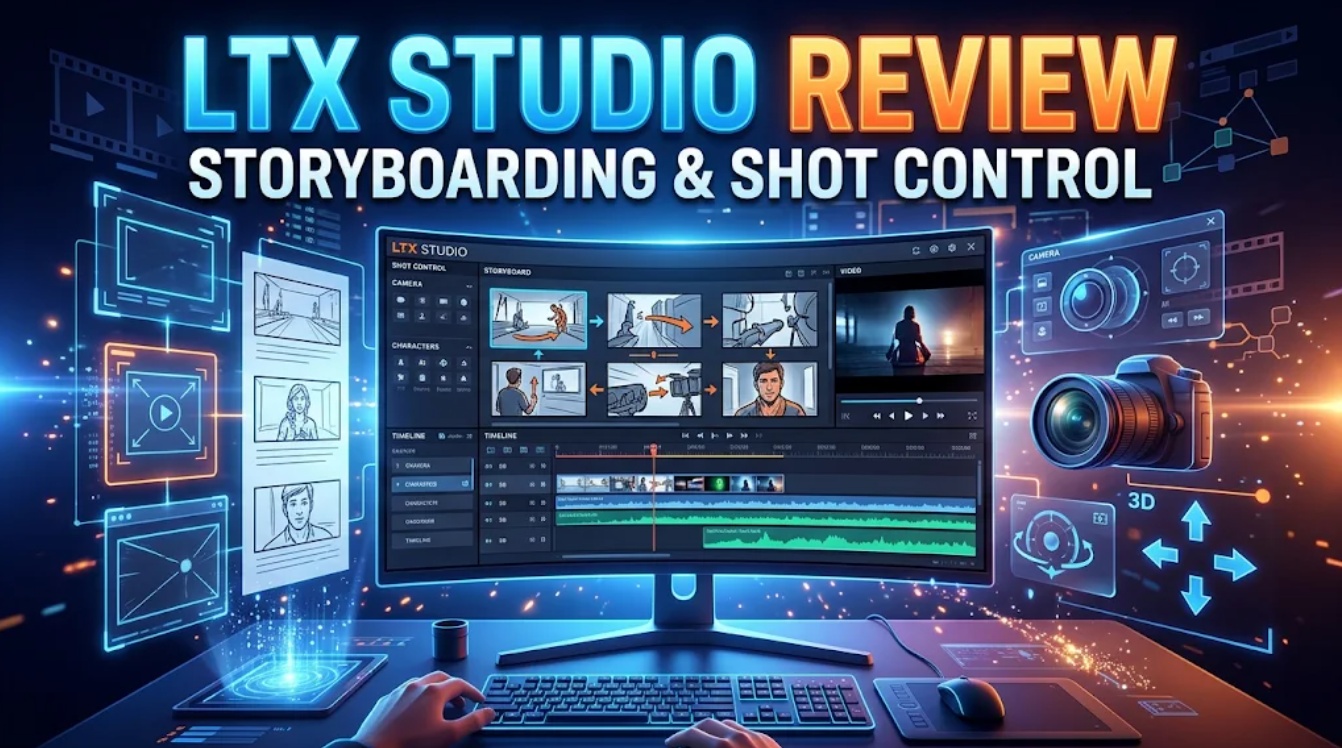
Once the script is broken down, LTX Studio generates a visual storyboard grid. Each panel represents a shot card featuring camera framing notes, lighting tags, and initial draft imagery.
This storyboard serves as a critical pre-production approval gate.Directors can reorder shots, adjust script lines, and swap base image models (such as FLUX or Nano Banana variants) before spending credits on heavy video generation passes.
What Shot Control Is Available During Production?
Once your storyboard frames are approved, LTX Studio provides deeper camera and motion controls than standard prompt-driven video generators.
- Targeted Camera Directives: Instead of relying on vague descriptive adjectives, you can apply explicit camera geometry parameters to individual shots—selecting overhead, eye-level, or low-angle perspectives, alongside focal lengths and pan velocities.
- Image-to-Video and Motion Prompting:Static storyboard frames are animated by attaching precise motion instructions (e.g., “camera slowly pushes in, subject turns head”), ensuring the video output respects the original composition.
- Model Selection: Depending on your project needs, you can route generation tasks across integrated image and video models to balance render speed against visual fidelity.
How Are Shots Revised and Assembled?
When a generated shot contains a physical glitch—such as a warped hand or mismatched background element—LTX Studio provides tools to fix the asset without starting over from scratch.
- Non-Destructive Storyboard Sequencing: Dragging clips into the timeline arranges references without altering your source generations, letting you trim handles or reorder sequences fluidly.
- Targeted Retakes: Creators can isolate specific sub-clips and redirect performance or dialogue context without rewriting the entire scene.
- Flows and Node Pipelines: For advanced technical users, visual node workspaces allow pipeline building—connecting text prompts, image generators, and video upscalers into repeatable multi-step automation graphs.
Where Does the Workflow Need Human Finishing?
Despite its comprehensive feature set, LTX Studio functions primarily as an ideation, pre-vis, and rough-cut assembly platform rather than a Hollywood finishing suite.() Human editors still need to step in for several key tasks:
LTX
- Complex Audio Mastering: While the platform handles basic voice tracks and audio synchronization, intricate multi-channel sound design, foley work, and final music mixing require dedicated digital audio workstations.
- Pixel-Level Retouching: Generative video can occasionally introduce subtle micro-artifacts along clothing edges or background geometry. Final delivery for broadcast or high-end client work often requires manual cleanup or external upscaling.
- Rigorous Continuity Auditing: Automated element tagging helps maintain consistency, but human eyes must still review sequence cuts to verify that lighting directions and eyelines match seamlessly across edits.
Who Is LTX Studio Best Suited To?
LTX Studio delivers the strongest return for a specific segment of the creator economy:
- Independent Filmmakers and Writers: Creators who think in terms of scripts, storyboards, and camera blocking rather than raw text prompts.
- Pre-Production Teams and Ad Agencies: Small studios that need to pitch visual concepts rapidly to clients using structured pitch decks and rough video animatics.
- Solo Creators Managing Multi-Shot Sequences: Producers who want an organized project workspace to keep assets, shot lists, and timeline cuts unified under one roof.
If your primary goal is generating simple 5-second social clips from standalone prompts, a full studio workspace may feel overly complex. For those interested in how standalone underlying video architectures compare, read our technical breakdown of the LTX-2.5 Model Review.
The video workflow shown below demonstrates how structured storyboarding bridges the gap between script breakdown and timeline assembly.
FAQ
Can LTX Studio import a screenplay as the project starting point?
Yes.LTX Studio allows you to paste raw script text or structured screenplays into the project setup.() The system automatically parses the text to establish scene breaks, dialogue lines, and visual descriptions, converting them into a structured storyboard framework.
Can a storyboard be shared with a client before video generation?
Yes. Because Storyboard view operates as a non-destructive sequencing layer, teams can share project workspaces or export early storyboard pitch decks to validate camera angles, shot order, and visual tone with stakeholders before consuming expensive video generation credits.
Does LTX Studio export individual shots for another editor?
Yes.Once your storyboard sequence and shot clips are generated, you can export individual video files or complete project timelines to bring into external non-linear editors like Premiere Pro, DaVinci Resolve, or Final Cut Pro for final finishing and color grading.
How do LTX Studio computing limits affect repeated retakes?
LTX Studio operates on a monthly credit allocation model (with plans ranging from Free trial credits to Lite, Standard, and Pro monthly tiers). Every generative action—such as rendering video shots, running retakes, or upscaling—consumes credits from your balance. Running endless unbudgeted retakes will drain your monthly credit pool quickly.
Toolfolio
Which rights apply to LTX Studio outputs made for client work?
According to LTX Studio’s published terms, the Free and Lite plans restrict generated outputs strictly to personal, non-commercial use. Commercial-use rights and licenses require active subscription to paid plans starting from the Standard tier ($35/month). Note: Licensing terms are subject to change and vary by partner model; this summary does not constitute legal advice, and creators must verify official T&Cs before commercial release.
Conclusion
LTX Studio successfully bridges the gap between scriptwriting, storyboard planning, and video assembly.() By organizing creative work into persistent projects, taggable character elements, and structured storyboard timelines, it lifts AI video production out of the random prompt box and into an organized pre-production workflow
While professional projects will still require external audio mastering and final finishing touches, LTX Studio gives small studios and creators the structural control needed to turn complex scripts into cohesive visual drafts.