Editor’s Note:Prepared by the Creative Automation & Agency Architecture Desk. Translating a single marketing brief into cross-channel assets traditionally forces operators to juggle fragmented point solutions—writing copy in one LLM window, tuning diffusion seeds in an image web UI, and prompting camera physics in a standalone video generator. This procedural SOP establishes a disciplined operational baseline for the newly released MiniMax Design desktop client. Drawing strictly from verified platform documentation and production test environments, this guide isolates the exact brief syntax, agent parameter limits, revision checkpoints, and handoff protocols required to generate an aligned pilot asset pack (one hero key visual, ad copy variations, and one 9:16 video concept) without credit wastage or brand drift.
For creative directors, performance marketing leads, and solo agency operators, the primary point of failure in generative campaigns is rarely model capability—it. It is cross-modal drift. When copywriters, visual designers, and motion editors prompt disparate foundation models independently, character geometry alters, color palettes disconnect, and core value propositions warp between static and moving assets.
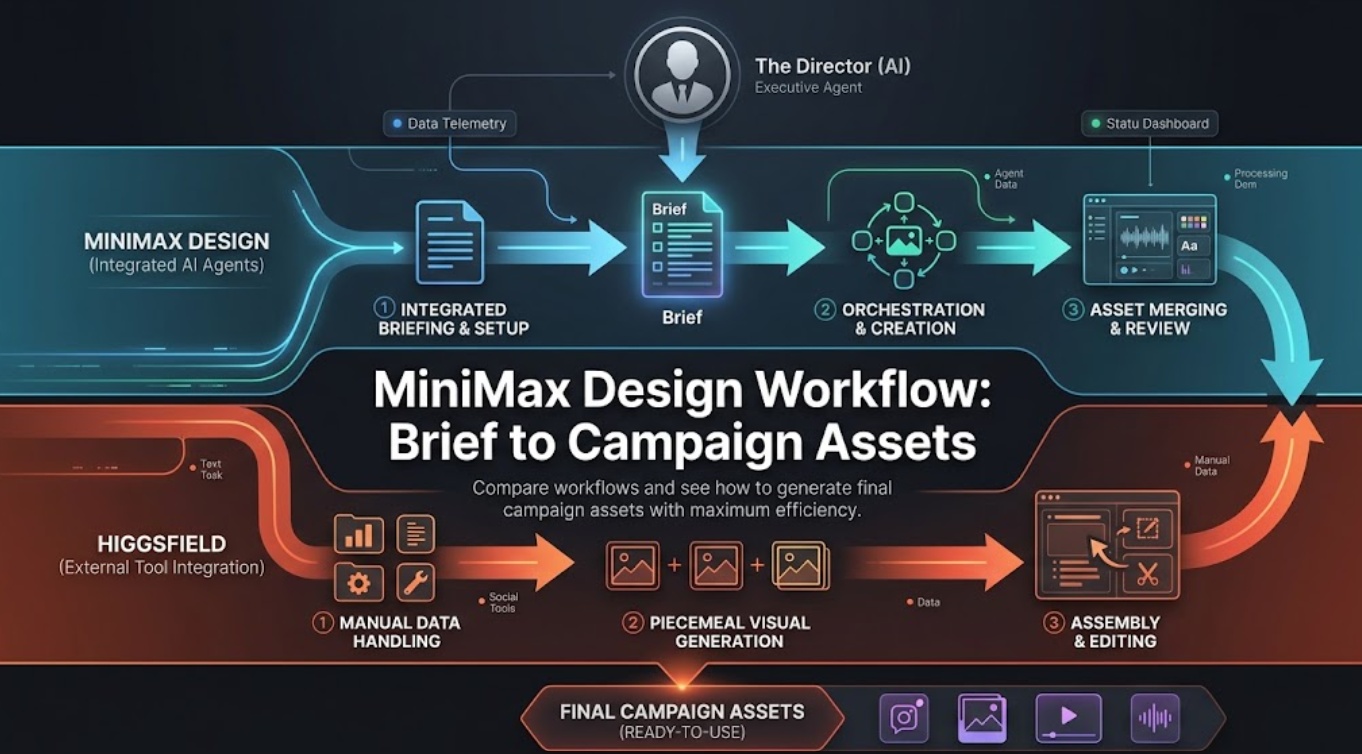
MiniMax addresses this operational friction with MiniMax Design, a native desktop-first workspace powered by an orchestrated multimodal agent workflow. Rather than functioning as a standard single-prompt generator, the system deploys an executive lead agent to ingest unstructured marketing briefs, generate a multi-tier execution tree, and coordinate specialized sub-agents.
This operational guide provides the exact step-by-step protocol for turning a commercial brief into a synchronized, broadcast-compliant starter asset pack.
Turn the Brief Into One Campaign Asset Plan
Generative agents amplify ambiguity. Submitting a vague brief like “Create a summer ad campaign for a sparkling water” causes the agent framework to hallucinate uncontrolled deliverables that rapidly burn compute credits. The pipeline requires disciplined parameter constraints at intake.
┌──────────────────────────────┐
│                   Brief Ingestion & Asset Strategy                     │
├──────────────────────────────┤
│ 1. CORE STRATEGY       Single Value Prop, Tone, Demographic Bounds     │
│                                  │                                     │
│ 2. SCOPED ASSETS       ├── 3x Ad Headlines & Short Social Hooks        │
│                        ├── 1x Hero Key Visual (1:1 / 4:5, 300 DPI)     │
│                        └── 1x Short Video Concept (9:16, 5–10s, H3)    │
│                                  │                                     │
│ 3. NEGATIVE CONSTRAINTS Color Bans, Forbidden Claims, Typography Rules │
└────────────────────────────┘
Define Audience, Message, Formats, and Approval Rules
Draft your initial brief text outside the software using a structured Markdown schema. To ensure operational compliance, paste the following structured template into the lead agent’s prompt console:
Markdown
[PROJECT: Hydration Zero Summer Launch]
- Target Audience: Active urban professionals, ages 25–40.
- Core Value Prop: Zero sugar, natural botanical electrolytes, crisp finish.
- Tone/Aesthetics: Minimalist, Scandinavian design, organic textures, sunlight, warm linen shadows.
- Target Deliverables:
  1. Copy: 3x performance headlines (<40 characters) + 2x Instagram caption hooks.
  2. Image: 1x Hero Key Visual (4:5 ratio, photorealistic commercial packshot).
  3. Video: 1x 9:16 vertical video concept (5-second slow-motion hero reveal).
- Negative Constraints: No neon saturation, no plastic bottles, no CGI hyper-gloss, no unverified health claims.
Attach Product, Brand, and Style References
Before triggering agent analysis, anchor the workspace using local source files:
- Hero Product PNG: Upload a high-resolution, uncompressed studio packshot featuring clear lighting and neutral backdrops to prevent label warping.
- Palette & Mood Swatches: Upload an approved 3-color swatch board (e.g.,
#E8ECE9,#C5A880,#2C3E35). - Reference Weighting: Explicitly instruct the agent to lock product geometry to the uploaded packshot while restricting latent generation to environmental backgrounds and lighting models.
Review the Agent Task Breakdown
Once the brief is submitted, the lead orchestration agent generates an interactive execution tree. Do not click “Run All” immediately. A technical operator must inspect and prune the task tree.
┌────────────────────────────────┐
│                 Decomposed Agent Architecture Tree          │
├───────────────────────────────┤
│ INPUT BRIEF ──► Lead Creative Director Agent                          │
│                      │                                                 │
│                      ├──► Copy Agent    [Headlines / Subheads / Audio] │
│                      ├──► Image Agent   [Key Visual / Lighting Pass]   │
│                      ├──► Video Agent   [MiniMax H3 / Camera Vectors]  │
│                      └──► Audio Agent   [Soundbed / Voiceover Track]   │
└──────────────────────────────────┘
Separate Copy, Image, Video, and Audio Tracks
According to developer documentation on the MiniMax Official Developer Portal and model registries such as the open-weight MiniMax H3 Model Card on Hugging Face, tasks run across distinct pipelines:
- Copy Agent: Leverages internal LLM logic to generate character-counted headlines, copy body variants, and exact voiceover scripts.
- Image Agent: Deconstructs the visual brief into composition prompts, utilizing native MiniMax text-to-image backends with reference weighting.
- Video Agent: Directs spatial camera motion and temporal physics utilizing the MiniMax H3 multimodal video pipeline.
- Audio Agent: Simultaneously synthesizes naturalistic voice tracks and ambient stereo audio paired with video cues.
Remove Outputs the Campaign Does Not Need
The lead agent frequently plans peripheral deliverables by default—such as landscape banner variants (16:9) or secondary character close-ups. Click into the task node canvas, select unneeded asset nodes, and click Delete Task. Limiting your pilot run strictly to one key visual, one copy bundle, and one 9:16 video concept conserves platform compute credits and accelerates generation queues.
Generate a Small First Asset Pack
With the task breakdown verified, trigger the parallel generation run.
Build One Key Visual and One Short Video Concept
Monitor the live generation queue across the workspace:
- Audit the Key Visual: Verify that the primary packshot maintains correct structural perspective and that background elements (e.g., condensation droplets, linen shadows) reflect the brief’s lighting constraints.
- Audit Video Motion Dynamics: Play back the 5-second video cut generated by the H3 engine. Confirm that the camera trajectory follows designated cinematic tags (e.g.,
[Slow tracking forward],[Subtle push-in]) and that the product label remains legible throughout the movement without temporal warping.
Keep Shared Claims and Visual Direction Aligned
Cross-verify copy against visual rendering. If the Copy Agent generates the hook “Crisp mountain spring hydration”, but the Image and Video agents place the bottle on a warm indoor marble countertop, flag the discrepancy. Edit the prompt context within the project board to realign environmental descriptors before passing the draft to stakeholders.
Revise Each Asset Without Losing the Brief
The primary advantage of MiniMax Design over standard chat UIs is modular, non-destructive editing.
┌─────────────────────────────────┐
│                   Modular Asset Revision Protocol                      │
├───────────────────┬───────────────┤
│ REVISION NEED     │ CORRECT OPERATIONAL WORKFLOW                       │
├───────────────────┼───────────┤
│ Copy Revision     │ Edit copy node text directly; do NOT re-roll seed. │
│ Image Lighting    │ Adjust text prompt lighting tags; lock seed value. │
│ Video Artifacting │ Tweak camera motion tags; keep reference packshot. │
│ Global Reroll     │ Avoid. Re-rolling resets all asset alignments.     │
└───────────────────┴────────────────┘- Localized Node Refinement: If the key visual background is too dark, click the Image node, add the prompt tag
soft morning sunlight through window, high key lighting, and regenerate only that card. The approved copy and video nodes remain locked. - Seed & Motion Stability: When refining the video concept, never alter both the camera direction tag and the subject prompt simultaneously. Adjust camera angles first; if subject motion is still unstable, modify the underlying still frame reference.
Package Approved Assets for Channel Adaptation
Once the creative pack clears internal review, transition the assets out of the sandbox and into delivery channels:
┌──────────────────────────────────────┐
│                 Channel Handoff & Technical Matrix                     │
├───────────────────┬──────────────────┤
│ DELIVERABLE       │ SPECIFICATION & DESTINATION                        │
├───────────────────┼────────┤
│ Copy Bundle       │ UTF-8 Plain Text / Markdown (Meta Ads Manager)     │
│ Hero Key Visual   │ 4:5 Full-Resolution PNG / JPEG (Social Grid/Feed)  │
│ Video Concept     │ 9:16 MP4, 1080x1920, 24fps (TikTok / Reels)       │
│ Narrative Scale   │ Upstream export to CrePal for multi-scene planning │
└───────────────────┴─────────────────┘
Export your assets using the unified export dialog. While MiniMax Design excels at rapid single-pack ideation, turning an approved short-form concept into an expansive, multi-scene brand narrative requires specialized timeline orchestration.
For projects demanding complex, multi-scene continuity, studios export approved visual references and video takes from MiniMax and ingest them into dedicated orchestration environments like CrePal. Within CrePal, directors utilize an AI Director framework to break narrative scripts into sequential, multi-shot storyboards, orchestrating downstream video models while locking character and stylistic identity across scenes.
Workflow Limits and Human Approval Points
Automated agent orchestration significantly accelerates visual prototyping, but professional teams must maintain strict human-in-the-loop checkpoints:
- Factual & Legal Clearance: Marketing copy generated by LLM sub-agents must be vetted by brand managers against legal compliance guidelines (e.g., FDA/FTC advertising regulations).
- Licensing & Commercial Indemnity: Before deploying assets commercially, operators must review commercial rights, IP terms, and disclosure rules outlined in MiniMax’s Official Terms of Service.
- Finishing & Typography: Generative video engines cannot output print-ready vector typography or clean vector SVG logos. Final headline typesetting, brand mark placement, and broadcast loudness mastering (e.g., -14 LUFS) must be executed in external post-production software.
FAQ
Can a saved brief become a reusable MiniMax Design skill?
Yes. MiniMax Design allows users to export approved agent prompt structures, reference assignments, and execution trees as custom “Skills.” These templates can be mapped across recurring seasonal campaign briefs to enforce structural continuity.
How should teams recover a project after an interrupted agent run?
Because the desktop client communicates with remote cloud compute APIs, task state is logged continuously. Relaunching the application reloads the canvas state, allowing users to re-run only the pending or interrupted nodes without re-spending credits on finished assets.
Does MiniMax Design track which agent created each asset?
Yes. Selecting any asset card displays a full provenance audit trail in the right-hand inspector panel, showing the responsible sub-agent, the exact prompt string, the parent seed value, and timestamp metadata.
Can MiniMax Design preserve translation glossaries between campaign projects?
While the underlying LLM handles multi-language translation, formal enterprise glossaries must currently be injected directly into the initial brief prompt constraints to ensure mandatory brand terminology is preserved.
Which export preserves editable layers for outside design software?
MiniMax Design exports flat raster files (PNG/JPEG) and compiled video files (MP4). Layered project formats (e.g., PSD/AI with separated text and graphic layers) are not natively generated and must be separated in dedicated graphic editors.
Conclusion
The MiniMax Design workflow transforms commercial pre-production from a disorganized series of single-prompt queries into a structured, agent-driven assembly line. By enforcing strict brief constraints at intake, actively pruning unnecessary task nodes, and conducting localized asset iterations, creative teams can produce cohesive campaign packs in a fraction of traditional production time. Incorporating rigid human compliance checks at the export stage ensures that rapid AI generation translates directly into broadcast-ready, commercially protected marketing collateral.