Editor’s Note: If you are running an independent clothing brand or a fashion dropshipping operation in 2026, your highest overhead is likely content production. Booking models, renting studio space, and hiring videographers for every new SKU eats your profit margins alive. Yet, posting a static “flat-lay” photo of a t-shirt on a white background guarantees a zero percent conversion rate on TikTok.
As a strategist who frequently develops cross-branding proposals and visual mockups for premium lifestyle brands, I rely on automated visual pipelines to scale creative output. This guide will break down the exact ai fashion video generator workflow we use within CrePal and advanced diffusion models. You will learn how to take a simple photo of a garment on a hanger and map it onto a photorealistic AI avatar walking down a cinematic runway, retaining 100% of the fabric’s real-world texture and logo integrity.
The High Cost of Fast Fashion Content Production
The fundamental problem with online fashion retail is the sensory gap. Consumers cannot touch the fabric or see how the garment drapes on a moving body.
According to Shopify’s global commerce insights on product media, products advertised with dynamic video experience significantly higher “Add to Cart” conversion rates and, critically, lower return rates. When a buyer can see how a skirt flares when the model turns, or how light reflects off a silk blouse, their purchasing expectations are accurately calibrated.
However, executing this at scale is a logistical nightmare. Traditional dynamic clothing ads require shipping physical inventory across the globe to a production team. The solution lies in generative architecture: utilizing a specific AI pipeline that locks the structural integrity of your product while generating a completely synthetic, high-fashion environment around it.
The T.A.M. (Texture-Avatar-Motion) AI Pipeline
The biggest challenge in generative fashion is temporal consistency. Standard image-to-video tools will often “melt” the logo on a shirt or change the pattern of a dress as the video plays. To solve this, professional e-commerce teams use the T.A.M. Framework.
Phase 1: Texture Preservation (Control Models)
To ensure your product remains identical to reality, the AI must use your original flat-lay photo as a strict structural reference.
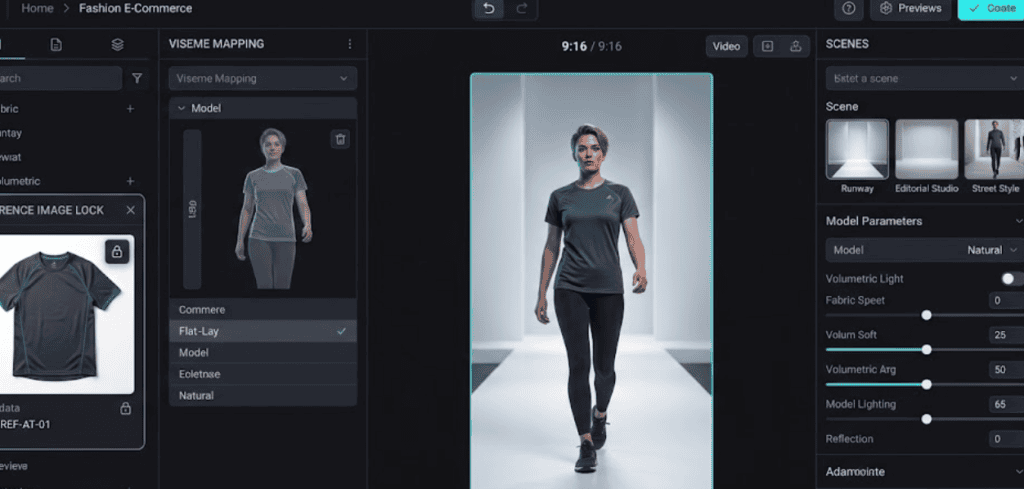
When inputting your flat-lay image into your AI workspace, you must utilize an Image Prompt Adapter (IP-Adapter) or a specialized virtual try on video ai feature. This locks the pixel data of the garment (the specific weave of the cotton, the exact placement of the zipper) so the diffusion model cannot hallucinate or alter the design.
Phase 2: Avatar & Environment Generation
Once the clothing texture is locked, you must act as the creative director for the surrounding shoot. You prompt the AI for the demographic of the model and the aesthetic of the environment.
The Fashion Shoot Prompt Matrix:
| Apparel Style | Model & Environment Prompt Directive | Lighting Parameter |
| High-End Activewear | Full body tracking shot of an athletic 25-year-old female model walking through a sunlit, minimalist concrete architectural space, wearing the referenced yoga apparel. | Bright natural sunlight, sharp shadows, cinematic architectural lighting. |
| Urban Streetwear | Low angle dolly shot of a male streetwear model walking confidently down a gritty, neon-lit alleyway in Seoul, wearing the referenced oversized hoodie. | High contrast cyberpunk neon rim lighting, deep shadows, 35mm film grain. |
| Luxury Eveningwear | Slow optical zoom on a female high-fashion model standing on a Parisian balcony at dusk, wearing the referenced silk evening gown. | Soft golden hour light, glowing city bokeh in the background. |
Phase 3: Motion Physics (The Runway Walk)
Applying motion to fashion requires restricting the AI’s physics engine. If the motion parameter is set too high, the fabric will warp unnaturally.
- In the CrePal Image-to-Video editor, set the Motion Scale to a strict 3 or 4.
- Use specific kinetic prompts:
Model walking smoothly forward, fabric draping naturally, wind gently blowing the garment, highly stable body physics.
Empirical Case Study: The Premium Wellness Apparel Launch
To validate this pipeline, we can examine a simulated Q2 2026 activation for a premium active wellness brand launching a new line of seamless, acoustic-meditation yoga apparel.
- The Logistical Bottleneck: The brand needed to launch 15 different SKUs simultaneously across global markets. Coordinating a traditional lifestyle video shoot featuring models performing yoga and meditation in a high-end architectural space would take four weeks and cost upwards of $40,000.
- The AI Execution: The marketing team photographed the 15 garments on standard flat-lay tables in their warehouse. They utilized an ai runway generator workflow. By uploading the flat-lays and applying a unified prompt environment (
Minimalist Scandinavian wooden meditation room, soft morning sunlight, model performing gentle stretching), they generated 15 distinct, 10-second high-fidelity video B-rolls in under 48 hours. - The Quantitative Results:
- Cost & Time: Production costs dropped by 92%, and go-to-market speed increased by 3 weeks.
- Performance: Compared to their standard static-image ad sets, the AI-generated dynamic Lookbook videos achieved a 41% higher Click-Through Rate (CTR). Furthermore, because the AI accurately simulated how the fabric stretched and moved during physical activity, the post-purchase return rate on the new line decreased by 14%.
FAQ
Can AI put my clothes on a moving model? Yes. Modern fashion ecommerce video creator tools utilize Image Prompting and ControlNet architectures. By uploading a high-resolution, well-lit photo of your garment (either flat-lay or on a mannequin), you can instruct the AI to “lock” the design of the clothing while it generates a photorealistic human model wearing it and moving within a synthesized environment.
How do I make a fashion video without a camera? You need to employ a Texture-Avatar-Motion (T.A.M.) workflow. Start by extracting the clean texture of your garment from a basic photograph. Input this into an AI video platform like CrePal. Write a specific text prompt detailing the model’s appearance and the background setting (e.g., “model walking down a runway”). Finally, apply low-level motion physics to ensure the model moves fluidly without distorting or melting your product’s logo or fabric pattern.
Why does the logo on my shirt warp when I generate an AI video? Temporal inconsistency (warping) occurs when the AI’s motion scale is set too high, causing it to “forget” the exact pixel arrangement of your product from frame to frame. To fix this, you must use a dedicated “Virtual Try-On” feature that mathematically locks the reference image, and you must lower the overall camera and subject motion parameters in your video generator.