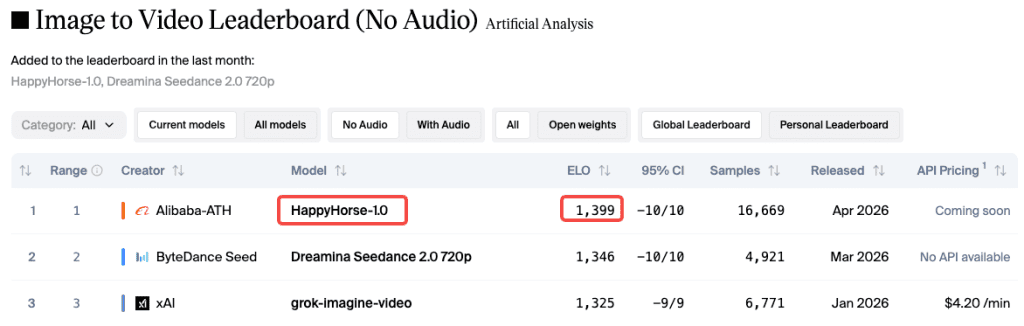
I check the Artificial Analysis video leaderboard about once a week. Two weeks ago, a model I’d never seen before was suddenly #1: HappyHorse-1.0. No team, no announcement—just an Elo score already climbing past 1366 (now around 1399).
I started testing it every night.
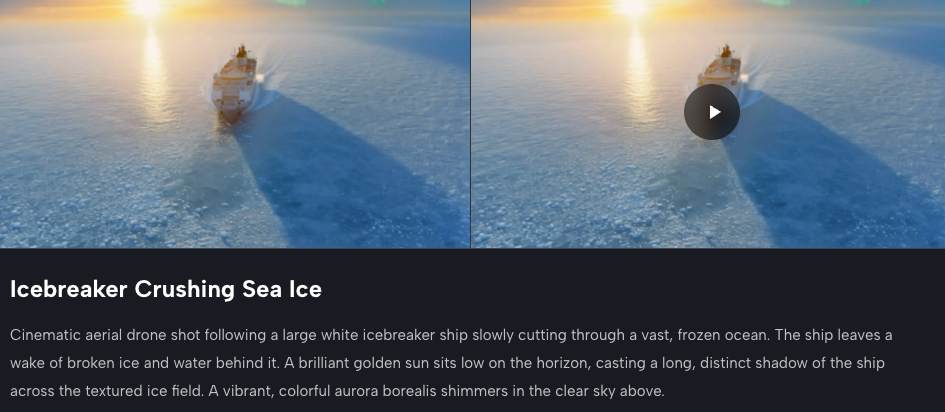
Here’s the key: the quality gap is real—but only if you prompt it properly. Basic prompts like “a woman walking in the rain” give decent results, nothing special. But when I added camera language, timing, and detailed scene setup, the output improved dramatically.
This guide covers what actually works: prompts you can use, mistakes to avoid, and where the model still struggles.
Why Prompting Matters More on HappyHorse 1.0
Most AI video models are pretty forgiving—you can give a vague prompt, and they’ll fill in the gaps to produce a decent clip.
HappyHorse works differently. It follows prompt structure closely, which is why it performs really well with specific inputs, and just average with vague ones.
This comes down to its architecture: a unified 40-layer Transformer that processes text, image, video, and audio together. It’s building a full understanding of your input.
So if your prompt is unclear, it has to guess. If it’s detailed and cinematic, it can execute precisely.
Its clips are only 5–8 seconds long. That’s enough to convey a clear moment—but only if each second is intentional.
A weak prompt wastes the clip. A structured one gives you something usable.
Prompt Structure That Works
Before the examples, here’s the framework I use on every generation now.
Subject + Motion + Camera + Lighting + Mood
Think of it less like writing a description and more like directing a shot. You need:
- Subject: who or what is in the frame, with specifics (age, look, wardrobe if relevant)
- Motion: what the subject is doing and how — not “walking” but “walking slowly through ankle-deep water, each step deliberate”
- Camera: shot type + movement. “Extreme close-up, handheld” vs “wide establishing shot, slow push in” gives completely different results
- Lighting: time of day, direction, quality — “soft diffused overcast light” vs “harsh midday sun from directly above”
- Mood / style: “documentary realism,” “cinematic drama,” “clean product aesthetic” — this shapes color grading and pacing
The order matters less than completeness. Missing any one of these tends to make the model fill in something generic.
Timing Cues (“8s duration, first 3s…”)
This one changed my results more than anything else. Since HappyHorse clips cap at 8 seconds, starting your prompt with a duration flag and a beat structure helps the model pace the action correctly.
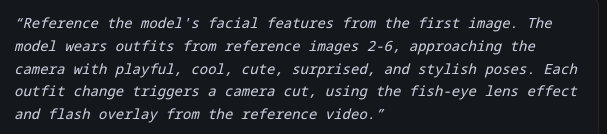
Something like: “8s duration. First 3 seconds: close-up on hands. Final 5 seconds: camera pulls back to reveal full scene.”
Tested this against the same prompt without timing cues — the paced version was noticeably tighter. According to HappyHorse’s own prompt guidance, the model handles multi-beat sequences well when you give it explicit structure to follow.
Cinematic Prompt Examples
Close-up portrait with motion
8s duration. Extreme close-up of a woman in her 30s, dark wet hair, rain running down her face, eyes focused ahead, subtle jaw tension. Camera holds still. Shallow depth of field. Overcast grey light from directly in front. Slow-motion feel, realistic skin texture, cinematic realism.
What I noticed: facial texture and micro-expression stability are genuinely impressive here. The rain interaction with skin was way more physically plausible than I expected. HappyHorse handles close-up human subjects better than most models I’ve tested — faces hold up under scrutiny instead of drifting.
Wide establishing shot
8s duration, first 2s: black. Slow fade reveals: wide shot, mountain valley at dawn, low mist between pine trees, single dirt road leading into the scene, no people. Camera very slowly pushes forward on a dolly. Soft blue-gold light on the horizon. Quiet, cinematic, high production value.
The push-in camera move on this one was smooth. What trips up a lot of models is maintaining background parallax coherence — trees at different depths all moving at the right rate. This held.
Action sequence
6s duration. A skateboarder lands a kick-flip on wet asphalt in an empty parking lot at night. Yellow sodium lights above. Low-angle side tracking shot moving with the board. Slow motion on impact, then returns to normal speed. Realistic motion blur. Urban, gritty, authentic.
Action is still the hardest category for any AI video model right now. HappyHorse does better than average, but complex limb movement in fast action can still look a bit mechanical. Manage expectations here — the environment and atmosphere are strong, the body mechanics are approximately right but not perfect.
Character & Narrative Prompt Examples
Maintaining identity across shots
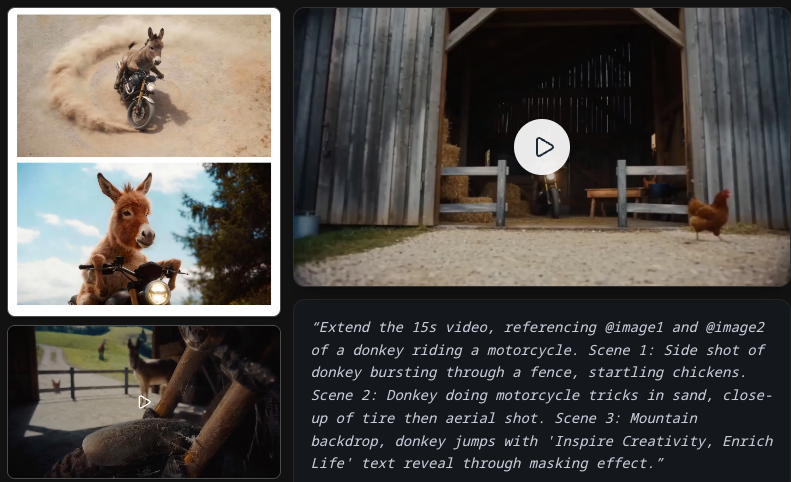
This is where HappyHorse has a real edge over models like Kling or older Runway generations. The multi-shot storytelling architecture is purpose-built for character consistency. When you’re doing image-to-video and reference your character with @Image1, the model locks onto the identity with notable accuracy — image-to-video rankings back this up, where it leads at Elo 1397, a 51-point gap over the next competitor.
For text-only character work:
8s duration. A young man, early 20s, dark curly hair, wearing a faded denim jacket, sits alone at a diner table at night. Empty coffee cup in front of him. He looks out the window, then slowly back at the table. Close-medium shot. Warm tungsten interior light against cold dark exterior. Quiet, slightly melancholic, naturalistic.
The wardrobe consistency matters more than you’d think. Specifying exact clothing items helps the model anchor the character. Vague descriptions (“casual outfit”) tend to drift between frames.
Emotion-driven scenes
Emotion communicates better through behavior than adjectives. Don’t write “she looks sad.” Write what sad looks like:
7s duration. A woman in her 40s stands in a doorway, one hand on the frame. She looks down the hallway, pauses, then slowly closes the door. Medium shot, static camera. Soft warm interior light. No dialogue. The scene communicates loss without showing it directly.
I ran several emotion-centric prompts. The model reads behavioral cues well — better than I expected from a system generating 5–8 second clips. What it can’t do is complex internal shifts within a single shot. Keep emotional arcs simple and action-driven.
Product & Commercial Prompt Examples
Hero product shot
8s duration. A luxury skincare serum bottle on a black marble surface, soft studio key light from upper left, subtle specular highlight along the glass edge. Camera slowly orbits the bottle in a 60-degree arc. Clean minimal aesthetic. Product stays sharp throughout. Commercial quality.
Orbit moves on products are where HappyHorse shines. The subject stability is excellent — the bottle doesn’t drift or deform mid-shot, which used to be a problem with earlier generation models. This is directly production-usable for e-commerce without any post-editing.
Lifestyle scene
7s duration. A woman in activewear stands on a rooftop at sunrise, facing the city, holding a water bottle. She takes a sip, looks out. Light tracking shot moving from side to behind. Golden hour warm light. Aspirational, clean, athletic lifestyle feel. No text. No logo.
Note: adding “no text, no logo” has helped me avoid occasional phantom text artifacts that can appear in commercial-style prompts. Not always necessary, but worth including when the framing is heavily product/marketing-adjacent.
Image-to-Video Prompt Tips
What to specify when you have a reference
When you’re going from a still image to video, your prompt changes purpose. You’re no longer building a scene from scratch — you’re directing what moves and how.
Focus on:
- Which element animates: “the subject’s hair moves,” “the water in the background ripples,” “the character blinks and slightly turns their head”
- Camera behavior: does the camera move or stay fixed?
- Duration rhythm: what happens in the first half vs the second half
8s duration. Image reference: [product flatlay]. Gentle diagonal camera drift, 30-degree tilt over 6 seconds. Small elements shift slightly with parallax. Dust particles float in the ambient light. Nothing dramatic — subtle life added to the composition.
What to leave out
When you have a reference image, skip re-describing what’s already visible. The model reads the image. Telling it again wastes prompt space and can create conflicts between your description and the visual.
Don’t describe colors, compositions, or subject appearance — the image handles all of that. Use your words for motion, timing, and camera.
Common Prompt Mistakes to Avoid
I have run hundreds of generations and these patterns consistently degrade output:
- Vague aesthetic words without visual grounding. “Make it cinematic” is almost meaningless. “Anamorphic lens flare, shallow depth of field, subtle film grain, slow dolly move” is cinematic.
- Overloading the action. Three or four distinct beats in one 8-second clip usually results in the model picking one or two and rushing or dropping the rest. One clear beat, maybe two at most.
- Mixing languages mid-prompt. Although the model supports multiple languages well individually, English/Chinese hybrids produced noticeably less stable results than pure English or pure Chinese.
- Complex camera choreography. One primary camera move per clip is ideal. Combining dolly + orbit + rack focus often causes the model to simplify or introduce drift.
- No timing cues. Explicit duration and beat structure is the single easiest upgrade for pacing and coherence.
When Prompts Stop Helping — Model Limits
Being honest about this matters if you’re deciding whether to build workflows around HappyHorse right now.
Clip length caps at 8 seconds. This is a real constraint for narrative storytelling. You can chain multiple generations, but there’s no in-model continuity across separate clips yet — you’re editing the seams yourself.
Fast, complex action still has issues. Highly articulated body movement — martial arts, gymnastics, complex dance — can look mechanical or drift noticeably. Limb tracking isn’t perfect at speed.
Audio generation is functional, not flawless. Joint audio synthesis works better than I expected for ambient sound and scene audio. Dialogue and lip-sync in English are solid. In other supported languages, accuracy varies — Japanese was close but not perfect in my tests. If precise lip-sync is critical for your project, generate 3–4 versions and pick the best.
Heavy camera move + complex subject = drift risk. Combining aggressive camera movement with a detailed subject (especially a face) increases the chance of subtle distortion. Simpler camera moves give the model more resources for subject fidelity.
One important thing to understand about leaderboard rankings is that Elo-based evaluations can be volatile for newly added models until enough votes are collected. HappyHorse’s scores are strong and consistent, but they will likely stabilize over time as more data comes in, so early high numbers may shift.
According to CNBC, HappyHorse was developed by Alibaba’s ATH AI Innovation Unit, led by Zhang Di, the technical architect behind Kling. This background helps explain its strong performance in motion quality and subject consistency.
In practice, the best approach is to generate at least 2–3 versions for each prompt and choose the best result. Output quality can vary significantly, even with the exact same input, so multiple runs greatly increase your chances of getting a usable or high-quality clip.
Conclusion
That’s what a few weeks of testing has taught me. HappyHorse 1.0 is genuinely the strongest model I’ve used for controlled cinematic shots and product work right now. But like any tool, the ceiling only reveals itself when the inputs are good.
Start specific. Build a prompt structure you can reuse. Run multiples. That’s the actual workflow.
FAQ
Q: Why do my HappyHorse videos look average? The most common reason is vague prompting. HappyHorse tends to follow instructions literally rather than filling in missing details, so if you don’t specify elements like camera movement or lighting, the results can look generic.
Q: Does HappyHorse 1.0 support multi-shot storytelling? Yes, but within a single 5–8 second clip. You can structure multiple beats using timing cues, but there’s no built-in continuity across separate clips, so longer stories require manual editing.
Q: How many generations should I run per prompt? At least 2–3 variations. Results can differ a lot even with the same prompt, so selecting the best output is key to getting high-quality clips.
Previous Posts: