Legal & Compliance Disclaimer: This article is strictly for educational and workflow optimization purposes, not legal advice. Digital asset generation—especially involving mature themes or human likenesses—is governed by strict IP laws, right-of-publicity statutes, and platform Terms of Service (TOS). Always consult legal counsel and refer to official platform guidelines before publishing.
Editor’s Note: Let’s cut to the chase: when professional VFX artists and visual creators search for an uncensored image to video pipeline, they aren’t trying to break the law. They are trying to escape automated moderation loops that mistakenly freeze classical anatomical art, editorial swimwear, or dark fantasy concepts. But removing software-level restrictions eliminates your safety net. Operating an unconstrained workspace means your studio takes 100% ownership of quality control and legal boundaries. Here is the exact Standard Operating Procedure (SOP) to animate static images safely and systematically without incurring catastrophic liability.
What Uncensored Images to Video Workflows Involve
Migrating from a moderated consumer app to an unconstrained image to video uncensored environment transforms how your studio manages data. Without algorithms blocking inputs or censoring outputs, your team must enforce technical guardrails across three stages:
- Static Source Assets: Video generators require uncompressed 16-bit PNG or TIFF master files. Ingesting lossy JPEGs introduces edge compression artifacts that cause “temporal hallucination”—where the AI invents chaotic pixels along character boundaries during motion. Legally, every asset must be logged in an internal registry recording its exact creation timestamp and copyright ownership before entering the animation queue.
- Motion Generation: An open AI video workflow generates temporal motion without algorithmic censorship. While this allows unhindered character articulation, it also introduces structural instability. An unconstrained model will execute whatever it calculates in the latent space, frequently causing limbs to morph or facial geometry to melt. You must replace vague text prompts with strict engineering parameters.
- Review and Export: Because an uncensored image to video generator does not apply automated safety labels, your team must perform manual pre-flight compliance audits. This includes scrubbing hardware routing paths from metadata and embedding cryptographically signed provenance manifests.
Boundaries Before Generation
Using a free uncensored image to video tool or an enterprise unconstrained cluster without operational guardrails exposes your studio to immediate legal liability and payment processor freezes. Enforce these three rules before generating a single frame:
- Synthetic-Only or Authorized Inputs: Under U.S. Copyright Office (USCO) guidance, AI-generated images lack copyright protection without proven human authorship (like manual masking or multi-layer compositing). If your input image depicts a real individual, you must hold an active commercial release agreement explicitly authorizing digital likeness simulation and AI animation.
- No Real-Person Misuse: The industry standard is absolute: zero non-consensual manipulation. Animating the likeness of any private citizen or public figure without contractual consent violates Right of Publicity laws and statutory digital replica acts (such as California’s AB 2602). Any unverified human face must be quarantined immediately.
- Distribution Context: What is permissible in a private sandbox may trigger immediate permanent bans on commercial cloud hosts. If you distribute internationally, align with regional mandates like the European Union AI Act, which requires machine-readable transparency labeling (watermarking) for commercial synthetic video deployers.
Workflow Checks for Adult Video Drafts
When animating mature digital art or complex anatomical visual assets, maintaining high production values while mitigating platform risks requires a standardized, parameter-driven workflow.
Visual continuity & parameter locks
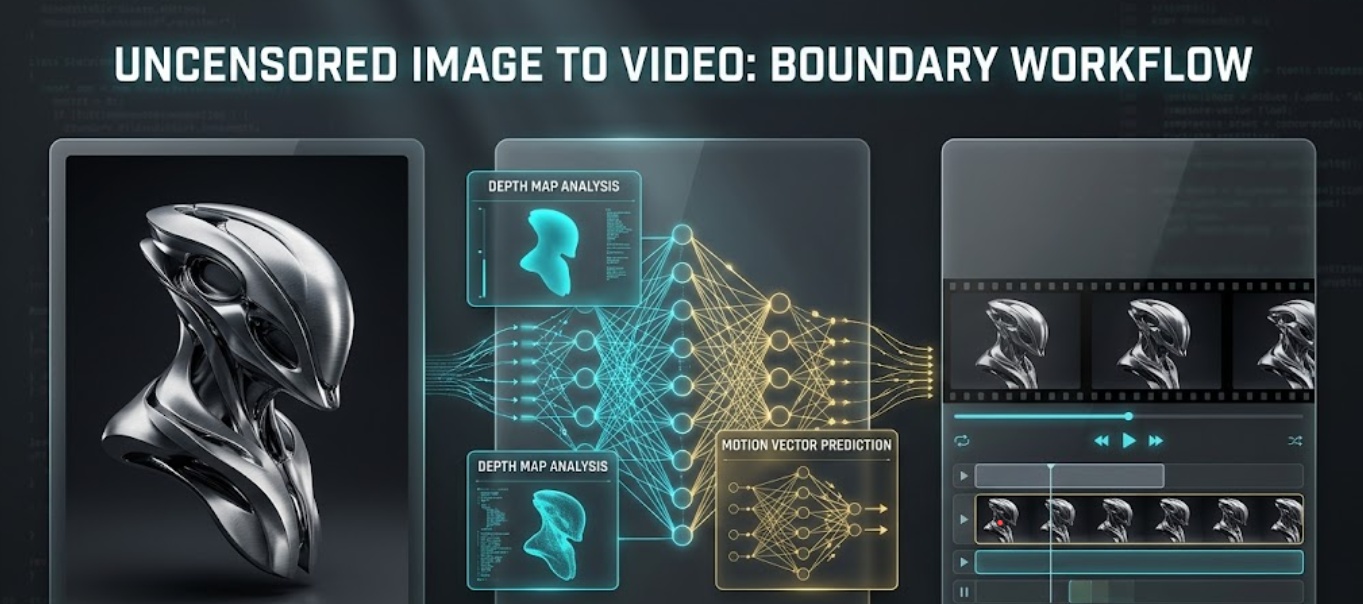
Identity morphing is the most frequent technical failure in generative video. To prevent facial proportions or body markings from shifting between frames, studios bind the static source image to the temporal generation node using Image Prompt Adapters (IP-Adapters) and ControlNet depth maps.
[Static Source: 16-bit PNG] ──► [IP-Adapter / Depth Lock] ──► [Motion Scale ≤ 3.0] ──► [Zero Morphing Output]To prevent latent space hallucinations, lock your rendering engine to these proven studio parameters:
| Technical Parameter | Recommended Setting | Operational Purpose |
| Motion Scale (Camera Physics) | 2.0 – 3.0 (Low) | Prevents the virtual camera from making erratic leaps that melt background architecture. |
| Video Denoising Strength | 0.35 – 0.45 | Forces the AI to retain the original texture and geometry of the static reference image. |
| IP-Adapter Weight | 0.85 – 0.90 | Locks character identity, scars, and specific anatomical details across sequential frames. |
Revision notes and final approval
Tracking modifications across multiple iterations requires centralized orchestration. Rather than relying on fragmented chat threads, production teams utilize an integrated platform like CrePal to manage the workflow. In this ecosystem, the AI Director workspace serves as the orchestration layer—scripting narratives, ordering camera shot sequences, managing client revision loops, and overseeing export configurations.
Before a video draft leaves the server, it must pass a pre-flight sign-off: verify biometric features against signed talent release IDs, audit frames for temporal shimmering, and embed digitally-signed C2PA content credentials to prove authorship.
Publishing Limits and Team Rules
Maintaining an unconstrained production workflow requires enforcing rigid internal governance to prevent data leaks or publishing violations:
- Principle of Least Privilege: Freelance animators and external contractors should only receive sanitized, layer-separated video handoff packages. Raw personal data and identity release forms must remain segregated on encrypted servers managed exclusively by legal leads.
- Staging Isolation: Video drafts generated during early look-development (lookdev) must be tagged with persistent metadata markers that block automated upload to public Content Delivery Networks (CDNs).
- Mandatory Training: Team members must undergo semi-annual compliance reviews to reinforce that software-level freedom never supersedes platform Terms of Service (TOS) or federal intellectual property laws.
FAQ
What evidence helps respond to a later complaint?
If a copyright holder or platform raises a complaint regarding a published video draft, your best defense is an immutable chain of custody. Produce the cryptographically signed C2PA manifest embedded within the file, the time-stamped SHA-256 hash linking the video to the approved static source image, the executed commercial talent release, and the written sign-off log from your compliance lead.
Who updates team rules after platform rejection?
When a hosting provider or merchant gateway updates its acceptable use policy, the Studio Compliance Officer and Lead Technical Director must act jointly. The Compliance Officer defines the legal shift, and the Technical Director translates it into actionable engineering guardrails (adjusting negative prompt libraries, motion scale limits, or export filters) within 48 hours.
How should rejected outputs be labeled in archives?
Files that fail quality control or violate likeness boundaries must be moved immediately to an isolated, encrypted quarantine archive. Rename them using a standardized convention: [STATUS]_[YYYYMMDD]_[ProjectID]_[ReasonCode].[ext] (e.g., REJECTED_20260720_PRJ402_LikenessDrift.mp4). Retain these quarantined logs for five years to demonstrate good-faith compliance during audits.
When should client-facing records exclude draft visuals?
Strictly exclude draft visuals from client deliverables whenever they represent unverified experimental renders, transitional lookdev files, or assets that have not cleared pre-flight compliance review. Clients should only receive compliance-cleared milestone previews that have been formally signed off within your AI Director workspace.
Conclusion
Adopting an uncensored image to video workflow gives visual artists and studios complete creative sovereignty—allowing you to render complex physical dynamics and intricate themes without algorithmic interference. However, technical freedom demands institutional discipline. By replacing automated restrictions with a rigorous Standard Operating Procedure—enforcing strict source provenance, utilizing management layers like CrePal, and executing exhaustive pre-flight reviews—you can achieve exceptional visual results without exposing your business to catastrophic legal or platform risks. True creative freedom is built on industrial-grade operational control.