Ideogram 2 is an AI image generator launched in August 2024 that specializes in creating images with accurate, readable text. Unlike competitors like DALL-E and Midjourney, which produce garbled text, Ideogram 2 renders text correctly in multiple fonts, sizes, and styles. The tool offers free and paid plans starting at $0 for basic use, making it ideal for social media managers, content creators, and small business owners who need graphics with clear text.
What is Ideogram 2 and Why Should You Care?
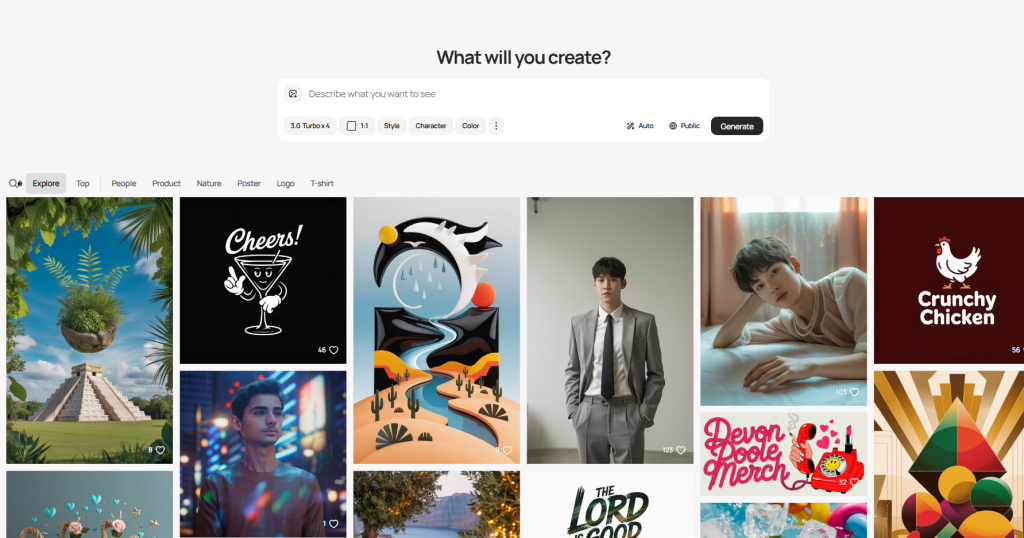
What is Ideogram 2?
Ideogram 2 is an AI image generator that launched in August 2024. Think of it as a tool that turns your text descriptions into images.
But here’s what makes it different: it can actually write readable text inside images. You know how most AI image generators create gibberish when you ask them to add words? Ideogram 2 solves that problem.
You can create:
- Social media graphics with clear captions
- Logos with proper text
- Marketing materials with readable headlines
- Memes that actually make sense
The tool offers both free and paid plans, starting at $0 for basic use.
What Problem Does Ideogram 2 Solve?
Every AI image generator has one embarrassing weakness: text rendering.
Ask DALL-E or Midjourney to create a “Sale 50% Off” banner, and you’ll get something like “Slae 05% Fof.” It’s frustrating when you need simple text in your images.
Ideogram 2 fixes this. Its text-rendering engine can generate accurate text in multiple fonts, sizes, and styles. This means you can finally create professional graphics without jumping into Photoshop afterward.
Why does this matter to you?
- Save time on post-production editing
- Create social media content faster
- Design marketing materials without a designer
- Produce print-ready graphics with proper text
Ideogram 2.0 vs 1.0: What’s New?
If you used Ideogram 1.0, here’s what changed:
Better image quality: Version 2.0 produces sharper, more photorealistic images. The improvement is noticeable in details like skin texture and lighting.
Improved text accuracy: Text rendering went from “pretty good” to “reliably accurate.” You’ll see fewer spelling errors and better font consistency.
New style controls: Version 2.0 added preset styles (like “Design” and “3D”) and a color palette system. This gives you more creative control without writing complex prompts.
Magic Prompt enhancement: The AI now better understands what you want and adds helpful details automatically.
The upgrade makes Ideogram 2 feel like a professional tool rather than an experimental one.
Features Deep Dive: What Ideogram 2 Actually Does
Text Rendering – The Signature Strength
This is where Ideogram 2 really shines.
How it works: You type what text you want in your image, and Ideogram 2 places it accurately. No more random letters or backwards words.
What you can control:
- Font styles (handwritten, bold, serif, sans-serif)
- Text placement (centered, top, bottom, integrated into the scene)
- Text size and emphasis
Real-world example: Need a birthday card that says “Happy 40th Birthday, Sarah”? Ideogram 2 will spell it correctly and make it look good. Other AI tools would give you “Hapy 04th Bithday Srah.”
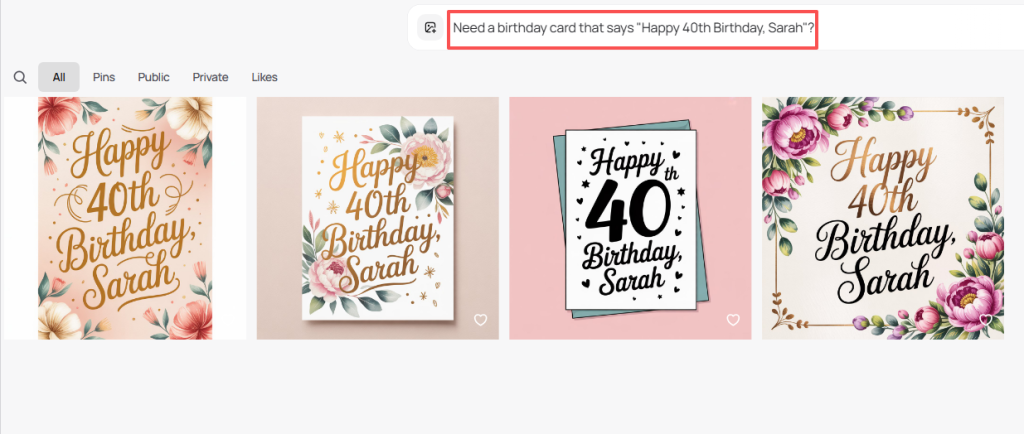
The text rendering works in about 85-90% of cases. When it fails, it’s usually with very long phrases or unusual fonts.
Style Control System
Ideogram 2 gives you five preset styles to choose from:
- General: Balanced, works for most purposes
- Realistic: Photorealistic images that look like actual photos
- Design: Clean graphics perfect for logos and branding
- 3D: Rendered 3D objects with depth and lighting
- Anime: Japanese animation style
Why this matters: Instead of writing “make it look realistic with proper lighting and photographic quality” in your prompt, you just click “Realistic.” It saves time and gives consistent results.
You can also mix styles with your own descriptions for custom looks.
Color Palette Control
This feature lets you choose the exact colors in your image.
How to use it: Select from preset color schemes (like “Pastel,” “Vibrant,” or “Monochrome”) or input specific hex codes for brand colors.
The benefit: If you’re creating content for a brand with specific colors (like Coca-Cola red), you can ensure your images match perfectly. No more generating 20 versions hoping one has the right colors.
This is especially useful for:
- Social media templates (keep your brand consistent)
- Marketing materials (match your website colors)
- Print designs (ensure color accuracy)
Magic Prompt & Describe Features
Magic Prompt takes your short description and expands it automatically.
Type: “a cat in space” Magic Prompt adds: “a fluffy orange tabby cat floating in deep space, wearing a tiny astronaut helmet, surrounded by colorful nebulas and distant stars, cinematic lighting, highly detailed”
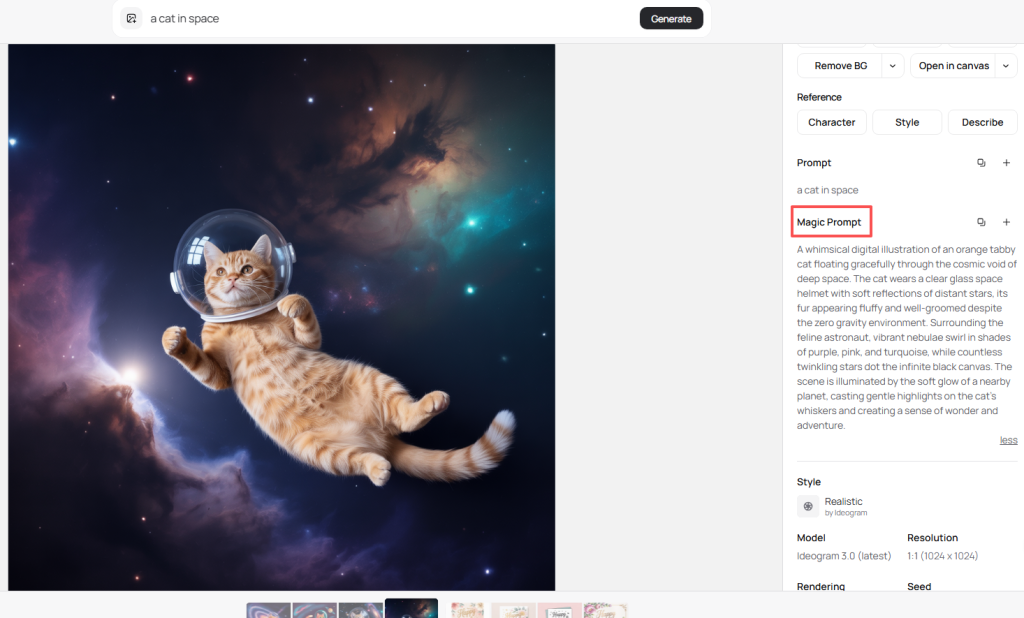
Describe works in reverse. Upload an image you like, and Ideogram 2 tells you what prompt would create something similar. This is perfect for reverse-engineering styles you want to copy.
Practical use: Found a design aesthetic you love? Use Describe to understand it, then create your own variations.
Other Key Features
Remix function: Upload an existing image and modify it with text prompts. Change colors, add elements, or adjust the style without starting from scratch.
Multiple aspect ratios: Create images in different sizes (square for Instagram, wide for YouTube thumbnails, vertical for Pinterest).
Negative prompts: Tell Ideogram 2 what NOT to include. Don’t want people in your landscape? Add “people” to the negative prompt.
Batch generation: Create 4-8 variations at once to pick your favorite.
Real Performance: Strengths, Weaknesses & Testing Results
What Ideogram 2 Does Best
After real-world testing, here’s where Ideogram 2 consistently delivers:
Text-heavy designs: Anything requiring readable text works beautifully. Posters, social media quotes, announcement graphics, and memes come out professional-looking.
Logo creation: The combination of text rendering and the Design style preset makes logo generation actually usable. You can create 10 logo concepts in minutes.
Marketing graphics: Need a quick Facebook ad or Instagram story? Ideogram 2 handles these fast. The color palette control keeps everything on-brand.
Typography art: Creative text layouts and word art look stunning. The AI understands how to make text itself become the visual element.
Consistency: Unlike some competitors, Ideogram 2 produces reliable results. Run the same prompt twice, and you’ll get similar quality both times.
Critical Weaknesses & Limitations
Let’s be honest about what doesn’t work well:
Complex scenes fail: Ask for “three people sitting at a restaurant table with specific facial features” and you’ll get weird results. Hands might have six fingers, faces look distorted, or the composition feels off.
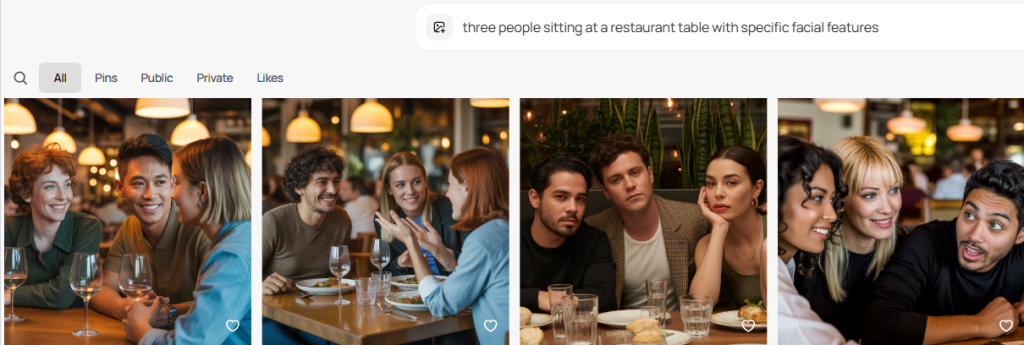
Text still isn’t perfect: While 85-90% accuracy is impressive, that 10-15% failure rate matters. Budget extra time to regenerate images when text comes out wrong.
Limited artistic control: You can’t easily adjust small details after generation. If the image is 95% perfect but one element is wrong, you often need to start over.
Photo editing capabilities lag behind: Tools like Photoshop’s AI features offer more precise control for actual photo manipulation. Ideogram 2 is better for creation than editing.
Prompt sensitivity: Small wording changes can dramatically alter results. You’ll spend time learning which phrases work best.
Speed: Generation takes 20-30 seconds per image. Not slow, but not instant either.
Real-World Use Cases: What to Create (and Avoid)
Best use cases (what you should create):
- Social media graphics with text overlays
- Simple logos and brand marks
- Motivational quote images
- Product mockups with text labels
- Event flyers and announcements
- Book covers with clear titles
- Presentation slides with visual elements
Avoid these (you’ll waste time):
- Complex portraits with specific features
- Detailed illustrations requiring precise anatomy
- Images needing extensive post-generation editing
- Photorealistic scenes with multiple people interacting
- Anything requiring exact spatial relationships between objects
My recommendation: Use Ideogram 2 as your first-draft tool. Generate concepts quickly, pick the best ones, then refine them in other tools if needed.
Pricing, Comparison & Final Verdict
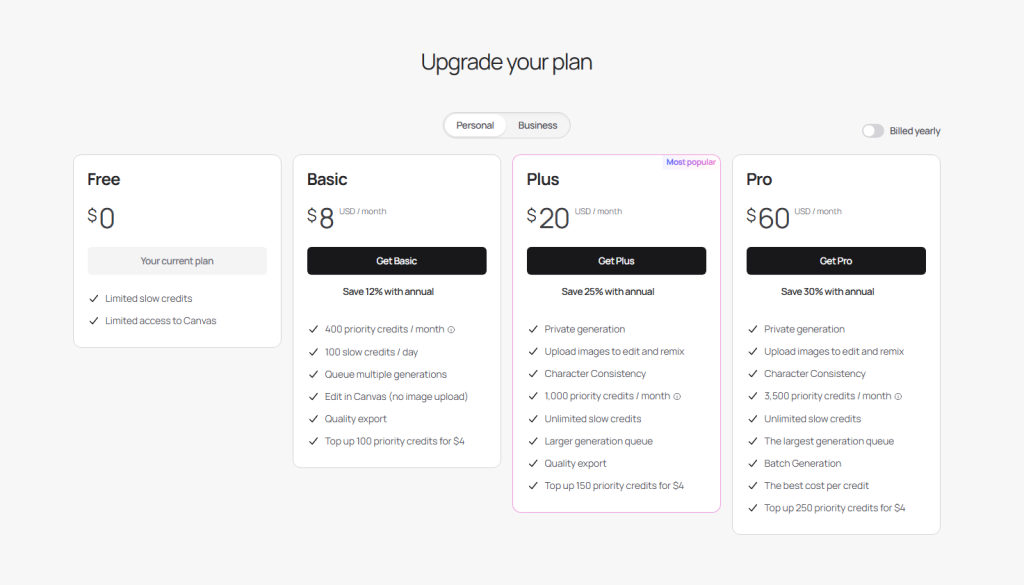
Complete Pricing Breakdown
Ideogram 2 offers three pricing tiers:
Free Plan ($0/month):
- 25 images per day
- Basic priority (slower generation)
- Watermarked images
- Public gallery only (all images visible to others)
Basic Plan ($8/month):
- 400 images per month
- Standard priority
- No watermarks
- Private generation option
- Commercial use allowed
Plus Plan ($20/month):
- 1,000 images per month
- Priority generation (faster)
- No watermarks
- Private generation
- Commercial use
- Advanced features access
My take: The free plan is perfect for testing. If you create content regularly, the $8 Basic plan offers solid value—that’s just $0.02 per image.
Ideogram 2 vs Major Competitors
vs. Midjourney ($10-$60/month):
- Ideogram wins: Text rendering, easier to use, cheaper entry point
- Midjourney wins: Artistic quality, complex scenes, community features
- Bottom line: Choose Ideogram for text-heavy work, Midjourney for pure artistry
vs. DALL-E 3 (ChatGPT Plus $20/month):
- Ideogram wins: Better text accuracy, style presets, dedicated interface
- DALL-E wins: Integration with ChatGPT, better at understanding complex prompts
- Bottom line: DALL-E for conversational creation, Ideogram for design work
vs. Adobe Firefly (included with Creative Cloud):
- Ideogram wins: Superior text rendering, more style options
- Firefly wins: Commercial safety (trained only on licensed content), Photoshop integration
- Bottom line: Firefly for professional commercial work, Ideogram for speed and text
Final Verdict & Rating
Overall Rating: 8.5/10 (based on weighted metrics: text accuracy 40%, usability 30%, consistency 20%, cost 10%)
What pushes the score up:
- Industry-leading text rendering (genuinely solves a major pain point)
- Fair pricing for what you get
- User-friendly interface anyone can learn
- Reliable, consistent output quality
What holds it back:
- Still struggles with complex compositions
- Limited fine-tuning after generation
- Not the best choice for pure artistic work
The reality: Ideogram 2 isn’t trying to be everything. It’s a specialized tool that does one thing exceptionally well—creating images with accurate text. For that specific job, it’s the best option available right now.
Who Should Use Ideogram 2?
Perfect for:
- Social media managers needing quick graphics
- Small business owners creating their own marketing
- Content creators making thumbnails and posts
- Bloggers needing article images with text
- Anyone who regularly needs text in images
Not ideal for:
- Fine artists seeking maximum creative control
- Professionals needing complex photo manipulation
- Users requiring photorealistic portraits
- Anyone expecting AI to replace a skilled designer completely
My honest recommendation: Try the free plan for a week. Create 10-15 different types of images you actually need. If the text rendering saves you time and the results look good, upgrade to Basic. If you’re fighting with it constantly, stick with your current tools.
Frequently Asked Questions
Can I use Ideogram 2 images commercially? Yes, but only on paid plans. Free plan images cannot be used for commercial purposes.
How accurate is the text rendering really? About 85-90% accurate in testing. You’ll occasionally need to regenerate, but it’s far better than any competitor.
Does it work in languages other than English? Yes, it supports multiple languages, though English typically gives the best results.
Can I edit images after generation? Limited editing through the Remix feature. For extensive edits, export to Photoshop or similar tools.
Is there a refund policy? Yes, Ideogram offers refunds within 14 days if you’re unsatisfied with paid plans.
Previous posts: