
Hi everyone, Dora here. I spent the back half of last year bouncing between four AI video tools, and then one of them just… died. So if you’re trying to compare Sora to other AI video generators in 2026, here’s the thing nobody tells you upfront: Sora isn’t really in the race anymore. OpenAI pulled the plug. That changes the whole conversation, and it’s exactly why I wanted to write this down — what’s actually worth your money right now, what each tool is good at, and which one fits the kind of work you do.
I’m not going to pretend I tested every render farm on earth. But I’ve made enough clips, burned through enough credits, and rage-quit enough generations to tell you where these tools land. Let’s get into it.
The Contenders
Sora, Kling, Luma, and Runway in one sentence each
Sora was OpenAI’s text-to-video model and social app — and as of 2026, it’s being shut down, so I’ll explain what that means for you below instead of pretending it’s still a live option.
Kling (made by Kuaishou) is the value champion: long clips, native audio, and the lowest paid entry price of the bunch.
Luma (Dream Machine, running the Ray3 family) is the realism-and-HDR pick, built for people who care how footage holds up in a color pipeline.
Runway (now on Gen-4.5) is the closest thing to a real production studio in your browser — best control surface, steepest learning curve.
Core Differences Table
Access, quality, editing control, cost model, and workflow fit
| Sora | Kling | Luma (Ray3) | Runway (Gen-4.5) | |
| Status (2026) | App shut down Apr 26; API ends Sep 24 | Active, frequent updates | Active | Active |
| Quality lean | (legacy) strong realism | Cinematic, good motion | Top-tier realism + HDR | Cinema-grade, physics-first |
| Editing control | Limited | Start/end frame, Elements | Modify Video, keyframes | Aleph, Act-Two, deepest |
| Cost model | (ending) | Cheapest entry | Mid | Credit-based, pricier |
| Best workflow fit | None going forward | Budget social + ads | Realistic B-roll | Pro, multi-shot film work |
A quick note before you read those rows as gospel: model versions and prices in this space move weekly. I’ll point you to official pages for anything that matters to your wallet.
Quality Compared
Realism, motion, prompt fidelity, and consistency
Here’s where it gets interesting, because “quality” means four different things and no single tool wins all of them.
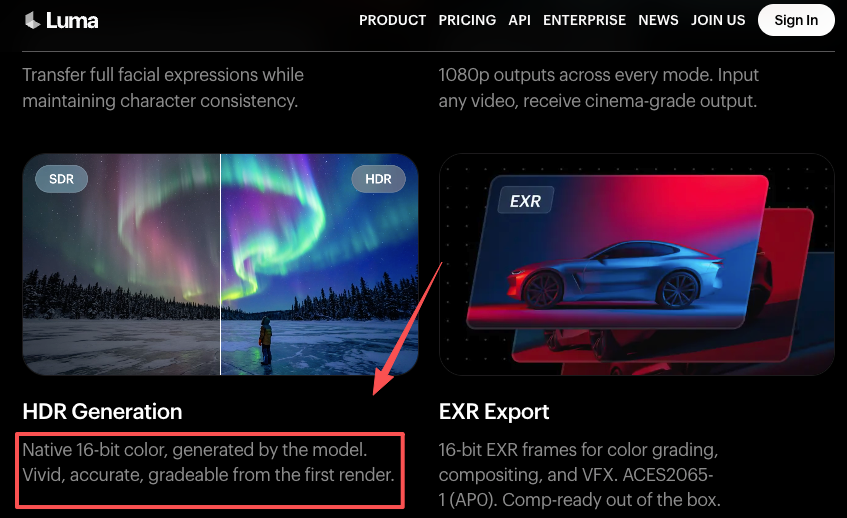
For raw photorealism — footage you genuinely can’t tell came from a model — Luma’s Ray3 has the edge in independent 2026 head-to-heads. Its headline trick is being the first mainstream model to ship a native 16-bit HDR pipeline with EXR export, which Luma documents on its official Ray3 product page. Honestly? That HDR pitch gets oversold. It only matters if you actually push footage through color grading. If you’re posting to TikTok, what you’re really buying from Luma is the realism and the speed, not the EXR.
Runway’s Gen-4.5 reads slightly more stylized on like-for-like prompts, but it nails physics and motion. It topped the Artificial Analysis text-to-video leaderboard at launch in late 2025 and still has the strongest control surface I’ve used. When I need the same character to hold up across several shots, Runway’s reference controls keep things steadier than Luma’s — that multi-shot consistency is where it pulls ahead.
Kling sits in a sweet spot for motion. The 2.6 release added native audio in a single pass, and the newer 3.0 line pushes toward physics-accurate movement and longer multi-shot stories. It’s not the absolute realism king, but for the price it punches way above its weight. The classic AI weaknesses haven’t vanished, though — hands and fingers still betray it sometimes, and long extensions degrade. Quick reality check: that’s true for all of these, not just Kling.
And sora ai image to video? The original Sora and sora 2 ai image to video workflows were genuinely impressive — Sora 2 could extend a clip while holding physics and lighting, which made it a favorite for b-roll. But impressive doesn’t matter if you can’t log in.
Workflow Compared
Single-model generation vs editing and production pipelines
This is the split that actually decides which tool you should pay for.
If your workflow is generate-and-go — type a prompt, get a clip, post it — Kling and Luma are built for that. Kling’s interface is rougher than Runway’s, but it gets you to a finished, sound-on clip fast. Luma’s path to a first draft is the gentlest of the four; three or four steps and you’ve got something.
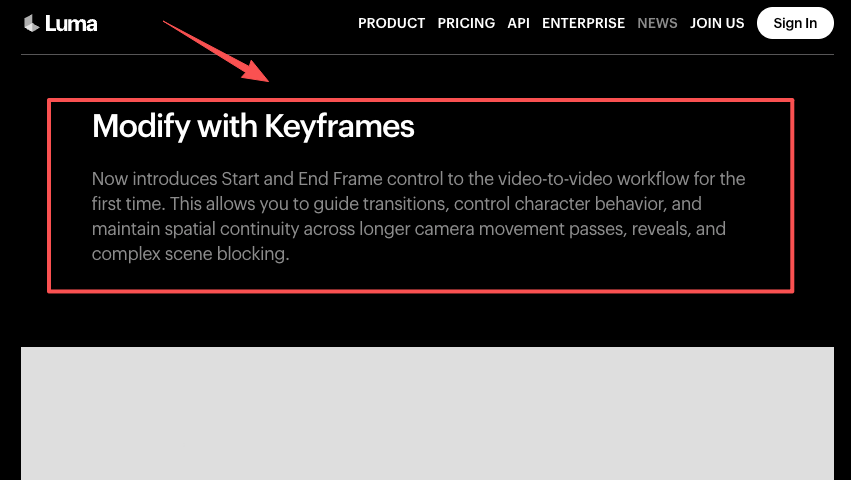
If your workflow is generate-then-direct, Runway is in a different league. Its Aleph editing system lets you change things in an existing clip through text prompts without regenerating the whole thing, and Act-Two does performance capture — transferring a real performance onto a character. Luma answers with Modify Video, which reshapes footage you already shot while keeping the lighting and performance intact (their Ray3 Modify announcement walks through how the keyframe and character-reference controls work). These are the features that separate “I made a clip” from “I produced a scene.”
The kling ai vs runway decision usually comes down to this exact axis: Kling optimizes for output-per-dollar, Runway optimizes for control. Neither is wrong. They’re answering different questions.
Pricing and Access Notes
Use official pages and current availability only
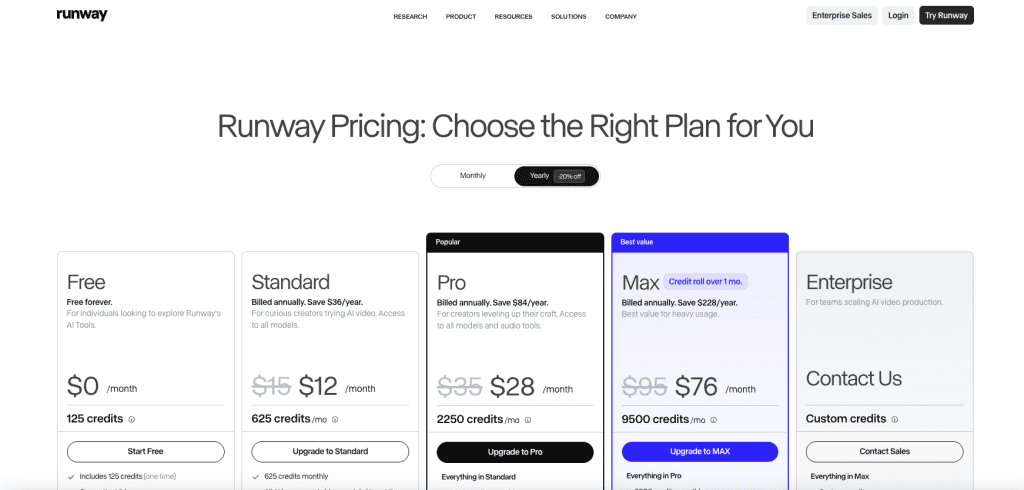
I’m deliberately not writing prices in stone here, because they shift constantly and I don’t want this post to lie to you in three months. Use it for how to think, then verify on the official page before you pay.
What to actually check:
- Does the plan charge separately by model? Runway does — a second of Gen-4.5 costs far more credits than a second of its cheaper Turbo model. Plan your budget around the model you’ll actually use, per Runway’s official pricing page.
- Does the free tier refresh or run dry? Kling’s free tier gives recurring daily credits; Runway’s free credits are a one-time bank that doesn’t renew.
- Are retries priced in? AI video is iterative. Most usable clips take me three to eight tries. A plan that looks generous on paper gets thin once you count rerenders.
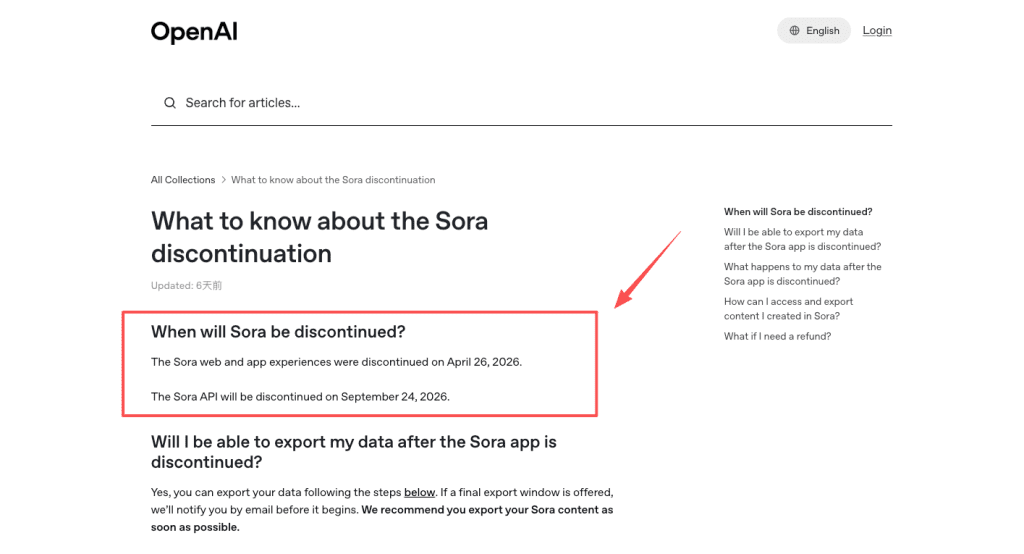
For Sora, the access note is blunt: there’s nothing to buy. According to OpenAI’s official discontinuation notice, the web and app experiences ended on April 26, 2026, and the API shuts down on September 24, 2026. If you still have clips in there, export them now — leftover content gets permanently deleted.
Best for Each Scenario
Social clips, cinematic shots, product visuals, and teams
- Social clips (TikTok, Reels, Shorts): Kling. Cheap, fast, sound-on, and it does vertical natively. Image to video ai luma also works well here if you want a more photoreal look and don’t need audio.
- Cinematic shots / short films: Runway. The control and multi-shot consistency are worth the learning curve and the higher cost.
- Product visuals and atmospheric B-roll: Luma. The realism and HDR make establishing shots and product reveals shine.
- Teams and client work: Runway again — it has the deepest editing toolkit and real collaboration seats, though you’ll feel the credit math fastest here.
Decision Criteria
When to choose each tool
So what’s the bottom line? Pick by the shape of your output, not the leaderboard.
Choose Kling if budget and clip length matter most and you want audio baked in. Choose Luma if photorealism or a color-managed pipeline is the priority. Choose Runway if you need frame-level control, character animation, or you’re producing multi-shot work that has to stay consistent.
And Sora? Don’t build anything new on it. If you’ve got assets trapped inside, export and migrate — the broader practice in 2026 is keeping your creative concepts model-agnostic so you can move them between tools as the landscape shifts. Google’s own Search Central guidance on helpful content is a decent reminder here too: the durable advantage isn’t the tool, it’s knowing why you’re choosing it.

I’ll keep using two of these in parallel, honestly — Luma when I want realism and Runway when I need control. That’s not indecision. That’s just what working creators actually do.
FAQ
Is Sora still one of the best options in 2026?
For anyone still holding legacy assets, Sora 2 ai image to video remains useful for extending existing clips with decent physics and lighting continuity. However, for any new project starting from scratch, the shutdown means you need to migrate workflows now. Many creators are moving their sora ai image to video prompts directly into Luma or Runway, where image-to-video ai luma currently offers stronger HDR and realism for continuation-style work.
How do the pricing models compare?
Beyond the sticker price, watch how each tool charges for iteration. Kling tends to be more forgiving on failed generations in the lower tiers, while Runway’s credit system can feel expensive when you’re doing heavy kling ai vs runway testing on complex motion. Luma sits in the middle but rewards users who batch shorter clips. The real difference shows up when you model your monthly retry rate — a tool that looks cheap on paper can become the most expensive once you factor in the number of generations needed to get one usable take.
Which is most beginner-friendly?
Luma currently has the gentlest on-ramp for new users who want quick, high-quality results without deep editing knowledge. Its image to video ai luma workflow lets you start with a simple prompt or reference image and get something watchable in fewer steps than Runway. Kling is a close second for pure speed, but Runway’s deeper controls (while powerful) require more time to learn, making it better as a second tool once you’re comfortable with the basics.
What should creators consider when choosing between different image-to-video tools?
When comparing sora ai image to video (or its successor alternatives) with current options, focus on your specific output needs. For example, kling ai vs runway often comes down to budget versus control — Kling wins for fast, affordable social clips, while Runway shines when you need precise multi-shot consistency. Image to video ai luma stands out if realism and HDR matter more than editing depth. Test the same prompt across tools with your real use case (product shots, character consistency, or cinematic B-roll) rather than relying on general benchmarks.
Previous posts:






