Hi, Dora here. It was almost 1 AM when a friend dropped a 22-second AI clip into our group chat — a tiny revenge story with a twist ending — and I watched it four times before I noticed I’d stopped breathing. So naturally I spent the next two weeks testing every reel stories ai app I could get my hands on, running close to 40 short story clips across Reels, Shorts, and TikTok. My test set was simple: 14 revenge/twist stories, 11 confession-style clips, 8 educational mini-stories, and 7 product-story formats. I exported each one in 9:16 and checked whether the first two seconds, captions, and final reveal survived on a phone screen. This is the honest version of what I learned: which workflows actually hold a story together, which ones spit out pretty nonsense, and how to pick the right tool for the format you’re posting to.
Quick take: No single tool wins everything. Script-to-short apps are fastest for a first draft, template apps are best for repeatable formats, and agent-style editors hold longer narratives together. Match the tool to the platform you’re posting to — that’s basically the whole game.
What Makes a Story-Based Reel Work
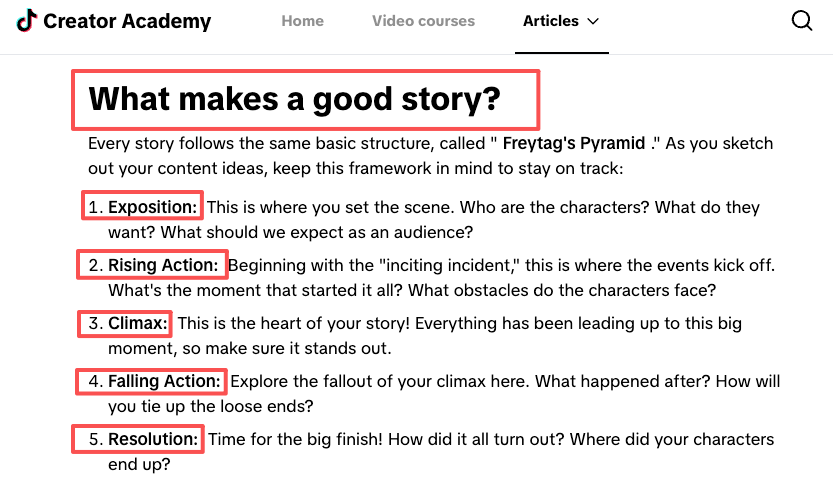
A story reel isn’t “a clip with a caption.” It’s a tiny arc — setup, tension, payoff — squeezed into a vertical frame someone watches with their thumb already hovering over the next video. The first one or two seconds decide everything. If your hook doesn’t land, the rest of your story video never gets seen. Doesn’t matter how gorgeous frame seven is.
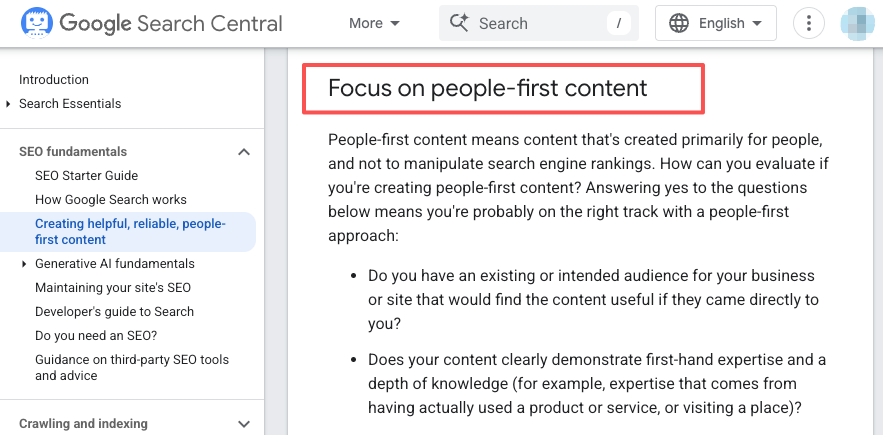
Here’s the part most AI tools get wrong: they optimize for looking good, not for holding attention. You end up with beautiful shots and zero reason to keep watching. Google’s guidance on people-first content is written about web pages, but the principle bleeds straight into video — anything made mainly to game an algorithm feels hollow, and people bail. Stories are the same. If a clip exists only to fill 20 seconds, viewers feel it and scroll.
What actually works:
- A hook that plants a question in the first beat (“He didn’t know the camera was still recording…”).
- One emotional turn — a reveal, a reversal, a punchline.
- A payoff that arrives before people run out of patience.
Everything below is me judging tools against that bar.
How We Compare AI Story Reel Apps
I scored each workflow on five things: hook quality, scene pacing, caption safety, edit flexibility, and clean 9:16 export. A clip only “passed” if I could imagine posting it without apologizing for the AI weirdness first.
Hook creation
This is where most apps quietly fail. A lot of generators write a competent middle and a flat opening line. I’d run a prompt, get a clean 25-second clip, and realize the first sentence was “In a world where…” — instant scroll. The tools I kept coming back to let me rewrite or regenerate just the hook without re-rolling the whole video. If you can’t iterate on the first two seconds cheaply, you’ll burn credits chasing one decent opener — and that gets expensive fast.
Scene pacing
Pacing is the difference between “a story” and “five pretty shots in a row.” I watched for whether scene length matched tension — quick cuts as stakes rise, one held beat on the reveal. Agent-style tools that storyboard first tend to pace better, because they’re reasoning about the whole arc instead of generating each shot in isolation. The weaker ai shorts tools gave every scene the same 3-second slot, which flattens any drama you were trying to build.
Vertical export
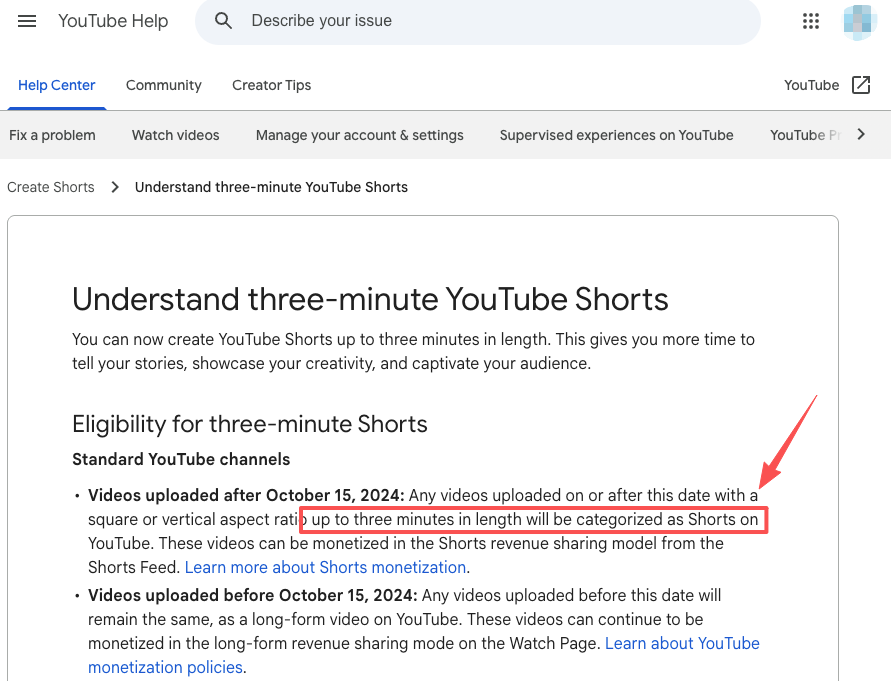
Sounds boring. Matters a lot. Your story can be perfect and still die because the export came out 1:1 or had baked-in letterboxing. Native 9:16 at 1080×1920 is the floor, not a bonus. YouTube now categorizes vertical uploads up to three minutes as Shorts (straight from their help docs), so there’s real room for longer arcs — but only if your tool exports clean vertical without cropping your captions off the bottom of the screen. I checked every app’s output on an actual phone, not the preview window. The preview lies.
| Test factor | What I checked | Why it matters |
| Hook quality | Could I understand the tension in 2 seconds? | Weak hooks kill retention. |
| Scene pacing | Did the reveal get a different beat than the setup? | Same-length scenes flatten stories. |
| Caption safety | Did captions survive phone preview? | Cropped text makes the video feel broken. |
| Edit flexibility | Could I change one scene without rebuilding everything? | Saves credits and time. |
| Vertical export | True 9:16, no letterboxing | Required for Reels, Shorts, and TikTok. |
Best Workflow Types
There isn’t one “best” tool. There are three workflow shapes, and the right one depends on how you like to work.
Script-to-short apps
You type or paste a script, the app generates scenes, voiceover, and captions. This is the fastest path from idea to first draft, and it’s what most people mean when they search for an ai youtube shorts generator. The trade-off: you hand over a lot of creative control up front. I find these brilliant for volume — knocking out five versions of one story to see which hook sticks.
Story template apps
These start from a proven structure — a confession-style monologue, a “things I wish I knew” list, a twist-ending micro-story — and slot your content into it. Less freedom, way more consistency. If you’re building a repeatable series, templates are how you stop reinventing the format every single time.
AI editing workflows
Here you bring your own footage or generated clips and use AI to cut, pace, caption, and restructure. Closer to traditional editing with an assistant riding shotgun. It’s the most control and the most work. AI editing workflows frame this as moving from operating tools to directing an agent, where you set the goal and adjust as it works — which, honestly, is the part that quietly changed how I think about making AI shorts. Less clicking, more directing.
Best Reel Stories AI Apps by Workflow
I wouldn’t rank these as one universal top 5, because they solve different parts of the story workflow. But if you’re choosing based on how you actually make short videos, here’s the cleaner split.
| App / workflow | Best for | Where it works well | Main limitation |
| CrePal | AI Director workflow | Turning a prompt, script, or rough story idea into a structured video workflow | Better for directing outcomes than frame-by-frame manual editing |
| InVideo AI | Script-to-short drafts | Fast narration-led shorts and simple social clips | Can feel templated if the script is weak |
| CapCut | Template-based story edits | Trend-aware TikTok/Reels formats, captions, fast manual polish | More editor/template tool than story reasoning system |
| OpusClip | Repurposing long videos into Shorts | Pulling short story moments from podcasts, webinars, or interviews | Not ideal for creating fictional stories from scratch |
| Runway | Shot generation and visual experiments | Generating specific cinematic shots or visual scenes | You still need to assemble and pace the full story elsewhere |
The short version: use CrePal when you want the AI to help structure the whole story workflow, CapCut when you already know the format, InVideo AI when you want a quick draft from a script, OpusClip when your story already exists inside long footage, and Runway when you need a specific generated shot.
Reels vs Shorts vs TikTok Story Formats
Same story, three platforms, three personalities. Posting the identical export everywhere is the laziest mistake I see — and yes, I’ve done it.
| Platform | Sweet-spot length | Vibe that wins | Watch-out |
| Instagram Reels | ~15–30s | Polished, aesthetic, loopable | 9:16, 1080×1920 recommended; off-ratio gets cropped |
| YouTube Shorts | ~20–45s | Hook-forward, searchable topics | Up to 3 min allowed, but shorter still wins retention |
| TikTok | ~15–34s | Raw, native, trend-aware | Native posting rules reward uploads that don’t look recycled |
The story core stays the same. What changes is the texture: TikTok forgives rough edges if the story’s good; Reels punishes them; Shorts rewards a clear, searchable premise. Re-cut the hook for each one — don’t just re-upload the same file and hope.
Common Mistakes in AI Story Shorts
The stuff that quietly kills otherwise good story videos:
- No real hook. A beautiful establishing shot is not a hook. Lead with the question, not the scenery.
- Same pacing for every beat. If the reveal gets the same screen time as the setup, there’s no payoff.
- Generic everything. The most common failure — AI fills the gaps with the most average possible choice. More on fixing that just below.
- Caption crop. Text that’s perfect in preview gets chopped on a real phone. Test on device, every time.
- One cut for all platforms. See the section above. Each platform deserves its own edit.
FAQ
What makes AI story reels too generic?
Generic happens when you let the model make every decision. It defaults to the statistical middle — the safest hook, the blandest twist, the most predictable voiceover. The fix is to own the specific parts yourself: write your own hook line, force one unexpected detail into the story, and reject the first “fine” output. The tool should execute your weird idea, not quietly swap it for an average one.
How to adapt one story across platforms?
Keep the spine, change the skin. Same setup-tension-payoff, but re-cut the hook and trim to each platform’s sweet spot. A 34-second TikTok cut becomes a tighter 22-second Reel and a hook-first Short. An ai youtube short generator can spit out a platform-tuned version in seconds, but I still hand-check the first two seconds every single time — that’s where the adaptation actually lives.
When should a story become a series?
When one video can’t hold the whole arc, or when people start asking “what happened next?” in the comments. If your story has more than one strong reveal, you’re probably sitting on a series. Templates make this sustainable — lock the format once, then just swap the content each episode.
What to review before posting?
My pre-post checklist: hook lands in under 2 seconds, captions sit inside the safe zone on a real phone, audio doesn’t clip, the payoff arrives before the energy drops, and the export is true 9:16. Thirty seconds of review saves a dead post — I learned that the annoying way.
Conclusion
So the bottom line? Don’t pick a reel stories AI app by asking which one is “best.” Ask what part of the story workflow is slowing you down.
If you need speed, start with script-to-short. If you need a repeatable series, use templates. If you need a story that actually holds together across scenes, use an AI Director workflow and keep your edits inside one system.
I’d still protect the first two seconds like they’re the whole video. Because for story reels, they basically are.
Previous posts: