I was mid-edit at 11 PM when a friend dropped a screenshot in our group chat — crisp text, eight consistent frames, a layout that actually matched the brief.
Hey everyone, it’s Dora. I couldn’t stop staring at it.
Naturally, I spent the next three hours figuring out what this thing actually costs to use for real work.
GPT Image 2 launched in April 2026, but its pricing is easier to understand once you separate three ways of using image generation: ChatGPT subscriptions, OpenAI API billing, and third-party platforms.
ChatGPT charges through subscription plans with usage limits. The API bills for token consumption, while third-party services may use their own credits or subscription fees. These costs are not interchangeable.
Pricing information last checked: October 28, 2026. This guide focuses on GPT Image 2 API pricing while also explaining the current ChatGPT image experience, which has since moved to Images 2.5.
How GPT Image 2 access works in ChatGPT
Free access vs paid tiers
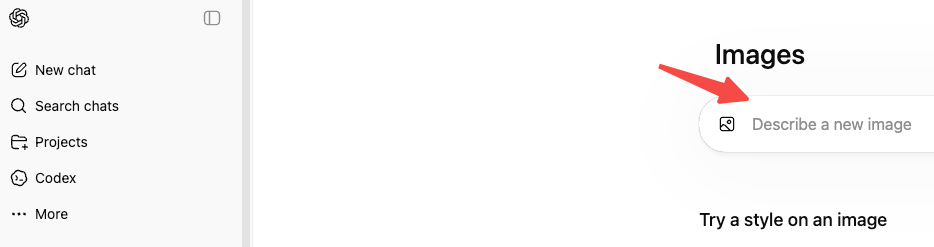
Instant mode is available to every ChatGPT user, including the free tier, starting April 22, 2026. So yes — you can use it right now without paying anything.
But “available” isn’t the same as “unlimited.” Free tier accounts hit a message cap every few hours, after which ChatGPT automatically drops down to a lighter model. For occasional use — testing a concept, making one-off thumbnails — that’s workable. For anything resembling a real creative workflow, you’ll hit the ceiling fast.
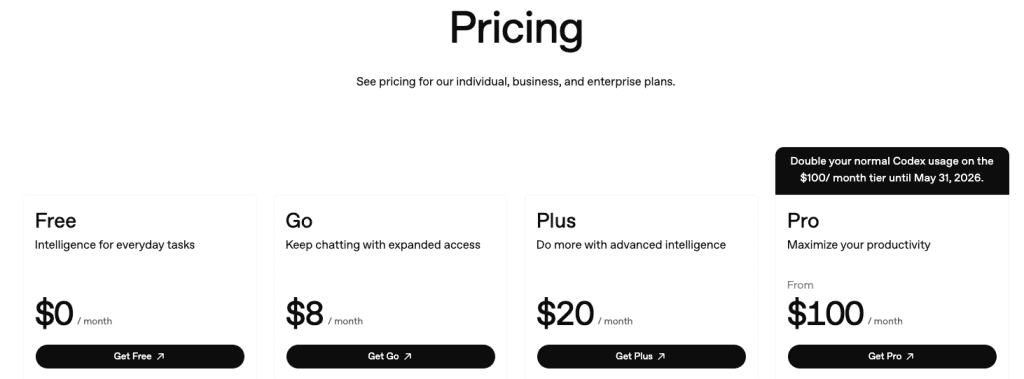
Here’s how ChatGPT image access works as of October 28, 2026:
- Free: ChatGPT Images is available with separate image-generation usage limits.
- Plus: Includes image generation with higher usage allowances and access to images with thinking.
- Pro: Offers expanded access for heavier individual use, subject to applicable limits.
- Business: Provides team-oriented access and images with thinking.
- Enterprise / Edu: Image generation is available, while images with thinking has a separate rollout schedule.
OpenAI does not provide a single fixed image quota that applies to every account and workflow. Check your current plan and the limits shown in ChatGPT before committing to regular production.
A ChatGPT subscription does not include OpenAI API credits. If you connect GPT Image 2 to a website, application, or automated workflow through the API, that usage is billed separately, even if you already pay for ChatGPT Plus or Pro.
One thing worth checking before assuming your plan covers everything: the exact per-tier generation limits aren’t spelled out cleanly anywhere. The ChatGPT pricing page describes Plus as “generous” and Pro as “unlimited subject to abuse guardrails” — which in practice means you’ll want to test your actual use case before committing.
What Thinking changes
This is the part that matters for creators doing anything beyond basic one-off generation.
Images with thinking gives eligible ChatGPT users a way to spend more time planning and refining an image request. That can be useful for detailed layouts, storyboard ideas, and prompts with several visual constraints.
However, this is a ChatGPT feature, not a separate fixed-price API image package. It should not be used to estimate GPT Image 2 API costs or to assume that every generation includes web research.
For creators comparing plans, the practical question is whether their current ChatGPT access and usage limits support the work they need to finish. For automated production, API billing needs to be evaluated separately.
GPT Image 2 API pricing explained
Input and output costs
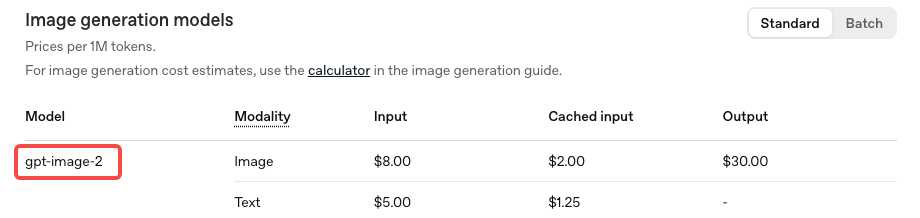
The API uses token-based billing, not flat per-image pricing. According to the official OpenAI API The GPT Image 2 API uses token-based billing rather than a fixed fee for every generated image. The bill can include text input tokens, reference-image input tokens, and image output tokens.
According to OpenAI’s official pricing page, checked on October 28, 2026, the Batch pricing table lists these rates for gpt-image-2:
| Token type | Batch price per 1M tokens |
|---|---|
| Image input | $4.00 |
| Cached image input | $1.00 |
| Image output | $15.00 |
| Text input | $2.50 |
| Cached text input | $0.625 |
These are Batch rates, not a confirmed universal price for every API request. The current Standard table lists the newer GPT Image 2.5 models but does not clearly display a separate gpt-image-2 Standard row. Check the pricing page and your intended billing route before quoting a production rate.
The per-image estimates in the table below are useful for planning, but they are image output estimates, not complete request prices. Text prompts, reference images, edits, and additional generations can increase total spending.
| Resolution | Quality | Approx. cost per image |
| 1024 × 1024 | Low | ~$0.006 |
| 1024 × 1024 | Medium | ~$0.053 |
| 1024 × 1024 | High | ~$0.211 |
| 1024 × 1536 | High | ~$0.165 |
One thing the pricing structure buries: edit requests that include reference images are billed at high-fidelity input rates. gpt-image-2 processes image inputs at maximum quality regardless of your quality parameter setting. If your workflow involves uploading reference images and iterating on them — common for product mockups, character consistency work, ad variations — your real cost per asset runs higher than the baseline table suggests.
At the same standard 1024×1024 resolution in high quality, gpt-image-2 is actually more expensive than GPT Image 1.5 ($0.211 vs $0.133). At larger portrait resolutions like 1024×1536, it flips the other way — the new model costs less. Worth knowing before you assume it’s cheaper across the board.
What still needs verification in your workflow
A few details still need checking before you build a production budget:
API availability and model selection: GPT Image 2 is documented in OpenAI’s API model catalog. The earlier announcement about API access opening in May 2026 is no longer a future milestone. Check which image models and endpoints are available to your organization before integration.
Standard vs Batch billing: OpenAI publishes different pricing tables for different processing modes. Confirm which rate applies to your requests rather than assuming the lowest displayed token price applies everywhere.
Third-party platform fees: Services offering GPT Image access may charge monthly subscriptions, credits, or per-generation fees. Their prices can differ from OpenAI’s direct API rates. Check the model version, credit consumption, resolution, usage rights, and renewal terms before purchasing.
Additional tool costs: ChatGPT’s images with thinking should not be treated as a separate API reasoning-token surcharge. If your own API workflow uses a separately billed tool, such as web search, include that tool’s documented charges. Do not assume every image request triggers a search fee.
DALL·E retirement: OpenAI removed the dall-e-2 and dall-e-3 API model snapshots on May 12, 2026. Existing integrations using those models need migration; this is a completed retirement, not an upcoming deadline.
Cheapest path for different creator workflows
Occasional creator (1–20 images/month via ChatGPT): Start with ChatGPT’s free image generation if the available limits cover your needs. This is useful for occasional thumbnails and visual concepts without setting up API billing. If limits regularly interrupt your work, compare the paid plans.
Regular content team (20–200 images/month): A ChatGPT subscription may be convenient for manual creation and editing. But a subscription is not directly comparable to an API cost-per-image figure: it offers access subject to usage limits, not a guaranteed number of images at a fixed unit price.
Developer building a product or tool (API): Use token-based API billing when you need to integrate image generation into an application or automated workflow. Estimate the number of generations required, not just the number of images you plan to publish.
Here are three illustrative budgets using OpenAI’s published GPT Image 2 image-output estimates:
| Workflow | Assumptions | Estimated image output cost |
|---|---|---|
| Blog covers | 20 finished images, 2 generations each, Medium, 1024×1024 at $0.053 | $2.12 |
| Social campaign assets | 100 finished images, 2 generations each, Medium, 1536×1024 at $0.041 | $8.20 |
| Ecommerce hero images | 500 finished images, 3 generations each, High, 1536×1024 at $0.165 | $247.50 |
These are planning examples, not actual bills or guaranteed API quotes. Each assumes a full image output for every generation and uses the listed output-cost estimate. They exclude input text tokens, reference-image inputs, additional edits, taxes, and third-party fees. Recheck the applicable model rate and billing mode before using them as procurement estimates.
For example, a creator who needs 20 approved blog covers but expects two generations per cover should budget for 40 outputs, not 20.
High-volume production (1,000+ images/month): Run a representative batch using your actual prompts, quality settings, and reference images. Record token usage, retries, and the share of generated images that become usable assets. Compare direct API spending with third-party credit packages only after accounting for what each service includes.
The cheapest route depends on workflow requirements and usable output, not image count alone.
Hidden limits to watch before scaling
Transparent backgrounds: gpt-image-2 doesn’t support transparent backgrounds through the Responses API image generation tool. If PNG-with-alpha is part of your workflow, verify the specific route you’re using before building around it.
4K resolution is still beta: The standard API tops out at 2K. Anything above that is in early testing and may produce inconsistent results. Don’t plan production workflows around 4K output yet.
Knowledge cutoff is December 2025: The model won’t accurately render products, events, or public figures that emerged after that date. Thinking mode can supplement with web search, but the underlying visual knowledge base stops there.
Edit costs compound: Already mentioned above, but worth repeating: if reference images are part of your iteration process, your actual cost per final asset is higher than the baseline per-image number. Log a few real sessions before projecting monthly spend.
FAQ
Is GPT Image 2 free to use? Instant mode is free for all ChatGPT users. Rate limits apply. Thinking mode — where the biggest quality improvements live — requires Plus or higher.
What’s the API model ID?gpt-image-2. There’s also a chatgpt-image-latest alias that will always point to the current default image model, which is useful if you want automatic updates going forward.
Does Thinking mode cost more via the API? Images with thinking is a ChatGPT feature and should not be treated as a separate GPT Image 2 API pricing tier. For API use, calculate costs using the selected model’s documented token rates, actual token consumption, and any separately billed tools.
Is gpt-image-2 cheaper than GPT Image 1.5? Depends on the resolution. At portrait formats like 1024×1536 high quality, yes — slightly cheaper. At standard 1024×1024 high quality, it’s actually more expensive. Verify at your target resolution before assuming.
What happens to DALL-E integrations? OpenAI retired the dall-e-2 and dall-e-3 API model snapshots on May 12, 2026. Developers still using those model identifiers need to migrate to a currently supported image model and verify the replacement’s capabilities and pricing.
Bottom line
For occasional image creation, ChatGPT may be the simplest starting point. For automated or repeatable production, the API offers usage-based billing, while third-party platforms may bundle generation into their own credit plans.
The key is to compare the total cost of usable assets, not just a subscription price or an estimated cost per output. Before scaling, confirm the current rate, count expected retries, and test a representative workflow against your actual budget.
Previous Posts: